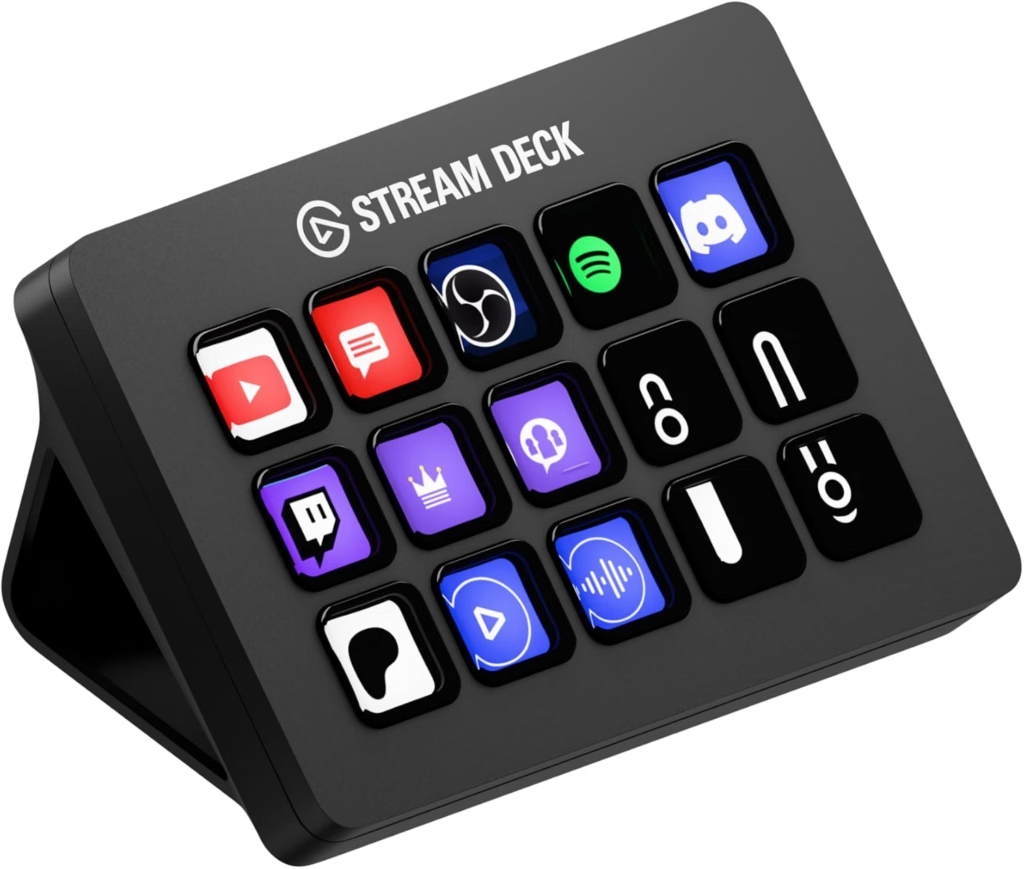

The Elgato Stream Deck MK.2 is a USB controller with 15 customizable LCD buttons. It is worth considering for creators, marketers, remote workers, and streamers who regularly repeat the same actions and want visible, dedicated controls.
Its biggest strength is combining labeled buttons with configurable shortcuts and application integrations. Its biggest weakness is the setup and maintenance those integrations require. It also lacks the rotary dials available on Stream Deck +.
My recommendation: buy it if you can already name several tasks you would put on its first page. If you only need two meeting shortcuts, try your keyboard shortcuts first.

- 15 Customizable LCD Keys: instantly control your apps, tools and platforms.
- One-Touch Operation: trigger single or multiple actions, launch social posts, adjust audio, mute mic, turn on lights, an…
- Visual Feedback: know that your command has been executed.
Introduction: decide what you want the buttons to do
Joining meetings, opening project folders, changing recording scenes, and moving between work tools can create a steady stream of small interruptions.
The MK.2 offers a way to gather those actions on a separate keypad. Its appeal is not that every task becomes possible only after buying it. Many actions already have keyboard shortcuts. The buying question is whether having labeled controls in one place makes your repeated work easier.
Start there before thinking about elaborate dashboards or downloading profiles you may never use.
Product overview
The Stream Deck MK.2 works with Elgato’s desktop application. You assign actions to buttons, add labels or icons, and organize layouts around your work.
An action can open an application or website, send a keyboard shortcut, or use a compatible plugin. Multi Actions can run a sequence of configured actions. Smart Profiles can change the active layout according to the application in focus.
The LCD keys distinguish it from a basic macro keypad: a button can show what it does instead of relying on a printed label you must replace when your layout changes.
This review covers the classic MK.2, commonly identified as SKU 10GBA9901. Elgato also offers a separate Scissor Keys edition with a different key mechanism. Do not assume a listing for one has the other’s key feel.


Key features
15 physical LCD keys
Fifteen visible buttons give you room for a useful starter layout without constantly changing pages. For example, a work layout could include your task manager, project folder, calendar, approved meeting controls, and a few common shortcuts.
Folders and additional layouts extend the number of actions available, but hidden controls require navigation. Put frequent actions on the first page and less-used tools inside folders. The useful measure is how readily you can find a control, not how many actions you can configure.
Basic actions can work without a dedicated plugin
Elgato’s System Actions support hotkeys, opening resources, websites, and media controls. That means you can make a useful layout even when a particular app has no dedicated integration.
There is a limitation: a generic hotkey is not always aware of the intended application or its status. Check the application’s shortcut behavior before using it as a dependable control.
Meeting shortcuts depend on the integration
Elgato documents controlling Teams through keyboard shortcuts, but its guide states that Teams must be running and in the foreground for those mapped actions. A button labeled “Mute” is not automatically a reliable global microphone control.
Use an integration that supports the behavior you need, verify the current app version, and check the actual meeting status. For a buyer who spends hours in meetings, this detail matters more than the number of available icons.
Smart Profiles keep layouts relevant
Smart Profiles switch the active layout when a configured application gains focus. An editing layout can appear in your editor, with a different layout for another application.
This can make 15 keys more useful, but switching contexts also means a physical position may perform different actions. Keep labels clear and avoid placing consequential actions where an unexpected layout could cause a mistake.
Multi Actions combine a repeatable sequence
A button can trigger several configured actions, with delays where needed. One possible work example is opening a project folder, a planning document, and a dashboard.
That is a proposed setup, not a tested demonstration. A sequence that launches applications and then sends keystrokes needs realistic timing. The controller does not infer whether a page loaded correctly or a dialog appeared.
Plugins add capabilities and possible extra costs
Elgato Marketplace supplies plugins and other resources. Many plugins are free, while some content or connected services can cost extra. The desktop software itself is a free download.
Start with the required plugin or service rather than assuming every marketplace item is included. A subscription to an external service remains separate from the physical controller.
Verified specifications
| Specification | Elgato Stream Deck MK.2 |
| Product type | USB shortcut controller |
| Keys | 15 customizable LCD keys |
| USB interface | USB 2.0 |
| Dimensions without stand | 118 × 84 × 25 mm; 4.6 × 3.3 × 1.0 inches |
| Weight | 145 g without stand; 270 g with stand |
| Stand | Included desktop stand |
| Current listed cable | USB-C to USB-C; older stock may include USB-C to USB-A |
| Current software: Windows | Windows 11, 64-bit; consult Elgato’s warning for Windows on ARM |
| Current software: Mac | macOS Ventura 13.0 or later |
| Warranty | Two years for new-in-box products under Elgato’s terms; U.S. authorized-seller requirements apply |
Sources: Elgato hardware specifications, current software requirements, and warranty policy.
Important compatibility distinction: older hardware documentation lists Windows 10 and macOS Catalina. For a new purchase, use the current software requirements above. Individual plugins can impose additional requirements.
Design, build, and ease of use
The small footprint and included stand make the MK.2 practical beside a keyboard. Its detachable cable lets you replace the cable or adapt the connection to your desk.
Elgato describes the classic keys as membrane-based, while the separate Scissor Keys model uses a different mechanism. This review does not claim first-hand button feel or long-term durability.
Basic setup means installing the application, connecting the controller, and assigning actions. The time-consuming part is deciding which actions belong on it and checking that they behave as expected.
A sensible first session is five controls, not five pages. Add more only after the first layout has proved useful.
Performance and realistic use
For a marketer or small-business owner
A useful starting layout could open your editorial calendar, reporting page, working folder, and content checklist. Add shortcuts for tools you already use frequently.
These are workflow suggestions. A button that opens an analytics website does not automatically log in, interpret the results, or create a report.
The product is most compelling when it supports a repeatable process you already understand.
For remote work and presentations
A labeled meeting layout can reduce hunting through menus. The limit is app behavior: shortcuts may require focus, and plugins may need updates or permissions. Elgato’s productivity guides document several integrations, but support must be checked for the specific workflow.
Test important controls before a presentation. Do not assume every key icon reflects the application’s current state.
For streaming and recording
The same keys can control supported streaming tools, switch scenes, and run action sequences. A dedicated layout keeps those actions visible when your main screen is busy.
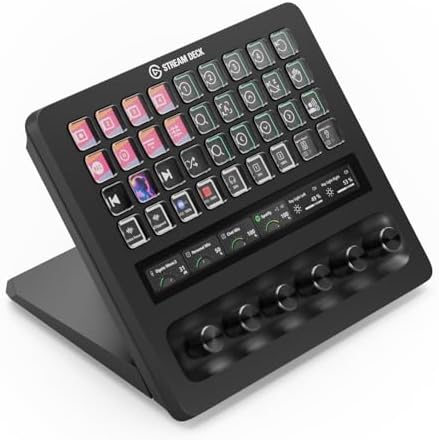
The MK.2 is less suitable if you mostly need continuous adjustments, such as turning several audio levels up and down. Stream Deck + provides dials for supported parameters.
For infrequent computer tasks
If you only occasionally open the same three apps, buying a controller may add another device and more setup without much practical benefit.
I did not measure task-completion times, missed presses, USB reliability, or productivity gains. No numerical time-saving claim is made.
Pros
- Fifteen labeled physical keys provide a useful amount of directly accessible control.
- Basic system actions do not require a separate plugin for every task.
- Profiles, folders, and sequences let the layout grow with an established workflow.
- Windows and macOS support suit common creator and office setups.
- The included stand and detachable cable simplify desk placement.
Cons
- Configuring and maintaining useful actions takes time.
- Generic hotkeys may depend on which application has focus.
- No rotary dials for continuous adjustments.
- Current software requirements are stricter than some older retail specifications suggest.
- Marketplace resources and connected services are not universally free.
- It is unnecessary for buyers already comfortable with a few keyboard shortcuts.
Value for money
At the verified $119.99 manufacturer-store offer observed during research, the MK.2 is easier to justify for someone who will use many controls daily than for someone who wants only a mute button. Elgato showed an add-to-cart option; B&H also showed the black MK.2 in stock at $119.99. Neither establishes Amazon availability.
Value depends on the layout you will actually keep using. More buttons do not guarantee more productivity.
Before purchasing, write down your ten most repeated actions. If most are already effortless keyboard shortcuts, the purchase is less compelling. If you often forget shortcuts or move among several tools, visible labels may be the benefit you are buying.
Current Amazon price
Amazon’s live checkout price for this review was not verified.
Check Amazon for the latest price and available offers.
The supplied short link could not be resolved. The matching standard black listing is:
Elgato Stream Deck MK.2 on Amazon — ASIN B09738CV2G.
Confirm the product name, classic versus Scissor Keys edition, condition, seller, included cable, and delivery estimate before ordering. A separately verified $119.99 price elsewhere should not be published as a live Amazon price.
Best alternatives and comparison
| Option | Main controls | What it does better than MK.2 | Main compromise |
| Stream Deck MK.2 | 15 LCD keys | More actions visible than Neo or + | No dials |
| Stream Deck Neo | 8 LCD keys, page touch points, InfoBar | A focused layout with dedicated navigation controls | Fewer actions visible at once |
| Stream Deck + | 8 LCD keys, 4 dials, touch strip | Adjusting supported audio and other continuous parameters | Fewer LCD keys |
| Existing keyboard shortcuts | Keys already on your keyboard | No additional hardware purchase or desk space | Shortcut recall and limited visible labeling |
Hardware comparisons are from Elgato’s device table. Compare current prices separately.
Stream Deck Neo: choose it for a smaller set of tasks
Stream Deck Neo makes sense if eight visible controls cover your routine and you prefer its dedicated page controls. Choose the MK.2 if you want more actions visible without changing pages. Neo is not automatically the better value: compare actual offers rather than assuming the smaller model is always substantially cheaper.
Stream Deck +: choose it for adjustments
Stream Deck + is the better match if your work involves repeatedly adjusting supported levels or parameters. Stay with MK.2 if you want more directly accessible scene, app, or shortcut buttons and rarely need dials.
Keyboard shortcuts: try the free alternative first
For two or three commands, shortcuts can be enough. Keep using them if they are already effortless. Consider the MK.2 when you want visual labels and a dedicated layout across several tasks, not simply because a controller looks attractive on the desk.
Who should buy it?
The MK.2 fits creators managing several production controls, marketers opening and operating the same tools repeatedly, and remote workers who benefit from visible shortcuts. It particularly suits people willing to configure and revise a layout.
Who should not buy it?
Skip it if you only need one or two commands, dislike configuration, require officially supported Linux desktop software, or mostly want physical audio dials. Elgato currently lists Windows and macOS support, not Linux.
Buying considerations
- Check current software requirements and your CPU platform, especially Windows on ARM.
- Confirm that the exact plugins or shortcuts support your applications and operating system.
- Check whether actions require the target app in the foreground.
- Compare classic MK.2 and Scissor Keys listings carefully.
- Confirm the supplied USB cable and an available host port.
- Check new versus refurbished condition and seller eligibility for warranty.
- Test a simple layout before adding complicated sequences.
Frequently asked questions
Do I need to be a streamer?
No. Elgato documents office, meeting, and productivity workflows. The relevant question is whether you repeat enough tasks to benefit from dedicated controls.
Does it require a subscription?
The desktop software is a free download. Basic actions do not require a recurring controller subscription. Some marketplace resources and connected services can carry separate charges.
Does it work with current Macs and Windows PCs?
Elgato currently lists Windows 11 64-bit and macOS 13 or later. Windows on ARM has a compatibility warning. Check plugin requirements too.
Can it mute Teams when another app is active?
Do not assume that a generic hotkey will. Elgato’s Teams shortcut guide specifies that Teams must be running and in the foreground. Verify the chosen integration’s behavior.
Can one button run multiple actions?
Yes. Multi Actions can sequence configured steps and delays. Test timing and window behavior for your particular sequence.
Is MK.2 the same as Stream Deck +?
No. MK.2 has 15 LCD keys. Stream Deck + has eight LCD keys, four dials, and a touch strip.
What cable is included?
Elgato now lists USB-C to USB-C and notes that older packages included USB-C to USB-A. Confirm the exact retailer’s stock.
Will it save a guaranteed amount of time?
No verified universal figure is available. Any benefit depends on how often you use the configured actions and how reliably they work.
Final verdict:
The Elgato Stream Deck MK.2 earns an editorial 8.5/10 for buyers with repeatable workflows who want visible, dedicated controls. Its flexible software and 15 keys give it room to serve both office work and streaming.
The score is not a hands-on benchmark. Configuration effort, app-specific limitations, no dials, and the option of free keyboard shortcuts prevent a universal recommendation.
At the observed $119.99 manufacturer offer, it is worth considering if you will use most of a first-page layout regularly. Choose Neo for fewer visible controls, + for dials, or keep your keyboard shortcuts if they already do the job comfortably.