
A local advertising campaign can collect plenty of contact details without producing useful business. Some inquiries come from outside your service area. Others concern services you do not offer, or never turn into conversations.
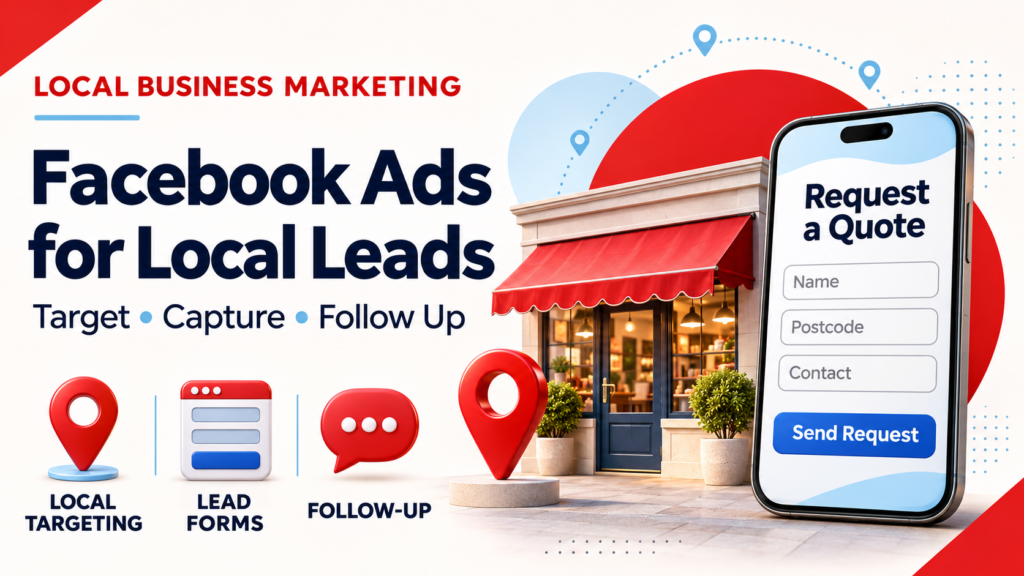
To understand how to run Facebook ads that generate leads for a local business, start with the complete process: a relevant offer, suitable geographic targeting, a clear inquiry experience, and reliable follow-up.
This guide explains how to build that process and measure its results. It includes a fictional example and sample ad copy. Advertising involves costs and uncertain outcomes; the aim is to run a controlled test and learn which inquiries become customers.
What Counts as a Useful Local Lead?
A lead is someone who expresses interest and provides a way to continue the conversation. A qualified lead also meets your business’s criteria.
For a local cleaning service, those criteria might include:
- A property within the service area.
- A request for a service the company provides.
- A suitable booking timeframe.
- Valid contact information.
- Willingness to discuss the quote and service requirements.
Define these conditions before launching. They help distinguish a campaign problem from a mismatch between the inquiry and your offer.
Track the progression:
Inquiry → Qualified lead → Appointment → Paying customer
An inexpensive form submission is useful only when it contributes to a business outcome.
1. Choose One Service and One Clear Offer
Begin with a service you can explain simply and deliver reliably.
For example:
Request a quote for recurring home cleaning in your service area.
Make clear:
- What the service includes.
- Where it is available.
- Any important exclusions or minimum requirements.
- What happens after someone submits their details.
A discount is optional. Clear scope, convenient booking, and relevant information can form the basis of an offer.
If you advertise a starting price, explain the conditions. Avoid unsupported claims about availability, savings, or results.
2. Choose Where People Will Inquire
Meta supports lead generation through instant forms, website forms, calls, and messaging. Its training materials describe these as different ways people can contact a business. Availability can vary by account and setup. facebookblueprint.com
| Method | When it may fit | Main consideration |
|---|---|---|
| Instant form | A straightforward quote or inquiry | Easy submission may require more qualification |
| Website form | Customers need detailed information first | The page must work well on mobile |
| Calls | Staff can answer and qualify inquiries | Missed calls can waste opportunities |
| Messaging | Customers need a short conversation | Someone must monitor and respond |
Instant Forms vs. Website Forms
An instant form lets people inquire within Meta’s environment. A website form gives you more room to explain the service and control the surrounding experience.
Choose based on the customer’s decision and your operational capacity. Neither method automatically guarantees better leads.
For a first test, select one primary inquiry method. This makes troubleshooting easier.
3. Prepare the Business Account and Lead Handling
Before spending, confirm that you have:
- The appropriate Facebook Page and advertising-account access.
- Working billing details.
- Accurate business contact information.
- A suitable privacy policy.
- A defined place to receive and manage inquiries.
- A named person responsible for follow-up.
Use individual staff access and strong account authentication.
Submit a test inquiry and verify the complete journey. Confirm that the lead reaches the correct person and that the follow-up information is accurate.
Meta documents lead retrieval through tools including Leads Center and CRM integrations. Check the permissions and integration requirements for your setup. developers.facebook.com
4. Create a Campaign Using the Leads Objective
In Meta Ads Manager, create a campaign and select Leads.
Then choose the appropriate conversion location, such as Instant forms or Website, from the options available in your account. Meta’s current documentation associates the Leads objective with these locations and others, including calls and messaging. developers.facebook.com
Review the performance goal carefully. Choose a setting aligned with the action you want to measure.
For website leads, verify that your measurement setup records successful submissions rather than simply page visits or button clicks. Have whoever manages your tracking test it before launch.
Interface labels and available settings change. Confirm the choices shown in your account rather than relying on an old screenshot.
5. Set Your Actual Service Area
Choose locations that match where your business can realistically serve customers.
A useful starting point is your existing service boundary. Consider travel time, delivery costs, and appointment capacity before extending it.
Avoid adding unrelated interests simply to make the audience look more specific. Start with a defensible geographic audience and relevant creative, then use results to guide changes.
Review which audience settings are firm controls and which are suggestions in your selected campaign configuration.
Location targeting is not proof that every inquiry is eligible. Ask for a service postcode or area in the form and repeat the service area in the ad.
If your business falls within a restricted advertising category, check the applicable targeting requirements before proceeding.
6. Build a Form That Helps People Qualify Themselves
Ask for information you will use.
For a home-cleaning quote, a practical form might request:
- Name.
- Preferred contact method.
- Phone number or email.
- Service postcode.
- Service required.
- Approximate timeframe.
Explain what happens next:
Submit your details to request a cleaning quote. Our team will contact you to confirm your location, requirements, and available appointments.
Add Useful Friction
Questions about location and service type can help identify unsuitable inquiries. Excessive questions can also make a simple request unnecessarily difficult.
Where available, evaluate a higher-intent form setting. Meta documents a review-and-confirm step for higher-intent forms, although that extra step does not establish that every submission will be qualified. developers.facebook.com
Link your privacy policy and provide appropriate contact disclosures. Explain any additional marketing use separately where required.
Collect only necessary information and follow the applicable rules for contacting prospects.
7. Create Ads That Show the Service Clearly
Use original photographs or video that accurately represent your business.
Useful creative could show:
- Staff delivering the service.
- The equipment or process involved.
- A finished result you can substantiate.
- A short explanation of what the customer receives.
Make the service, location, and next step understandable without requiring someone to read a long caption.
Sample Ad Copy
Fictional example: a local cleaning service
Primary text:
Looking for recurring home cleaning in [service area]?
Review a clearly explained cleaning service and request a quote based on your home and requirements. Share your postcode and preferred schedule, and our team will contact you about suitable options.
Headline:
Request a Home Cleaning Quote
Call to action:
Choose an available button that matches the inquiry.
Replace the placeholders and confirm that every statement matches your actual offer.
Start with a small number of creative variations. For example, compare a team photograph with a short service demonstration while keeping the offer consistent.
8. Set a Controlled Test Budget
Choose an amount your business can afford to spend without assuming it will generate sales.
A hypothetical first test might have a $280 total media budget over 14 days. This is a planning example, not a recommended minimum or predicted result.
Use the budget and scheduling controls appropriate to your account, then verify the published settings and monitor spending.
Keep a small campaign structure. Dividing a limited budget across many audiences, offers, and ads can leave too little information to evaluate each one.
Before launch, decide:
- The total spending limit.
- Who monitors the campaign.
- What qualifies as a lead.
- When you will review results.
- Which problems require an immediate pause.
A broken form or incorrect service area deserves immediate attention. A few hours without a booking usually provide little evidence about long-term performance.
9. Follow Up Through a Defined Process
Assign each inquiry to someone responsible for responding during stated business hours.
A useful first message could say:
Hello [name], this is [person] from [business]. You requested information about [service] through our Facebook form. Is now a suitable time to confirm your requirements?
Record whether the lead is reachable, suitable, booked, or closed.
If you cannot consistently answer calls, reconsider a call-focused campaign. If messages remain unread, a messaging campaign may create a poor customer experience.
Match follow-up capacity to the number of inquiries you can handle.
10. Measure Qualified Leads and Customers
Use a simple tracker:
| Field | What to record |
|---|---|
| Lead identifier | A unique record for the inquiry |
| Campaign and ad | Where the inquiry originated |
| Submission date | When it arrived |
| Service area | Whether the location is eligible |
| Qualification | Suitable, unsuitable, or unresolved |
| Follow-up | Attempts and contact outcome |
| Booking | Appointment status |
| Customer outcome | Paid, declined, cancelled, or pending |
Restrict access to personal information.
When appropriate and permitted, CRM outcome data can help connect advertising with downstream results. Meta describes CRM integration and conversion-lead optimization, but availability and setup requirements vary. developers.facebook.com
Worked Example: A Fictional Campaign
Assume a campaign produces the following results:
| Metric | Illustrative result |
|---|---|
| Advertising spend | $280 |
| Submitted leads | 28 |
| Qualified leads | 16 |
| Booked appointments | 8 |
| Paying new customers | 6 |
These figures are invented solely to demonstrate calculations, not presented as actual campaign performance or a benchmark.
Cost per submitted lead:
$280 ÷ 28 = $10
Cost per qualified lead:
$280 ÷ 16 = $17.50
Cost per booked appointment:
$280 ÷ 8 = $35
Advertising spend per new customer:
$280 ÷ 6 = $46.67, rounded.
Now assume creative production costs $80 and follow-up labor costs $60.
Included acquisition cost:
$280 + $80 + $60 = $420
Cost per new customer including those expenses:
$420 ÷ 6 = $70
This broader measure is more informative than media cost alone. Compare it with customer contribution after service-delivery costs and allow for refunds, cancellations, and other relevant expenses.
How to Troubleshoot Weak Results
| Problem | What to investigate |
|---|---|
| Few inquiries | Offer clarity, creative, audience suitability, form function |
| Many out-of-area leads | Location settings, service-area wording, postcode qualification |
| Invalid contact details | Form clarity, confirmation options, accidental submissions |
| Qualified leads rarely book | Follow-up, availability, pricing, customer expectations |
| Bookings do not become customers | Appointment reminders, service fit, sales process |
| Leads appear profitable only in Ads Manager | Attribution, duplicates, customer records, omitted costs |
Change one major element at a time when practical. Keep records of what changed and when.
A cheaper lead is not automatically an improvement if fewer leads become suitable customers.
Frequently Asked Questions
1. Should I boost a post or create a Leads campaign?
Use Ads Manager when you need deliberate control over the lead objective, inquiry method, budget, and reporting. A boosted post’s engagement results should not be treated as evidence of qualified-lead performance.
2. How much should a local business spend on Facebook ads?
Choose a controlled amount based on your finances, customer economics, and ability to handle inquiries. There is no universal budget that guarantees enough leads or customers.
3. Do I need a website for Facebook lead ads?
An instant-form campaign can collect inquiries without sending users to a website form. You still need the required business information, privacy disclosures, and a working follow-up process.
4. Why am I getting leads that do not answer?
Possible reasons include accidental submissions, outdated contact information, unclear expectations, or delayed follow-up. Review the form, ad wording, contact process, and any available confirmation settings.
5. How long should I wait before judging a campaign?
Allow time for delivery, follow-up, and your normal sales cycle. Review operational problems immediately, but assess marketing performance using sufficient completed outcomes rather than an arbitrary number of days.
Conclusion
Build the campaign around a specific service, an accurate service area, and a clear next step. Test the inquiry process before spending and make someone responsible for every lead.
Judge results through qualification, bookings, and customer economics. Those measures provide a stronger basis for improving the campaign than clicks or submission volume alone.