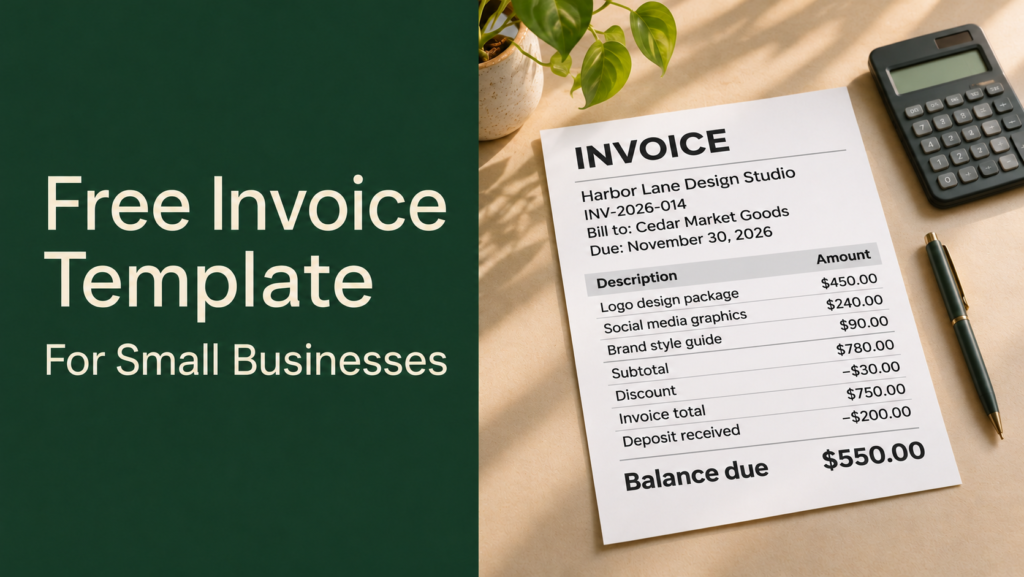

Need to bill a customer for a completed job or a product sale? This free invoice template for small businesses gives you the fields to copy into Word, Google Docs, Excel, or Google Sheets. The filled-in example shows how to list charges, apply an agreed discount, and account for a deposit the customer has already paid.
Start with the blank template. Then use the example to check that your customer can see what they’re paying for, how much they still owe, and when payment is due.
Free small business invoice template you can copy
Copy the invoice fields, line-item table, and totals into your preferred editor. Add a row for each product or service and remove optional fields you don’t need, keeping any information required for your business and transaction.
Invoice details
| Field | What to enter |
|---|---|
| Document heading | Invoice |
| From | [Your business name, address, and billing contact] |
| Bill to | [Customer or company name, billing address, and billing contact] |
| Invoice number | [Unique invoice number] |
| Invoice date | [Date issued] |
| Supply date or service period | [Date goods were supplied or services delivered] |
| Payment terms | [Agreed terms, such as due within 14 days] |
| Payment due date | [Agreed due date] |
| Currency | [Currency code, such as USD] |
| Customer reference | [Purchase order number or project reference, if requested] |
Line items
| Product or service | Quantity | Unit price | Line total |
|---|---|---|---|
| [Clear description of what was provided] | [Qty] | [Rate] | [Qty × rate] |
| [Next product or service] | [Qty] | [Rate] | [Qty × rate] |
Totals and payment instructions
| Field | What to enter |
|---|---|
| Subtotal | [Sum of the line totals] |
| Agreed discount | [Amount, if applicable] |
| Tax | [Applicable rate and amount, plus any required details] |
| Invoice total | [Total charge after discount and applicable tax] |
| Payment already received | [Deposit or other payment applied to this invoice] |
| Balance due | [Invoice total minus payment already received] |
| How to pay | [Accepted payment method and the instructions the customer needs] |
| Payment reference | [Invoice number or another agreed reference] |
If the customer paid a deposit, show it separately from any discount. A discount reduces the price. A deposit is money the customer has already paid toward that price.
Filled-in invoice example for a small service business
Imagine a design studio billing a client after delivering a logo and social media graphics. The client received a $30 discount and paid a $200 deposit. This fictional example uses U.S. dollars and assumes no tax is charged for purposes of the calculation.
| Field | Example |
|---|---|
| From | Harbor Lane Design Studio · 100 Sample Avenue · billing@example.com |
| Bill to | Cedar Market Goods · 200 Example Street · accounts@example.org |
| Invoice number | INV-2026-014 |
| Invoice date | November 16, 2026 |
| Service completion date | November 13, 2026 |
| Payment terms | Due 14 days from the invoice date |
| Payment due date | November 30, 2026 |
| Currency | USD |
The business names and contact details are illustrative. Enter complete billing addresses for your business and customer when preparing a real invoice.
| Service | Quantity | Unit price | Line total |
|---|---|---|---|
| Logo design package | 1 | $450.00 | $450.00 |
| Branded social media graphics | 4 | $60.00 | $240.00 |
| Brand style guide | 1 | $90.00 | $90.00 |
| Subtotal | $780.00 |
| Calculation | Amount |
|---|---|
| Subtotal | $780.00 |
| Agreed discount | −$30.00 |
| Tax charged in this example | $0.00 |
| Invoice total | $750.00 |
| Deposit already received | −$200.00 |
| Balance due | $550.00 |
Payment instructions in this example
Pay by bank transfer using the details agreed with the studio. Include INV-2026-014 as the payment reference.
The client can match the $750 invoice total to the agreed price and see that only $550 remains payable. If the invoice showed just one of those numbers, the client would have to work out whether the deposit was included.
How to fill in and send a small business invoice
1. Start with the quote, contract, or order
Confirm what the customer agreed to buy, the price, and when payment is due. Ask for the correct billing contact and include any purchase order number the customer needs to approve the invoice. A customer may use a different email address for accounts payable than the person who ordered the work.
2. Give the invoice a unique number and clear dates
Use a numbering system you can maintain, such as INV-2026-014. Record the date you issue the invoice, the date you supplied the goods or services, and the actual due date. If the agreement says “due within 14 days,” include the calendar date too so the customer can see the deadline at a glance.
3. Describe the work and check the math
Use descriptions the customer can match to the order. “Four branded social media graphics” is easier to approve than “design services.” Multiply each quantity by its unit price, add the line totals, and then enter any agreed discounts, applicable tax, and payments already received. If tax applies, confirm how your rules treat discounts and deposits before calculating it.
4. Check the required fields for your location
Invoice requirements vary by jurisdiction, business type, and tax registration. For example, the UK government lists different invoice details for sole traders and limited companies, and the Australian Taxation Office explains when a business should label its document a tax invoice. Check your local tax authority’s guidance for any required registration numbers, tax breakdowns, or electronic invoicing rules. UK government invoice guidance · Australian Taxation Office invoice guidance
5. Send the invoice and track the payment
Send the invoice through the customer’s agreed channel. If email and PDF work for the customer, use a filename such as INV-2026-014.pdf and enter the invoice number, issue date, due date, and balance in your tracker. When a payment arrives, record the amount and date so you can see whether anything remains outstanding.
Should you use a document, spreadsheet, or invoicing app?
| Format | Best fit | What to watch for |
|---|---|---|
| Word or Google Docs | Occasional invoices with a simple layout | Calculate and verify totals manually. |
| Excel or Google Sheets | Regular invoices with several line items | Check that formulas include any rows you add. |
| Invoicing software | Recurring bills, reminders, or payment tracking | Check subscription and payment processing fees, plus any local invoicing requirements. |
If you add formulas to a spreadsheet, keep a blank master copy and duplicate it for each new invoice. That way, old customer details and payment amounts are less likely to carry over.
Frequently asked questions
1. Can I use the same invoice template for products and services?
Yes. For products, list the item name, quantity, and unit price. For services, use the billing unit you agreed to, such as an hour, a project, or a milestone. Include the delivery date or service period where appropriate.
2. What is the difference between an invoice and a receipt?
An invoice records the charges and tells the customer what is due. A receipt acknowledges payment. If the customer pays in installments, keep a record of each payment and show the remaining balance when you send an updated statement or payment reminder. UK government overview of invoicing and payments
3. What does “Net 30” mean on an invoice?
It generally means payment is due within 30 days, often counted from the invoice date. Follow the start date specified in your agreement and show the exact calendar due date on the invoice. Australian Government guide to payment terms
4. How do I show a deposit or partial payment?
List the full invoice total first, then show the amount already paid and subtract it to get the balance due. Add the payment date or reference if it will help the customer match it to their records.
5. Can I send my invoice as a PDF?
Yes, if the customer accepts PDFs and that format meets the rules for your transaction. If the customer requires a supplier portal or your jurisdiction requires structured electronic invoicing, follow that workflow. Keep an editable copy for your records.
Conclusion
Before sending your next invoice, read it as if you were the person approving the bill. Can you match each charge to the order, see which payments have already been applied, and find the due date and payment instructions without asking? Once the invoice answers those questions, keep the blank template as your starting point for the next sale.