


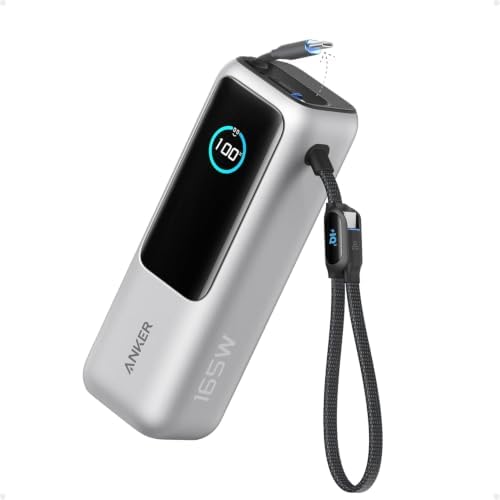
The Anker A1695 is a high-capacity USB power bank designed for people carrying a laptop, phone, and other rechargeable devices. Its biggest advantage is convenience: two integrated USB-C cables reduce the number of separate accessories you need to remember.
Its biggest compromise is portability. This is a substantial addition to a laptop bag, and its headline output should not be mistaken for the power available to one device.
It is worth considering if your laptop charges through USB-C and your priority is convenient backup power. Buyers who need a lightweight phone charger or more than 100W through one connection should compare alternatives.

- Triple 100W USB-C Ports for Multi-Device Charging: Ideal for laptop users, this 25,000mAh power bank features three 100W…
- 25,000mAh for Long-Haul Power: Tackle week-long trips or extended camping with 25,000mAh capacity and ultra-fast recharg…
- Dual Built-In Cables for Travel: Features two USB-C cables, one extendable up to 2.3 ft with 20,000 retractions, and ano…
Why Consider the Anker A1695?
A power bank is useful only when it works with the devices you actually carry. A large capacity figure means little if the battery cannot supply your laptop’s charging requirements—or if you leave the necessary cable at home.
The A1695 addresses the second problem particularly well. Its integrated cables make it easier to connect common USB-C devices without searching through a bag.
The more important purchasing questions are whether its output suits your laptop, how much usable energy it can deliver, and whether that convenience justifies the weight.
This Anker A1695 review focuses on those decisions rather than treating the largest number on the packaging as the whole story.
Product Overview
Anker sells the A1695 as the Anker Power Bank (25K, 165W, Built-In and Retractable Cables).
It provides four charging connections:
- One retractable USB-C cable.
- One shorter integrated USB-C cable that also forms a carrying loop.
- One separate USB-C socket.
- One USB-A socket.
That distinction matters: the three USB-C connections include the two attached cables. There are not three additional USB-C sockets.
Macworld’s hands-on review describes the same arrangement and identifies the retractable cable as approximately 0.7 metres long.
The product’s appeal is therefore straightforward: laptop-capable USB charging with fewer loose cables to manage.


Key Features and Why They Matter
100W Laptop Charging Through One USB-C Connection
The A1695 supports a maximum of 100W through an individual USB-C connection.
For a compatible laptop, that offers considerably more flexibility than a phone-focused power bank. However, the laptop must accept the supported USB-C charging profile; the connector shape alone does not establish compatibility. Anker’s support specifications identify a maximum 20V/5A USB-C output.
For buyers, the practical question is whether that matches the laptop’s documented requirements.
A machine normally supplied with a higher-powered charger may accept a lower input, but it could charge more slowly or continue losing battery during demanding work. Check the laptop manufacturer’s guidance before buying.
165W Shared Output Has Conditions
The headline 165W describes combined output when using supported two-device configurations.
Anker specifies a maximum combined output of 130W when three or four devices are connected. Its published allocation also prioritizes the USB-C1 connection in those larger configurations.
The purchasing implication is important: connecting more devices does not give each one its individual maximum.
If your normal setup includes a laptop, phone, tablet, and accessories, examine the allocation diagram rather than assuming all four will fast-charge together.
Built-In Cables Reduce Packing Friction
Attached cables are useful for people who frequently move between meetings, study spaces, cafés, and transport.
You can keep the power bank ready in your bag without making a separate cable part of every charging decision.
There is a trade-off: an integrated cable is less straightforward to replace than a loose cable. That is a design consideration, not evidence that the supplied cables are unreliable.
The separate USB-C socket remains useful when you need a different cable length or connector arrangement.
A Screen Provides Useful Charging Feedback
Anker’s display guide confirms that pressing the button or extending the retractable cable activates the screen. A double press enables or disables trickle-charging mode, while a two-second hold switches the screen off during operation.
For the buyer, a screen is useful when diagnosing a charging setup. It helps make the power bank’s operating state more visible than a simple row of battery LEDs.
However, a displayed figure should not be treated as a laboratory measurement of long-term battery health or charging efficiency.
Verified Specifications
| Specification | Verified information |
| Brand | Anker |
| Model | A1695 |
| Advertised cell capacity | 25,000mAh |
| Rated battery energy | 90Wh |
| Individual USB-C output | Up to 100W |
| Maximum combined output | Up to 165W in supported two-device configurations |
| Three- or four-device combined output | Up to 130W |
| USB-A output | Up to 33W |
| Maximum recharging input | Up to 100W through a supported USB-C connection |
| Charging connections | Two integrated USB-C cables, one USB-C socket, one USB-A socket |
| Dimensions | Approximately 157 × 54 × 49mm |
| Weight | Approximately 595g |
| Pass-through charging | Supported, subject to operating conditions |
Specifications are based on Anker’s product and support documentation. These are rated limits, not promises of continuously sustained performance in every setup.
Warranty: Anker’s UK product page lists an 18-month warranty. Coverage for a particular Amazon.com seller, purchase location, or imported unit should be confirmed before ordering. Lifetime customer support should not be interpreted as a lifetime product warranty.
Design, Build Quality, and Ease of Use
The A1695 is better suited to a laptop bag than a clothing pocket.
Its substantial weight becomes easier to justify if it replaces a separate laptop power bank and several loose charging cables. For someone carrying only a phone, that same weight is harder to defend.
Macworld’s hands-on assessment highlighted the rounded body, rubberized base, integrated cables, and display. Those observations support its practical design, but they do not establish resistance to years of drops, cable wear, or rough handling.
Setup is simple: connect a compatible device and allow the charging equipment to negotiate the supported power level.
For readers comparing portability, consider the entire kit. The power bank is only part of what you may carry; a wall charger is also relevant when you need to replenish it during the day.
Performance and Real-World Use
Working Away From an Outlet
The most convincing use case is extending a compatible laptop’s working time between access to mains power.
That could mean finishing a document, attending another meeting, or continuing routine work when an outlet is unavailable.
How much extra time you receive depends on the laptop’s energy consumption. Video editing, gaming, screen brightness, and background tasks can change the result substantially.
A useful distinction is between recharging a sleeping laptop and powering a laptop while using it. In the second case, some energy supports the workload immediately rather than increasing the battery percentage.
Charging a Laptop and Phone Together
A laptop-and-phone combination is a sensible reason to consider this model.
However, actual power draw depends on both devices. A phone near full charge may request little power, while a laptop under load may request much more.
Maximum output is therefore a capability ceiling, rather than a constant charging speed.
The best purchasing approach is to identify your most demanding device first, then check whether the remaining allocation suits your other equipment.
Realistic Capacity: Why 25,000mAh Does Not Tell the Whole Story
Battery capacity should be compared in watt-hours when possible.
Anker identifies the A1695’s stored energy as 90Wh and estimates approximately 63–70Wh of usable output, depending on the connected device, cable, and charging protocol. This is manufacturer information based on internal testing, not a GobsoorMarketing measurement.
To illustrate what that means, consider a hypothetical laptop with a 60Wh battery:
65Wh ÷ 60Wh ≈ 1.08
That describes an energy comparison before allowing for additional losses inside the laptop or energy consumed while it is operating. It does not guarantee slightly more than one complete recharge.
A second illustration shows why workload matters:
65Wh ÷ 20W ≈ 3.25 hours
That is a simplified calculation for a hypothetical steady 20W load. Real runtime will vary.
These examples are more useful than claiming a fixed number of laptop charges without naming the device and conditions.
Recharging the Power Bank
Anker estimates approximately two hours for a full recharge using a suitable 100W-or-higher charger at around 25°C. It also notes that peak recharging power is conditional rather than constant.
For buyers, the implication is to budget for the right wall charger if they do not already own one.
A charger’s headline output also needs checking when its ports are shared with other devices. The output available from the chosen port is what matters.
Pass-Through Charging
Anker confirms pass-through support, with input of at least 20W required to activate it. Its product guidance adds that input power must exceed output power for the described charging arrangement.
This can simplify a temporary charging setup, but it should not be treated as an uninterruptible power supply. Transfer behavior and suitability for equipment requiring uninterrupted power were not verified.
Pros
- Integrated cables make everyday charging more convenient.
- Suitable for compatible USB-C laptops as well as smaller devices.
- Multiple connection options help when carrying mixed equipment.
- Screen and dedicated operating modes improve usability.
- Separate USB sockets provide flexibility beyond the attached cables.
Cons
- Heavy for buyers who mainly need occasional phone charging.
- The combined-output headline can be misunderstood.
- Shared-power limits become more restrictive with additional devices.
- Integrated cables introduce a serviceability consideration.
- Fast replenishment requires an appropriate wall charger.
- Current Amazon pricing and seller-specific warranty coverage require checking.
Value for Money
The A1695 offers its clearest value to someone who will regularly use both its laptop-charging capability and integrated cables.
For that buyer, convenience has a practical benefit: less packing preparation and fewer opportunities to forget an essential accessory.
Its value is weaker for someone who needs a small emergency phone top-up or already owns a suitable laptop power bank and dependable cable kit.
A premium should also be considered carefully if a competing battery offers higher single-device output that your laptop can actually use.
Current Amazon price could not be reliably verified during this review.
Check Amazon for the latest price and available offers.
Compare the total cost of the required setup, including a suitable charger if needed.
Best Alternatives
Anker Prime 27,650mAh Power Bank — A1340
The A1340 offers up to 140W from one USB-C connection, a maximum 250W combined output, and a larger advertised capacity. Anker lists its weight at approximately 665g.
What it does better: Provides greater rated power headroom for compatible demanding devices.
What it does worse: Adds weight and requires separate device cables.
Choose it instead if: Your laptop benefits from more than 100W USB-C input or your multi-device requirements exceed the A1695’s allocation.
Stay with the A1695 if: Integrated cables matter more than extra rated output.
The manufacturer’s U.S. page showed the A1340 as sold out during research, so retailer availability needs checking.
CUKTECH 20 — P23
CUKTECH’s specifications identify a primary USB-C output of up to 140W, with another USB-C output rated up to 60W, plus USB-A. Its advertised capacity is 25,000mAh.
What it does better: Offers higher rated output through its primary USB-C connection.
What it does worse: Lacks the A1695’s integrated-cable arrangement, so you must pack suitable cables.
Choose it instead if: Your compatible laptop benefits from the higher primary output and you prefer separate cables.
Stay with the A1695 if: Cable convenience is central to the purchase.
Check the exact P23 listing and regional support before ordering; similar product names can make comparisons confusing.
Comparison Table
| Product | Advertised capacity | Maximum single USB-C output | Integrated cables | Main reason to choose |
| Anker A1695 | 25,000mAh | 100W | Two | Convenient everyday laptop-and-phone charging |
| Anker Prime A1340 | 27,650mAh | 140W | No | Greater power and capacity headroom |
| CUKTECH 20 P23 | 25,000mAh | 140W on primary USB-C | No | Higher primary output with separate cables |
These are manufacturer-rated specifications. They do not establish equivalent sustained performance, usable capacity, or value at current retail prices.
Who Should Buy the Anker A1695?
Consider it if you:
- Regularly carry a compatible USB-C laptop and phone.
- Work or study away from dependable outlets.
- Prefer attached cables to a separate cable organizer.
- Accept additional bag weight in exchange for backup energy.
- Want one battery for several different charging needs.
Who Should Not Buy It?
Compare another option if you:
- Mainly need a lightweight phone charger.
- Require more than 100W through one connection.
- Expect several complete recharges of a large laptop.
- Use equipment that cannot accept compatible USB charging.
- Need uninterrupted backup power for critical equipment.
- Will rarely use the integrated cables or laptop capability.
Buying Considerations
Before purchasing, check the following:
- Your laptop’s charging specification. Confirm USB-C charging support and the required power profile.
- Your normal device combination. Review power allocation for the equipment you expect to connect together.
- The exact model and bundle. Confirm A1695 and check whether a wall charger is included.
- Your capacity expectations. Consider both battery size and workload.
- Seller and warranty coverage. Confirm support for your purchase location.
- Travel requirements. Check the operating airline’s current rules.
The A1695’s stated 90Wh rating is below the FAA’s usual 100Wh threshold. Power banks must be carried in cabin baggage and protected against damage and short circuits. Individual airlines may impose stricter quantity, storage, or onboard-use rules.
Frequently Asked Questions
1. Can the Anker A1695 deliver 165W to one laptop?
No. Its single USB-C connection limit is 100W. The larger figure describes supported combined output.
2. Does it have three separate USB-C sockets?
No. Its three USB-C connections consist of two integrated cables and one separate socket.
3. How many times can it recharge my laptop?
There is no reliable universal answer. Compare your laptop’s battery energy and workload with usable output, rather than dividing the advertised mAh figures.
4. Can I charge four devices simultaneously?
Yes, but they share the available output. Connecting more devices does not preserve every connection’s individual maximum.
5. Can it recharge while charging another device?
Yes, subject to Anker’s pass-through conditions. A low-powered input may not support the arrangement you expect.
6. Will a 100W connection damage a phone that needs less power?
A compatible USB charging setup negotiates the supported power level; the maximum rating does not mean the phone is forced to accept that amount.
7. Is it suitable for flying?
Its stated energy rating falls below the usual FAA threshold, but you must check the airline’s current rules and carry it in the cabin.
Final Verdict: 8.3/10
Its strongest argument is practical convenience. A laptop-capable battery with attached cables makes sense for people who repeatedly need to connect equipment while away from their usual desk.
The main reasons to hesitate are its weight, shared-output compromises, and the possibility that your laptop needs a different charging capability.
Current pricing also affects the recommendation. This score reflects its design and suitability for the intended buyer, with final value dependent on the offer available when purchasing.
Choose it for convenient backup charging of a compatible laptop and everyday devices. Compare higher-output alternatives when your laptop’s needs make that extra capability useful.