


The Anker 100W smart-display charger is a wall adapter designed to charge a laptop, phone, and smaller accessories from one power source.
Its biggest strength is combining a useful three-port arrangement with visible charging information. Its biggest weakness is that the headline wattage is shared: connecting several devices changes how much power each receives. Anker also acknowledges brief charging interruptions during certain connection changes. Anker US
It is worth considering for people who want to understand their charging setup and reduce the number of adapters they carry. Buyers who only need dependable charging for one device may get better value from a simpler model.
The screen is helpful, but its readings should be treated as guidance rather than laboratory measurements.
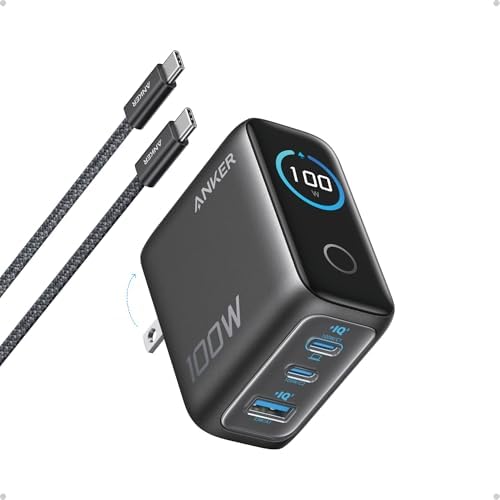
- Full-Speed 100W Max Power: Advanced GaN technology delivers a steady 100W output on any USB-C port and sustains peak per…
- See Charging in Motion: The high-definition smart display shows real-time details on charging status, temperature, and p…
- Travel-Sized for Daily Carry: With a foldable plug and a 330% smaller frame, it measures just 2.72 x 2.17 x 1.34", makin…
Introduction
Buying a powerful charger seems straightforward until you connect a second device and your laptop’s charging rate changes.
A screen can make that behaviour easier to understand. Instead of guessing whether a cable is connected properly or wondering why charging has slowed, you can see what the adapter reports.
However, the display does not remove the need to check compatibility. The important question is whether this charger’s power allocation suits your actual devices—and whether the additional information justifies its price.
Product Overview
Anker’s reviewed charger has two USB-C outputs and one USB-A output. It plugs into mains power and supplies connected equipment through separate charging cables; it is not a power bank.
The identified Amazon package includes a USB-C cable and advertises an 18-month warranty. Package contents and warranty eligibility should be checked against the selected seller and region. amazon.com
The display is the main distinguishing feature. For buyers deciding between similarly powerful adapters, it adds visibility rather than additional charging capacity.
That distinction matters: a charger without a screen may still meet your devices’ needs equally well.


Key Features
A display that helps explain charging behaviour
Anker describes screen readouts for power, voltage, and temperature. Anker US
The practical benefit is observation. You can notice when charging starts, when a device draws less power, or when connecting another accessory changes the allocation.
However, Anker’s FAQ says differences in measurement methods and cable losses can produce a reading up to 10W higher than the connected device’s reading. It also explains that a “100W” animation can appear when total output exceeds 95W under specified conditions. service.anker.com
Editorial assessment: The screen is useful for everyday awareness. It is insufficient evidence for declaring that a cable, battery, or charger is faulty.
High-power USB-C charging—with a documentation qualification
Anker’s current US product specifications advertise up to 100W from either USB-C port when used individually. However, its separate support table lists USB-C2 at 20V/3.5A, equivalent to 70W. Anker US
ChargerLAB’s inspected A121B sample carried labels specifying 100W on both USB-C ports. That supports the product-page figure for that sample, but does not explain the conflicting support entry. chargerlab.com
Buying implication: Use USB-C1 for your highest-power device, and check the exact unit’s label or obtain manufacturer confirmation if full-power USB-C2 operation is essential.
Power sharing for different combinations
The published allocations are more useful than the headline wattage:
| Connected ports | Published maximum allocation |
| USB-C1 + USB-C2 | 70W + 30W, or 95W + 5W |
| One USB-C + USB-A | 67W + 33W, or 95W + 5W |
| Both USB-C ports + USB-A | 80W + 12W + 7.5W |
These figures describe available allocations, not a promise that every device will draw that power. The connected equipment must negotiate compatible charging. support.anker.com
Why it matters: Three sockets do not mean three simultaneous high-speed charging connections. Choose around the combination you use most often.
Low-current accessory handling
Anker documents a 95W + 5W mode for suitable low-power accessories. Its FAQ says activation depends on the connected accessory meeting the required conditions and can take around one minute. service.anker.com
This arrangement is relevant when pairing a laptop with earbuds or a watch charger. It should not be interpreted as a selectable 95W laptop output alongside any second device.
Verified Specifications
| Specification | Documented detail |
| Brand | Anker |
| Product | Charger, 100W, 3 Ports, Smart Display |
| Model references | B121B cable bundle; A121B in support documentation |
| Maximum total output | 100W |
| Connections | Two USB-C; one USB-A |
| USB-C1 maximum | 100W |
| USB-C2 maximum | Product page states 100W; support table conflicts |
| USB-A maximum | 33W, subject to compatible charging |
| AC input | 100–240V, 50/60Hz, 2.3A maximum |
| Listed dimensions | 2.72 × 2.17 × 1.34 inches |
| Listed weight | 7.47 ounces |
| US design | Foldable mains plug |
| Warranty advertised for identified package | 18 months; confirm applicable terms |
Specifications are drawn from Anker’s product and support pages, with package warranty information corroborated by the identified Amazon listing. Anker US
A precise enclosure-material specification was not reliably established, so none is asserted here.
Design, Build Quality, and Ease of Use
The folding plug makes the US version easier to pack without exposed prongs catching on other items. However, its listed weight means it should not automatically be treated as the lightest travel choice.
The more important practical consideration is socket placement. A display provides little benefit if the charger normally sits behind a desk or underneath furniture.
ChargerLAB’s teardown documents internal heat-management measures, including heatsinks and thermal materials. Those observations provide construction evidence, but do not establish long-term reliability or surface temperatures during your particular workload. chargerlab.com
Setup is straightforward in principle: connect a suitable cable and device, then allow charging negotiation to settle. When assessing the screen, compare behaviour over time rather than reacting to every changing number.
There is no hands-on evidence here to judge touch-control responsiveness, scratch resistance, or how firmly the reviewed unit stays in worn wall sockets.
Performance and Real-World Use
The following scenarios are editorial analysis based on published capabilities, not measured charging tests.
One laptop
For a laptop that accepts compatible USB-C charging within this adapter’s capabilities, the charger may replace its original power brick.
The important check is the laptop manufacturer’s power requirement. A computer supplied with a higher-powered adapter may accept less power while still failing to maintain its usual charging speed under demanding workloads.
Do not judge suitability only by the connector shape.
A laptop and phone together
This is the most persuasive use case.
Imagine a laptop whose normal adapter is rated at 65W. An allocation offering 70W to the laptop connection could be suitable, provided the computer and cable negotiate the required profile.
Now consider a laptop that needs close to the full charger rating. Sharing power with a phone can leave less available than the laptop would receive alone.
The practical decision is whether you need simultaneous maximum charging or simply convenient charging throughout the day.
Three devices at once
Adding a third device can make the adapter more convenient, but may reduce how quickly the smaller devices charge.
For a desk where accessories stay connected for hours, that trade-off may be acceptable. For a short stop before travelling, you may prefer to prioritise the device with the lowest battery.
This is why a review should consider charging combinations rather than treating the port count as the main performance measure.
What independent evidence establishes
ChargerLAB’s A121B testing identified USB Power Delivery and PPS support on its sample. It also documented a particular Xiaomi charging demonstration. Those findings are specific to the inspected hardware and conditions; they do not establish maximum speeds for every phone. chargerlab.com
No universal charging-time claim is justified here. Battery level, temperature, device limits, cables, and background use can all affect the outcome.
Pros
- Visible charging information helps users observe their setup.
- Mixed connector types accommodate newer cables and older accessories.
- Useful published power allocations allow buyers to assess their intended combinations.
- A cable is included in the identified bundle, reducing one additional purchasing decision.
- Wide-range AC input is useful when travelling with the appropriate regional plug arrangement. amazon.com
Cons
- Power is shared, so several devices cannot each receive the headline maximum.
- Connection changes can briefly interrupt charging.
- The display has acknowledged measurement limitations.
- USB-C2 specifications conflict across official documentation.
- A screen may offer little benefit in an inaccessible socket.
- The current Amazon price could not be reliably verified, limiting a firm value comparison.
The interruption and display limitations are acknowledged in Anker’s FAQ. service.anker.com
Value for Money
The charger’s value depends on how much you would otherwise spend to meet the same charging requirements.
A useful comparison includes:
- The adapter.
- A suitable USB-C cable.
- The ports you actually need.
- The power available when those ports are occupied.
The display becomes easier to justify if you regularly troubleshoot charging behaviour or enjoy seeing how your devices draw power.
It is harder to justify if you already own an adequate charger and rarely look at it.
Editorial assessment: Consider paying a modest premium for the screen when you expect to use it. A large premium requires a stronger reason than appearance alone.
Because the exact current Amazon offer was unavailable, this review cannot establish that the product is a bargain.
Current Price
Check Amazon for the latest price and available offers.
Confirm the selected model, cable bundle, seller, plug type, and warranty before ordering. A manufacturer-store price should not be presented as the current Amazon price.
Best Alternatives
Anker Prime 100W three-port charger — A2688
Anker lists the Prime A2688 at 170g, with two USB-C ports, one USB-A port, and no smart display. Its specifications list USB-A output up to 22.5W and three-port total output up to 89W. Anker US
What it does better: Its lower listed weight makes it more appealing for buyers prioritising lighter luggage.
What it does worse: It provides less charging visibility and lower published USB-A and three-port ceilings.
Choose it instead if: Portability matters more than a screen.
Stay with the smart-display model if: You value visible charging information and its allocation suits your devices.
View official Anker Prime specifications
UGREEN Nexode 100W three-port charger — SKU 35037
UGREEN’s official page documents two USB-C ports, one USB-A port, a folding plug, and a screen-free design. Its US storefront advertises a two-year product warranty, subject to applicable terms. UGREEN US
What it does better: Its advertised warranty period is longer, and it deserves consideration if its complete package costs less.
What it does worse: It lacks the Anker’s charging display. The reviewed page also did not provide an equally clear text-based allocation table for a detailed comparison.
Choose it instead if: You want conventional charging and can verify that its sharing rules suit your equipment.
Stay with Anker if: The display is a meaningful part of your buying decision.
View official UGREEN product details
Comparison Table
| Feature | Anker smart-display model | Anker Prime A2688 | UGREEN Nexode 35037 |
| Advertised maximum | 100W | 100W | 100W |
| Port arrangement | 2 USB-C + 1 USB-A | 2 USB-C + 1 USB-A | 2 USB-C + 1 USB-A |
| Charging display | Yes | No | No |
| Listed weight | Approximately 212g | 170g | Not verified here |
| Main reason to consider | Charging visibility | Lower listed weight | Conventional alternative |
| Essential check | Exact model and sharing | Three-port allocation | Exact sharing rules |
Manufacturer specifications support the comparison; prices are intentionally omitted. Anker US
Who Should Buy This Charger?
It is a sensible candidate for:
- Laptop owners who also charge a phone and accessories.
- Remote workers moving between home and office.
- Travellers seeking to consolidate compatible adapters.
- Users who want visible information about charging behaviour.
- Buyers whose devices fit the published power-sharing arrangements.
Who Should Not Buy It?
Consider something else if:
- Your laptop requires more power than this adapter can supply.
- You need two laptops charging at high power simultaneously.
- You only charge one small device.
- You want the lowest possible travel weight.
- You need precision electrical measurements.
- You require uninterrupted output when other devices are connected.
Buying Considerations
Match the exact model
Confirm B121B/A121B documentation against the actual product label. Do not transfer specifications from another Anker charger simply because it also says “100W.”
Check the laptop’s requirements
Verify USB-C charging support and the manufacturer’s recommended adapter power.
Check the cable
Anker recommends a cable rated for at least 100W to achieve full-power charging. Anker UK
Check phone-specific charging support
A high total wattage does not prove that a phone will activate its fastest proprietary charging mode.
Check regional details
A wide input-voltage range does not make the physical plug fit every socket. Verify the version supplied and any required travel adapter.
Compare complete packages
Check cable inclusion, seller eligibility, returns, and warranty support before comparing prices.
Frequently Asked Questions
1. Is this a charger or a power bank?
It is a mains-powered wall charger. It does not provide portable battery storage.
2. Can it supply 100W to all three devices simultaneously?
No. Its maximum is shared across connected devices; it is not 100W per port simultaneously.
3. Why does my laptop show less power than expected?
The device may not need the maximum available power. Check its charging limits, battery level, cable, and other connected equipment before assuming a fault.
4. Is the screen a precision power meter?
No. Anker acknowledges differences between charger and device readings. Use it as an everyday indicator.
5. Why does charging pause when I connect another device?
Anker says redistribution when switching between two-port and three-port use can cause a brief interruption. service.anker.com
6. Can it charge earbuds or a smartwatch?
Anker documents support for low-power accessories. The accessory still needs its appropriate cable or charging puck.
7. Does USB-C2 definitely support 100W?
The current product page says yes, but a support table conflicts. Check the exact unit or confirm with Anker if that capability is essential.
8. Is the display worth paying extra for?
It can be worthwhile if you regularly check charging behaviour. For buyers who simply connect a device and leave it charging, a suitable screen-free adapter may be better value.
Final Verdict
This is a research-based buying assessment, not a laboratory performance score.
The Anker 100W smart-display charger combines useful connectivity with information that can make everyday charging easier to understand. Its strongest audience is the laptop user who wants one adapter for several compatible devices and will actually use the screen.
Shared power, brief redistribution interruptions, display limitations, and conflicting USB-C2 documentation prevent an unqualified recommendation.
If the screen adds practical value to your routine, this charger deserves consideration. If it does not, compare the cost and portability of the alternatives first.
Check the latest price on Amazon and confirm the model, plug type, and included cable.