
“We deliver exceptional solutions tailored to your needs.” A visitor could read that on a cleaning company’s website, a bookkeeping firm’s homepage, or a design studio’s service page. In every case, they still have to figure out what’s offered and whether it fits their situation.
Good service website copy answers those questions early. Tell visitors what you do, who it’s for, and what happens when they get in touch. This guide to website copywriting for service businesses shows how to do that with six before-and-after examples, a copy-ready service page template, and a checklist for reviewing your own pages.
Start with the questions customers ask before they buy
Review recent calls, emails, and quote requests. Write down the questions people ask repeatedly. A prospective customer might want to know whether you serve their area, how you price a job, or whether they’ll have to leave their premises while you work. Put those answers on the page where they’re likely to look.
Give each page a job. Your homepage should help visitors recognize the business and find the right service. A service page should explain one offer well enough for someone to decide whether to inquire. The contact page should tell them what information you need and what happens after they send it.
Six before-and-after website copywriting examples
The examples use fictional businesses. Any prices, deadlines, or service promises are illustrative. Replace them with terms your own team can deliver.
1. Homepage headline for an office cleaning company
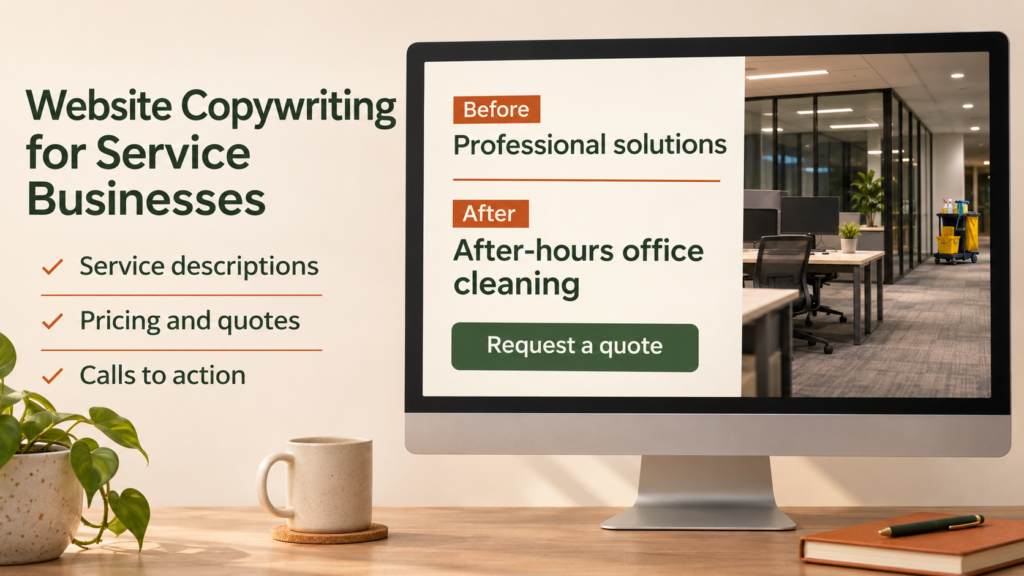
Before: Welcome to our website. We provide professional solutions for your business.
After: After-hours office cleaning for small workplaces in Riverside. Choose weekly or twice-weekly visits. We’ll agree on a cleaning checklist and access arrangements before your first visit.
Button: Request an office cleaning quote
The rewrite names the service, customer, and location. The checklist and access details also give visitors a sense of how the company works. If your business covers several areas, name the main area on the homepage and link to a fuller service-area page.
2. Service description for a bookkeeping firm
Before: We offer comprehensive bookkeeping to keep your finances organized.
After: Our monthly bookkeeping service categorizes transactions, reconciles your bank accounts, and sends you a profit and loss report. If you’re behind on previous months, tell us how far back your records go so we can quote the catch-up work separately.
The rewrite explains what customers receive and gives people with overdue records a way to ask for help. Add prerequisites your buyers need to know about, such as which accounting software you support or when you need access to their records.
3. Pricing copy for a web design studio
Before: Contact us for competitive prices.
After: A five-page website refresh starts at $900. That includes updates to five existing pages and one round of revisions. We quote new pages, copywriting, or booking features separately. Send your current website link and the changes you want for a written estimate.
A starting price helps when it corresponds to a package customers can actually buy. If each job needs a custom quote, explain what affects the price and what the customer should send. For example, a commercial photographer might need the shoot location, the number of products, and where the images will be used.
4. Proof of experience for an IT support team
Before: We’re the most reliable IT team in town.
After: Before a new employee’s first day, we use a setup checklist to confirm their device, email, and access to the apps their manager approved. Ask us to walk you through a sample checklist on your first call.
Specific process details help buyers understand what they can expect. If you have permission to share a client example, describe the starting problem, the work you did, and any result you can verify. Use your actual process or a genuine work sample when you’re still building a portfolio.
5. Call to action for a mobile bicycle repair service
Before: Click here to learn more.
After: Check mobile repair availability
Send your postcode and a short description of the issue. We’ll confirm whether we cover your area and suggest the next available appointment.
Write the action the visitor is actually taking. “Book a repair” implies a booking. “Check availability” fits a form that sends an inquiry. Descriptive link text can also make links easier to understand for people using assistive technology. W3C guidance on descriptive link text
6. Contact form copy for a local photography business
Before: Fill out the form below and we’ll get back to you.
After: Request a quote for event photography. Include your event date, location, and how many hours you’d like covered. We’ll confirm availability and explain what’s included in the quote.
The rewrite helps people send an inquiry the business can act on. Ask for the details you need at this stage and save longer questions for the follow-up. If you can reliably reply within a set period, say so next to the form.
Copy-ready service page template
Fill in this outline for one service. Move the questions your customers care about most higher up the page.
| Section | What to write |
|---|---|
| Headline | [Specific service] for [type of customer or location] |
| Opening paragraph | We help [customer] with [situation]. You get [specific deliverable or result within your control]. |
| What’s included | [Two to four deliverables or tasks the customer can expect.] |
| How it works | [First step] → [what we do] → [what the customer receives]. |
| Price or quote process | [Typical scope and starting price, or the factors that determine a custom quote.] |
| Evidence | [A real sample, a process detail, or an approved client example.] |
| Next step | [Action button]. [What the customer should send and what happens next.] |
Use the service name and location in the page title when they describe the page accurately. Keep titles concise and distinguish pages that cover different services. Google Search Central recommends descriptive title text so readers can tell what a page is about. Google Search Central guidance on title links
Check the page before you publish
- Read the first screen on a phone. Can someone tell what you do, who you serve, and which action they can take?
- Verify the details. Check service areas, starting prices, availability, and any turnaround times against what your team can deliver.
- Follow the main button. Check that the page or form delivers the action the button describes.
- Check the confirmation. Tell the customer their inquiry was received and explain the next step.
- Track inquiry quality. Record how many inquiries fit the advertised service and area. Note the questions people still ask, then use those to revise the page.
If you compare inquiry counts before and after a rewrite, record other changes too, such as a new promotion, a seasonal shift, or a change in traffic. A clearer page can help people decide, while the number of inquiries also depends on who visits and what they need.
Frequently asked questions
1. How long should a service page be?
Use enough space to explain the service, its scope, the price or quote process, and the next action. A simple local service may only need a few short sections. A larger project may need examples, prerequisites, and answers to more questions.
2. Should I show prices on my website?
Show a price when the scope is predictable. If the cost varies by location, complexity, or volume, explain which details affect the quote and what people need to send. Use a starting price only when customers can buy a defined service at that price.
3. What can I use as proof if I don’t have testimonials?
Show a real sample, a relevant qualification you hold, or the steps you use to check your work. If you share a fictional sample to demonstrate the format, label it as an example.
4. Should my homepage and service pages use the same copy?
Give them distinct jobs. The homepage introduces the business and points people to the right offer. A service page can explain that offer in enough detail for someone to judge whether it fits.
5. How do I know which page to rewrite first?
Start with a page tied to an important service that already gets visits or frequently comes up in sales conversations. If people ask the same question after reading it, put the answer near the point where they need it.
Conclusion
Pick one service page and rewrite the headline, the scope, and the main button. Use a question from a recent customer inquiry to check whether the new version gives people enough information to act. Then follow the page through to the form and confirmation so the experience matches what the copy promises.