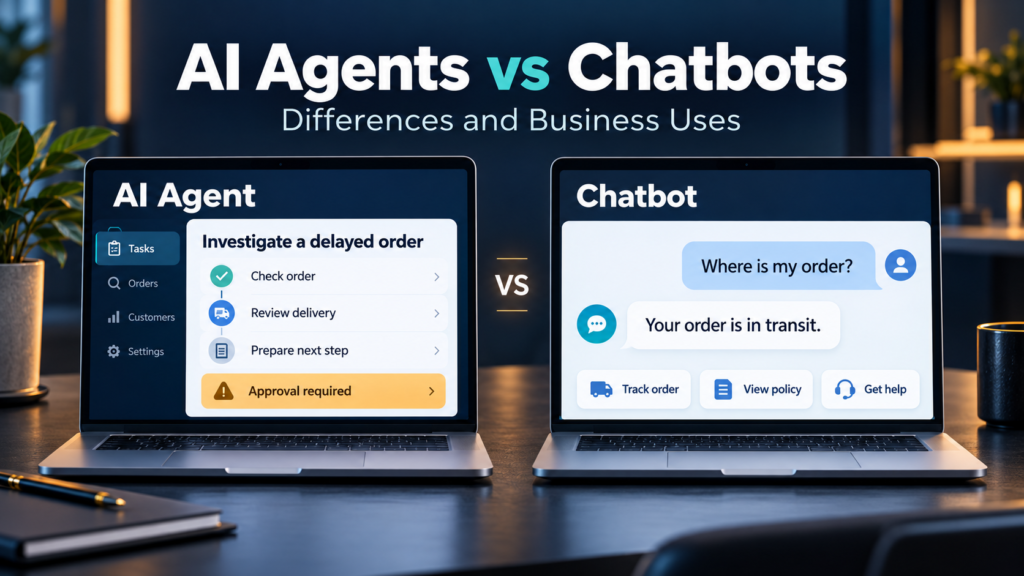

A customer asks where an order is. One system retrieves the delivery status and explains it. Another investigates a delay, checks available options, and prepares a replacement request for approval.
Both systems might appear inside the same chat window. Their underlying capabilities, permissions, and responsibilities can be very different.
Understanding AI agents vs chatbots: differences and business uses starts with looking beyond the interface. A chatbot describes how people interact with a system. An AI agent describes how a system works toward a goal, including how it selects actions and uses tools.
The categories overlap. A chatbot can provide access to an agent, and an agent can operate without a chat interface.
This guide explains the distinction, where each approach can help, and what businesses should evaluate before adopting either.
What Is a Chatbot?
A chatbot is software that communicates with people through conversation, usually through text or voice.
Not all chatbots use generative AI. Some follow menus and predefined rules. Others use language models to interpret questions and generate responses. IBM’s overview distinguishes these earlier chatbot approaches from more recent generative systems.
A business chatbot might:
- Answer common questions.
- Search a knowledge base.
- Explain a product or policy.
- Collect enquiry details.
- Retrieve an order status.
- Transfer a conversation to a person.
Chatbots can also trigger actions through integrations. Booking an appointment or creating a support ticket does not automatically make a system an autonomous agent.
What matters is how the next steps are selected.
What Is an AI Agent?
In the context of modern business software, an AI agent is a system that uses an AI model to select and carry out steps toward a goal, within the tools and permissions available to it.
It may examine information, choose a tool, inspect the result, and decide what to do next.
The terminology is not standardized across vendors. Anthropic makes a useful architectural distinction: workflows follow predefined paths, while agents allow the model to direct more of the process dynamically.
An agent does not necessarily operate without supervision. It can be restricted to research, drafting, or recommendations, with human approval required before consequential actions.
A Simple Example
Suppose an employee asks:
“Investigate why this customer’s onboarding has stalled and recommend the next step.”
An appropriately connected agent could:
- Review the customer record.
- Check outstanding onboarding tasks.
- Retrieve relevant support notes.
- Identify missing information.
- Draft a recommendation.
Whether it can update records or contact the customer depends on its permissions and the business’s approval rules.
These capabilities must be implemented and tested. They do not appear automatically because a product is called an agent.
AI Agents vs Chatbots: Key Differences
| Area | Chatbot | AI agent |
|---|---|---|
| Main description | A conversational interface | A system that selects actions toward a goal |
| Typical interaction | Responds to messages or guides a conversation | May perform several steps before returning a result |
| Process control | Can follow scripts, workflows, or model-generated responses | Uses model-driven decisions for at least part of the process |
| Tool access | Optional | Commonly used to gather information or perform work |
| Autonomy | Varies by implementation | Varies by permissions and approval requirements |
| Output | Answers, collected information, or triggered actions | Findings, completed tasks, proposed actions, or system changes |
| Evaluation priority | Answer quality and conversational usefulness | End-to-end task correctness and action safety |
These are overlapping characteristics, not a strict division between products.
A sophisticated chatbot may contain agent capabilities. A carefully controlled agent may perform only a narrow task.
Chatbots, Workflows, and Agents Are Different Design Choices
Businesses often have three useful options.
Chatbot: Help Someone Through Conversation
Use a chatbot when the main need is answering questions, explaining information, or collecting details.
For example, a website visitor asks which service package includes onboarding support.
Workflow: Follow a Defined Process
Use a workflow when the steps and conditions are known.
For example:
- Receive a completed enquiry form.
- Check required fields.
- Create a CRM record.
- Assign an owner.
- Send an approved confirmation.
This process may need ordinary automation rather than an AI agent.
Agent: Adapt the Steps to the Situation
Consider an agent when the task requires flexible investigation or choosing among tools based on intermediate results.
For example, preparing a customer handover may require finding relevant records across several systems, resolving gaps, and deciding which documents matter.
More flexibility also creates more opportunities for error. Choose it because the task needs it.
Practical Business Uses for Chatbots
Customer Questions and Self-Service
A chatbot can help customers find delivery policies, setup instructions, service information, or troubleshooting guidance.
For business-specific answers, connect it to maintained sources and test whether it answers accurately. Providing documents does not guarantee that every response will be correct.
Customers should have a clear route to human support when the system cannot resolve an issue.
Enquiry Collection
A chatbot can ask visitors about their requirements and record information for follow-up.
Keep questions relevant and explain what happens after submission. Avoid collecting details your team does not need.
Internal Knowledge Search
Employees can use conversational search to locate approved procedures, product documentation, or onboarding guidance.
The system should respect existing access restrictions. Information available somewhere in the company should not automatically become available to every employee.
Guided Booking and Requests
A chatbot connected to a defined workflow can support appointment booking, service requests, or ticket creation.
For straightforward processes, this may provide the needed functionality with less complexity than an agent.
Practical Business Uses for AI Agents
Customer Support Investigation
An agent could review an order, check delivery information, retrieve relevant policy, and propose a resolution.
A sensible initial scope might allow investigation and drafting while requiring approval for refunds, replacements, or changes to customer commitments.
Sales Preparation
An agent could assemble an account brief from approved CRM records and public company information.
It might summarize previous discussions, identify missing details, and suggest questions for a meeting.
The result should distinguish confirmed facts from inferences. A plausible account brief can still contain errors.
Operational Exception Handling
Routine cases often fit standard automation. Exceptions may require more investigation.
For example, an agent could examine an incomplete supplier record, compare it with approved documentation, and prepare a request for missing information.
Changes to sensitive payment details should follow established verification controls.
Research and Reporting Support
An agent could gather information from approved sources, compare documents, and draft a structured report.
The system should preserve source references, flag missing information, and avoid treating unsupported conclusions as facts.
Software Development Assistance
An agent with suitable tools can inspect code, propose changes, and run available checks.
Its output still requires evaluation. A successful command or passing test does not establish that a change is correct in every relevant situation.
A Business Scenario: Handling a Delayed Order
Consider a hypothetical online retailer.
| Approach | Possible behavior |
|---|---|
| Chatbot | Retrieves tracking information and explains the delivery policy |
| Defined workflow | Opens an investigation ticket when stated conditions are met |
| AI agent | Reviews the order, investigates available information, and recommends an appropriate next action |
The agent offers flexibility, but it also needs more context, permissions, and testing.
For many retailers, a chatbot connected to a reliable ticket workflow may be sufficient. Others may benefit from agent-assisted investigation while keeping final decisions with staff.
The appropriate choice depends on the work, not the label.
Costs and Implementation Requirements
Chatbots are not always inexpensive, and agents are not always costly. Complexity, usage, integrations, and service expectations determine the total.
Chatbot Costs May Include
- Subscription or hosting.
- Conversation or model usage.
- Knowledge-base preparation.
- Integration work.
- Human support handovers.
- Answer-quality testing.
- Ongoing content maintenance.
Agent Costs May Also Include
- Repeated model and tool calls.
- Longer task execution.
- Workflow state management.
- Monitoring and action logs.
- Exception handling.
- Permission controls.
- Recovery from failed or partially completed tasks.
Compare cost per correctly completed task, alongside customer experience and operational risk.
A low-cost interaction is not valuable if it creates more work downstream.
Limitations and Risks Businesses Should Understand
Incorrect Answers and Decisions
Generative systems can produce confident but inaccurate outputs. NIST identifies this problem, often called confabulation or hallucination, in its Generative AI risk profile.
For an informational chatbot, that might mean an incorrect policy explanation. For an agent with write access, an error could also change a business record or trigger an inappropriate action.
Untrusted Instructions
An agent may encounter instructions embedded in documents, websites, or messages that conflict with its legitimate task.
Treat retrieved content as information to assess, rather than automatically granting it authority over the system’s behavior.
Excessive Permissions
Give the system only the access required for its task.
Read-only access, limited tool permissions, and approval gates can reduce the consequences of mistakes.
Partial Completion
An agent might update one system and fail before updating another.
Require clear completion reporting, logs, and a recovery procedure. “Task finished” should reflect verified results, not merely attempted actions.
Unnecessary Customer Friction
A system that repeats questions, misunderstands requests, or blocks human support can make service worse.
Measure the customer’s outcome, including repeat contacts and corrections.
How to Choose Between an AI Agent and a Chatbot
1. Define the Outcome
Write a specific requirement:
“Help customers find accurate setup instructions.”
Or:
“Investigate incomplete service requests and prepare the missing-information summary.”
Avoid starting with a vague instruction to “add AI.”
2. Check Whether the Process Is Predictable
If the steps are stable, evaluate a workflow first.
If the process requires flexible investigation, test whether agent-driven decisions provide a measurable benefit.
3. Set Permission Boundaries
Decide what the system may read, draft, change, and send.
Identify actions requiring human approval before connecting production systems.
4. Test Representative Cases
Include ordinary requests, ambiguous instructions, missing information, tool failures, and requests outside the intended scope.
Assess both successful completion and appropriate escalation.
5. Measure the Pilot
Useful measures include:
- Correct answers or completed tasks.
- Human corrections.
- Escalation quality.
- Resolution time.
- Cost per successful outcome.
- Customer satisfaction.
- Unauthorized or incorrect actions.
Compare results with your existing process before expanding.
Frequently Asked Questions
1. Can a chatbot also be an AI agent?
Yes. A chat interface can connect to an agent that investigates information and takes permitted actions. The interface and underlying architecture describe different aspects of the system.
2. Do AI agents work without human supervision?
Some tasks can run with limited intervention, but autonomy should be deliberately bounded. The required oversight depends on the task and consequences of mistakes.
3. Are AI agents always better than chatbots?
No. A chatbot or defined workflow may be more suitable for a straightforward task. Additional flexibility is useful only when it improves the outcome enough to justify the complexity.
4. Do small businesses need custom-built agents?
Not necessarily. Existing software may offer suitable capabilities. Check actual integrations, permissions, pricing, and limitations rather than relying on the product name.
5. Can either replace an entire customer service team?
Do not assume so. Both can support selected tasks, but exceptions, judgment, relationship management, and service accountability still require appropriate human coverage.
Conclusion
The distinction between AI agents and chatbots is about how work is performed, as well as how people interact with the system.
Use conversational tools for accessible answers and guidance, workflows for predictable processes, and agents where flexible investigation adds value. Begin with a narrow use case, verify results, and expand permissions only when the system demonstrates dependable performance.