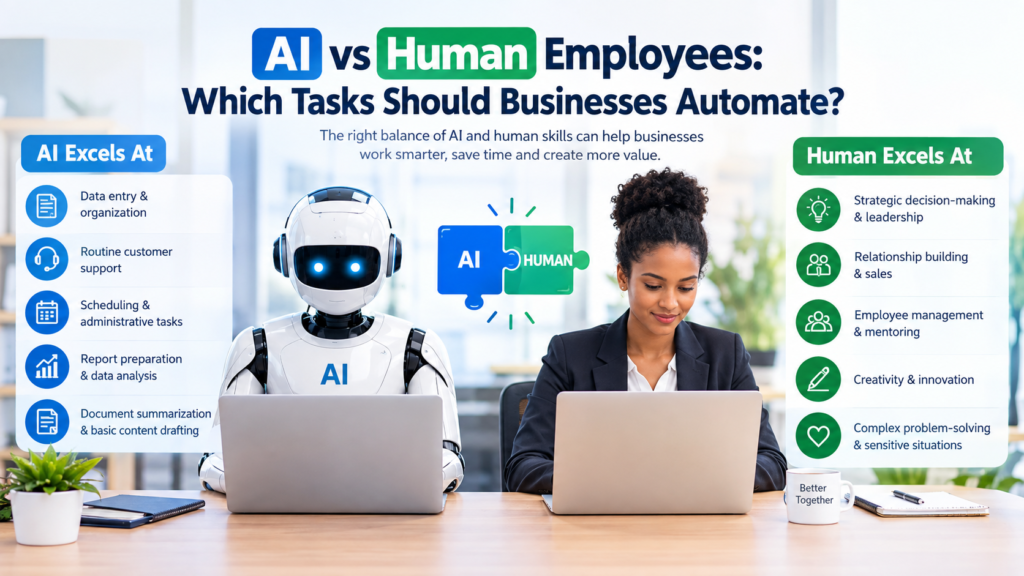

Artificial intelligence is changing how businesses handle everyday work. Tasks that once required employees to spend hours sorting information, drafting routine content, answering common questions, or preparing reports can increasingly be supported by AI-powered tools.
But automation does not mean that every task should be handed over to a machine.
The more useful question is not simply AI vs human employees. It is: Which tasks are better suited to AI, which require people, and where can humans and AI work together?
For most businesses, the strongest approach is not to replace employees with AI across the board. Instead, companies can use automation to reduce repetitive work while allowing employees to spend more time on activities that require judgment, creativity, relationships, problem-solving, and accountability.
This guide explains how businesses can evaluate tasks, where AI automation can be useful, where human employees remain essential, and how to introduce automation responsibly.
AI vs Human Employees: Understanding the Difference
AI and human employees have different strengths.
AI systems are particularly useful for processing information, identifying patterns, generating drafts, organizing data, and performing repetitive digital tasks. They can often handle structured workflows quickly when the instructions and available information are clear.
Human employees bring capabilities that are much harder to automate reliably. These include empathy, contextual judgment, leadership, negotiation, relationship building, ethical decision-making, creativity, and responsibility for important business decisions.
The distinction is important because a task that looks simple on the surface may contain a human element that is difficult to automate.
For example, an AI system may help prepare a customer-service response. However, deciding how to handle an upset customer, protect a long-term relationship, or make an exception may require an employee’s judgment.
Which Business Tasks Are Good Candidates for AI Automation?
Not every business activity is equally suitable for automation. The best candidates tend to be repetitive, predictable, digital, and relatively easy to review.
1. Data Entry and Data Organization
Businesses frequently spend time moving information between systems, organizing records, categorizing documents, and updating databases.
AI and automation tools can assist with these activities by extracting information, classifying records, and transferring structured data between connected systems.
Human employees should still review important information when mistakes could affect customers, finances, compliance, or business decisions.
2. Routine Customer Support
AI-powered chatbots and virtual assistants can handle straightforward customer questions, particularly when answers are available in a knowledge base.
For example, an automated system may answer questions about:
- Business hours
- Basic product information
- Shipping policies
- Account instructions
- Common troubleshooting steps
- Frequently requested documents
More complicated complaints or sensitive situations can then be transferred to a human employee.
This creates a useful division of responsibility: AI handles routine questions while employees focus on situations requiring judgment and personal attention.
3. Scheduling and Administrative Tasks
Scheduling meetings, sending reminders, organizing calendars, and managing routine administrative workflows can consume considerable employee time.
Automation can help coordinate appointments, send notifications, create recurring tasks, and organize information.
These tasks are generally suitable for automation because they often follow clearly defined rules.
4. Report Preparation
AI can help employees turn structured business information into preliminary reports.
For example, an AI tool might organize sales information, summarize customer feedback, or prepare a first draft of an internal report.
However, employees should verify important figures and conclusions before reports are used for significant decisions.
AI can accelerate preparation, but responsibility for the final business interpretation should remain with an appropriate person.
5. Document Summarization
Employees often need to review long documents, meeting notes, emails, or internal materials.
AI can help summarize large amounts of text and identify potentially relevant sections.
This can save time during research and information review. However, summaries can omit context or misunderstand important details, so employees should consult the original material when accuracy is important.
6. Basic Content Drafting
AI can assist marketing and communications teams with first drafts of:
- Blog outlines
- Product descriptions
- Email drafts
- Social media ideas
- Frequently asked questions
- Internal communications
The human role remains important for fact-checking, brand voice, originality, strategic decisions, and final editing.
AI-generated text should not automatically be treated as accurate simply because it sounds professional.
Which Tasks Should Businesses Keep Human?
Some responsibilities involve too much judgment, context, risk, or human interaction to hand over completely to automation.
1. Leadership and Strategic Decision-Making
AI can provide analysis and suggestions, but business strategy involves more than analyzing available information.
Leaders must consider company goals, employees, customers, competition, resources, risks, and circumstances that may not be fully represented in data.
AI can support strategic thinking, but leadership decisions should remain accountable to people.
2. Relationship-Based Sales
AI can help sales teams research prospects, organize leads, draft emails, and automate routine follow-ups.
However, successful business relationships often depend on understanding another person’s priorities, concerns, expectations, and circumstances.
Negotiations and important client relationships are therefore better supported by humans, even when AI assists behind the scenes.
3. Employee Management
AI can help managers organize schedules, analyze workforce information, or prepare administrative documents.
But decisions involving employees can have significant personal and organizational consequences.
Performance discussions, conflict resolution, mentoring, hiring decisions, and difficult conversations require human judgment and communication.
4. Creative Direction
AI can generate ideas and drafts, but creative work often requires a clear understanding of a company’s identity, audience, culture, and objectives.
Designers, writers, marketers, and creative directors can use AI as a brainstorming and production assistant without surrendering creative responsibility to it.
5. Sensitive Customer Situations
A customer with a complicated complaint may not want an automated response.
When a situation involves frustration, unusual circumstances, financial consequences, or a valuable customer relationship, human involvement can be more appropriate.
Automation should make it easier to reach a person when necessary rather than create barriers to human support.
Tasks Where AI and Humans Work Best Together
The AI-versus-human debate can sometimes create a false choice.
In many businesses, the best solution is a human-in-the-loop workflow.
Under this model, AI handles part of the process while a person reviews, approves, corrects, or completes the work.
For example:
AI: Collects customer feedback
Human: Identifies the most important issues and decides what action to take
AI: Creates a first draft of a report
Human: Checks the information and adds business context
AI: Answers common customer questions
Human: Handles complex or sensitive cases
AI: Organizes potential sales leads
Human: Determines which prospects should receive personal attention
AI: Produces content ideas
Human: Chooses the appropriate topics and ensures the final content is accurate and useful
This approach can allow businesses to gain efficiency without removing human oversight.
A Simple Framework for Deciding What to Automate
Businesses do not need to automate everything at once. A structured evaluation can help identify appropriate opportunities.
Step 1: List Repetitive Tasks
Start by identifying activities employees perform frequently.
Look for tasks that involve:
- Copying information
- Sorting data
- Scheduling
- Sending routine messages
- Creating repetitive documents
- Answering common questions
- Moving information between systems
These are often good places to investigate automation.
Step 2: Measure the Complexity of Each Task
Ask whether the task follows predictable rules.
A highly structured process is generally easier to automate than one requiring frequent interpretation.
For example, automatically sending a reminder after a customer submits a form is relatively straightforward.
Deciding how to respond to a complicated customer complaint is much less predictable.
Step 3: Consider the Cost of Mistakes
This is one of the most important questions.
If an automated system makes a mistake, what happens?
A minor formatting error may be easy to correct. An incorrect business decision involving sensitive customer information or important financial data may have much greater consequences.
The greater the potential impact of an error, the stronger the case for human review.
Step 4: Identify the Human Value
Ask what employees contribute to the task.
Does the activity require:
- Empathy?
- Negotiation?
- Creativity?
- Leadership?
- Ethical judgment?
- Personal relationships?
- Complex problem-solving?
- Accountability?
If the answer is yes, full automation may not be appropriate.
Step 5: Test Before Expanding
Businesses can start with a limited workflow rather than changing an entire department.
Test the automation with a defined group of tasks, monitor its performance, collect employee feedback, and identify problems.
If the system performs reliably and creates meaningful value, the company can consider expanding its use.
Benefits of Automating the Right Business Tasks
Thoughtful automation can provide several practical benefits.
More Time for Valuable Work
When employees spend less time on repetitive administrative activities, they can devote more attention to work requiring expertise and judgment.
More Consistent Routine Processes
Automation can follow predefined workflows consistently, which can be useful for repetitive processes.
Consistency still depends on the quality of the workflow, instructions, data, and system configuration.
Faster Information Processing
AI can process and organize large amounts of digital information quickly, helping employees begin their work with a more organized starting point.
Better Use of Employee Skills
Instead of viewing AI only as a labor-replacement technology, businesses can use it to support employees and allow them to concentrate on higher-value responsibilities.
Risks and Limitations of AI Automation
AI automation also creates challenges that businesses should consider carefully.
AI Can Make Mistakes
AI systems can produce incorrect information, misunderstand instructions, or generate outputs that sound convincing but are wrong.
Human review is particularly important when the consequences of an error are significant.
Automation Can Create New Work
Introducing an AI system does not automatically eliminate work.
Employees may need to monitor outputs, correct errors, maintain workflows, update information, and manage exceptions.
Businesses should evaluate the entire process rather than assuming automation will remove every associated task.
Privacy and Security Require Attention
Companies should understand how an AI tool handles business and customer information before using it.
Sensitive information should not be entered into an AI service without appropriate authorization, security controls, and an understanding of the provider’s data practices.
Businesses should also review applicable laws, contracts, internal policies, and industry requirements.
Employees Need Training
AI tools are only useful when employees know how to use them properly.
Training may need to cover appropriate use, verification of AI-generated information, data handling, security, and when human review is required.
Poor Automation Can Hurt Customer Experience
Automating a process simply because technology makes it possible can create frustration.
Customers should have a clear path to human assistance when an automated system cannot adequately resolve their issue.
How Small Businesses Can Start With AI Automation
Small businesses do not need a large technology project to begin.
A practical approach is to select one repetitive process and improve it first.
For example:
- Identify a task employees perform repeatedly.
- Document the current process.
- Determine which parts are predictable.
- Select an appropriate automation or AI tool.
- Establish human review requirements.
- Test the workflow on a small scale.
- Monitor errors and employee feedback.
- Calculate whether the process actually saves time or improves service.
- Adjust the workflow.
- Expand only when the results justify doing so.
The objective should be better work, not automation for its own sake.
AI vs Human Employees: A Practical Comparison
| Business Responsibility | AI Can Help With | Human Role |
|---|---|---|
| Data organization | Sorting and categorizing information | Reviewing important records |
| Customer support | Common questions and basic requests | Complex complaints and relationships |
| Content creation | Ideas and first drafts | Strategy, fact-checking, editing |
| Reporting | Summaries and initial analysis | Interpretation and decisions |
| Scheduling | Appointments and reminders | Handling exceptions |
| Sales | Lead organization and research | Negotiation and relationship building |
| Management | Administrative support | Leadership and people decisions |
| Strategy | Analysis and scenario support | Final judgment and accountability |
| Research | Information organization and summaries | Evaluation and critical thinking |
| Creative work | Brainstorming and drafts | Creative direction and final decisions |
Questions Business Leaders Should Ask Before Automating
Before introducing an AI system, decision-makers should ask:
What problem are we trying to solve?
Automation should have a clear purpose. Saving time is one possible objective, but improving consistency, reducing administrative workload, or making information easier to access may also be relevant.
What happens if the system is wrong?
Understanding the consequences of errors helps determine the appropriate level of human oversight.
Who is responsible for the final decision?
There should be a clear owner for important processes, even when AI performs part of the work.
Can employees easily review or correct the output?
A system is more useful when employees can identify problems and intervene when necessary.
Will customers or employees understand when AI is involved?
Depending on the context, transparency may be important for maintaining trust and meeting organizational or legal requirements.
Does the automation actually improve the process?
A sophisticated AI tool is not automatically better than a simple workflow. Businesses should evaluate the outcome rather than the technology itself.
The Future of AI and Human Work
The relationship between AI and employees is likely to continue evolving.
As AI tools become more capable, businesses may automate a wider range of routine activities. At the same time, human skills such as judgment, communication, leadership, creativity, and relationship management will continue to matter.
This means the most useful question for businesses may increasingly become:
How can we redesign work so that AI handles appropriate routine activities while employees focus on work where human judgment creates the most value?
Companies that approach automation this way can make technology part of a broader workforce strategy rather than treating AI as a simple replacement for employees.
Frequently Asked Questions
1. Which business tasks are best suited for AI automation?
Tasks that are repetitive, predictable, digital, and easy to verify are often good candidates. Examples include scheduling, data organization, routine customer questions, document summarization, and administrative workflows.
2. Should businesses replace employees with AI?
Not necessarily. AI is better viewed as a tool that can support employees in many workflows. Whether a particular role or task should be automated depends on its complexity, risk, human requirements, and business objectives.
3. What tasks should not be fully automated?
Tasks involving sensitive decisions, leadership, complex negotiations, important customer relationships, employee management, ethical judgment, or significant consequences generally benefit from meaningful human involvement.
4. How can businesses use AI without losing the human touch?
Businesses can use human-in-the-loop workflows. AI can handle routine preparation while employees review outputs, make important decisions, communicate with customers, and manage complex situations.
5. How should a business start automating tasks with AI?
Start with one well-defined, repetitive process. Evaluate its risks, test an appropriate tool, establish human oversight, monitor the results, and expand gradually if the automation genuinely improves the workflow.
Conclusion
The question of AI vs human employees does not have a single answer for every business.
AI is well suited to many repetitive, structured, and information-heavy tasks. Human employees remain essential for responsibilities involving judgment, empathy, creativity, leadership, relationships, and accountability.
The smartest approach is therefore not to automate everything that can technically be automated. Businesses should identify where AI can remove unnecessary repetitive work while keeping people responsible for decisions and interactions that require human understanding.
By evaluating tasks individually, considering the cost of errors, protecting sensitive information, training employees, and maintaining appropriate human oversight, businesses can build automation strategies that are practical, responsible, and useful for both employees and customers.