The Anker 332 is a five-port USB-C hub for connecting an HDMI monitor and USB accessories while optionally charging a compatible laptop.
Its biggest strength is a focused connection mix for a basic work setup. Its biggest weakness is display capability: HDMI tops out at 4K/30Hz, and neither USB-C socket outputs video.
Consider it for office documents, meetings, presentations, and occasional file transfers. Choose another hub if you need 4K/60Hz, two external displays through the adapter, memory-card readers, or Ethernet. Its value depends on the current price and whether your laptop supports the required functions. lp.ankerjapan.com

- 5-in-1 Connectivity: Equipped with a 4K HDMI port, a 5 Gbps USB-C data port, two 5 Gbps USB-A ports, and a USB C 100W PD…
- Powerful Pass-Through Charging: Supports up to 85W pass-through charging so you can power up your laptop while you use t…
- Transfer Files in Seconds: Move files to and from your laptop at speeds of up to 5 Gbps via the USB-C and USB-A data por…
Introduction
A laptop with too few ports can turn a simple workday into a juggling exercise. You disconnect storage to plug in a mouse, remove a charger to attach an adapter, or carry several dongles.
The Anker 332 addresses that everyday problem. The important question is whether its connections match your setup.
Two details deserve particular attention: its USB-C sockets perform different jobs, and “4K support” does not mean the refresh rate matches your monitor’s full capability.
Product overview
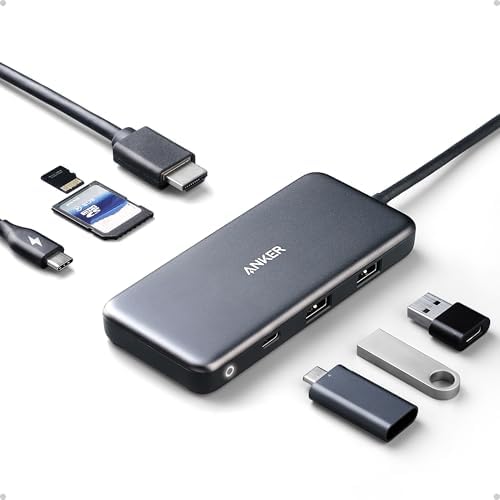
The Anker 332, model A8355, connects through an attached USB-C lead. Its expansion connections comprise:
- One HDMI output.
- Two USB-A data ports.
- One USB-C data port.
- One USB-C Power Delivery input.
The charging input accepts power from a separate adapter. It does not make the hub a standalone charger or power bank. Think of the 332 as a compact accessory for one display and several peripherals rather than a complete workstation dock. lp.ankerjapan.com


Key features and what they mean
HDMI: check refresh rate before buying
The HDMI connection supports up to 3840 × 2160 at 30Hz. Anker’s FAQ separately confirms 1080p at 60Hz. service.anker.com
For a static presentation or reference document, the lower refresh rate may be acceptable. Buyers accustomed to 60Hz may find cursor movement and scrolling at 30Hz less comfortable.
That is a practical buying consideration, not a performance measurement from this review.
If your main reason for purchasing is a 4K monitor, decide your required refresh rate first. An expensive monitor cannot remove the hub’s output limit.
Charging: 100W input does not mean 100W laptop output
Anker distinguishes between the power accepted by the hub and the maximum passed to the computer. Its manual specifies a 100W PD charger for up to 85W laptop charging. The charger is not included. lp.ankerjapan.com
These are maximum figures, not constant delivery rates. Your charger, cable, laptop, and negotiated charging profile determine the result.
A computer normally supplied with a high-wattage adapter may charge more slowly—or lose battery during demanding work—through a lower-power USB-C connection. Check its documented requirements before replacing the original charging arrangement.
USB connections for ordinary accessories
Anker rates the USB data connections at up to 5Gbps. They provide places for peripherals and external storage without occupying several laptop sockets. Anker US
That figure is a connection specification, not a guaranteed file-copy speed. The storage device, cables, file sizes, and simultaneous activity affect results.
Do not interpret several rated ports as a promise of several independent transfers running at their maximum speeds simultaneously.
Straightforward setup
Anker describes the hub as plug-and-play, without a separate driver installation. This simplifies basic setup, although attached peripherals may have their own software requirements. service.anker.com
Plug-and-play also does not create video capability where the laptop’s USB-C port lacks it.
Verified specifications
| Specification | Verified information |
| Brand | Anker |
| Product | Anker 332 USB-C Hub |
| Model | A8355 |
| Host connection | Attached USB-C connector |
| Expansion connections | HDMI, two USB-A data ports, USB-C data, USB-C PD input |
| Maximum HDMI resolution | 3840 × 2160 at 30Hz |
| Maximum data rating | 5Gbps |
| Charging input | Up to 100W |
| Laptop charging pass-through | Up to 85W |
| Listed dimensions | 4.78 × 1.59 × 0.45 inches |
| Listed weight | 1.44 ounces |
| Listed enclosure material | ABS plastic |
| Documented warranty | 18-month limited warranty; eligibility and regional terms apply |
Port specifications come from Anker. Dimensions, weight, and material are listing-reported information; the warranty is stated in the official manual. Anker US
Design, build quality, and ease of use
The listed dimensions and weight suggest an adapter that is easy to carry with a laptop. Its plastic enclosure distinguishes it from metal-bodied alternatives, but enclosure material alone does not establish durability.
The attached host lead removes one separate cable from setup. The trade-off is that it is not a user-swappable connection: damage to that lead could make the hub unusable.
Avoid leaving the adapter suspended from a laptop port with heavy cables pulling on it. Supporting the hub on the desk is a sensible precaution.
The most important usability detail is matching each USB-C socket to its intended role. Connect the charger to PD-IN and a compatible peripheral to the data connection.
Anker says the hub can become warm during charging or transfers and advises leaving it uncovered. This review does not establish operating temperatures, connector endurance, or long-term failure rates. service.anker.com
Performance and realistic use
Documents, meetings, and a simple desk
The intended arrangement is straightforward: a compatible laptop, one HDMI monitor, and a few USB peripherals.
For someone working mainly in email, documents, and browser applications, that connection mix may be sufficient. The benefit is fewer separate adapters—not an increase in application performance.
Before buying, compare the hub with your actual daily connections. Paying for unused ports is unnecessary, but buying too few can leave you carrying another adapter.
External storage and larger transfers
The data ports are useful for everyday file movement. However, this is not the strongest match for someone buying a hub primarily to exploit faster external-storage interfaces.
Compare the hub’s connection rating with the drive’s interface. A fast SSD cannot reach its full interface potential through a slower connection.
Anker specifically recommends connecting a Samsung T7 SSD to the USB-A ports for stable transfers. Follow that model-specific guidance rather than assuming the USB-C socket is always preferable. Anker US
Laptop charging while working
Light office work and sustained CPU or GPU activity can have very different power demands. Whether pass-through charging is sufficient depends on both the laptop and workload.
If the computer has another suitable charging connection, keeping its charger connected directly may make more sense when maximum charging performance matters.
Convenience should not override the computer manufacturer’s power requirements.
When the monitor does not work
A blank screen does not automatically establish a defective adapter.
Start by checking:
- Whether the laptop’s chosen USB-C socket supports DisplayPort Alt Mode.
- Whether the monitor is set to its HDMI input.
- Whether the HDMI cable works in another known-compatible setup.
Anker’s troubleshooting guidance identifies host video support as a prerequisite. service.anker.com
Pros
- Useful connection mix for a basic one-monitor workstation.
- Separate USB-C connections for data and charger input.
- Compact listed dimensions and low listed weight.
- Manufacturer manual, FAQ, and troubleshooting resources are available.
- Clear specifications make it possible to assess suitability before ordering.
Cons
- Does not meet a 4K/60Hz display requirement.
- No USB-C monitor output.
- No built-in Ethernet, memory-card readers, or dedicated audio connection.
- One HDMI output does not provide two independent external displays.
- A separate charger is needed for laptop pass-through charging.
- Attached host cable limits straightforward cable replacement.
- Sustained performance and reliability were not independently tested for this review.
Value for money
The Anker 332 makes sense when you need most of its connections and its total purchase cost compares favorably with alternatives.
Include any HDMI cable, charger, or charging cable you still need. The hub’s checkout price may not represent the complete setup cost.
It becomes less compelling if you immediately need to add a card reader or Ethernet adapter. A more comprehensive hub may provide a simpler arrangement even if its initial price is higher.
The clearest reason to reject it is a mismatch in requirements. An adapter that cannot drive your monitor as intended offers poor value for that setup, regardless of the discount.
Current Amazon price
Check Amazon for the latest price and available offers.
A reliable current Amazon checkout price was not verified on November 2, 2026. No current discount or availability claim is made here.
View the Anker 332 A8355 on Amazon.
Best alternatives
UGREEN Revodok 1071 7-in-1: for memory-card users
The UGREEN Revodok 1071, model 15214, adds SD and microSD readers. UGREEN advertises up to 95W charging pass-through, while its display output remains limited to 4K/30Hz. UGREEN UK
What it does better: Built-in card access and higher advertised laptop-charging headroom.
Its trade-off: It adds connections without solving the display refresh-rate limitation. Buyers who do not use memory cards may gain little from the additional functionality.
Choose it instead: If importing camera or memory-card files is part of your normal workflow.
Stay with the Anker 332: If its simpler connection mix is sufficient and its actual purchase price is favorable. A current Amazon price comparison was not verified.
See UGREEN’s model information.
Anker 565 11-in-1: for a more connected workstation
Anker’s A8388 documentation includes Ethernet, memory-card readers, audio, faster data connections, and HDMI/DisplayPort outputs specified up to 4K/60Hz, subject to host and configuration requirements. Anker US
What it does better: More connection options and greater maximum display capability.
Its trade-off: More complexity and additional display-compatibility decisions. Anker states that its two external monitors show the same content on MacBooks; it is not a universal solution for independently extended Mac displays. Anker US
Choose it instead: If your workstation needs wired networking, cards, or additional display connections.
Stay with the Anker 332: If one screen and ordinary peripherals cover your requirements.
See Anker’s 565 specifications.
Comparison table
| Feature | Anker 332 A8355 | UGREEN 1071/15214 | Anker 565 A8388 |
| Best fit | Basic laptop expansion | Card-reader convenience | More connected workstation |
| Advertised display maximum | HDMI 4K/30Hz | HDMI 4K/30Hz | HDMI/DisplayPort up to 4K/60Hz* |
| Data connections | Up to 5Gbps | Up to 5Gbps | Includes up to 10Gbps connections |
| Laptop pass-through | Up to 85W | Up to 95W | Up to 85W |
| SD/microSD readers | No | Yes | Yes |
| Ethernet | No | No | Gigabit |
| Current Amazon price | Not verified | Not verified | Not verified |
Maximum specifications are conditional. Check supported display modes; two display connectors do not guarantee two independent extended screens on every computer. Anker US
Who should buy the Anker 332?
It is worth considering for:
- Office users connecting one monitor and a few peripherals.
- Students needing an adapter for presentations and accessories.
- Mobile professionals whose laptop supports the required functions.
- Buyers who have checked their monitor requirements and do not need extra networking or card connections.
Who should choose something else?
Look elsewhere if you need:
- 4K/60Hz output.
- A USB-C-only monitor connection.
- Two external monitors through one adapter.
- Built-in Ethernet or memory-card slots.
- Higher-speed storage connections.
- More charging power than this arrangement can deliver.
Linux users should also avoid assuming verified support. The retrieved Amazon listing explicitly excludes Linux; that statement is not independent testing of every Linux configuration. amazon.com
Buying considerations
Before ordering, check:
- Exact model: Confirm A8355 rather than a similarly named Anker product.
- Host video support: Consult the laptop specification for DisplayPort Alt Mode or the relevant display capability.
- Charging support: Confirm that the chosen computer socket accepts USB-C Power Delivery.
- Monitor requirements: Decide your required resolution and refresh rate.
- Accessories: Include appropriate cables and a suitable charger in the budget.
- Operating system: Check support for your exact computer rather than relying on a generic brand list.
- Seller and warranty: Confirm the supplier, return policy, and warranty eligibility in your location.
Frequently asked questions
Does the Anker 332 support 4K at 60Hz?
No. Its documented HDMI maximum is 4K/30Hz. Anker separately confirms 1080p/60Hz. service.anker.com
Can it charge a laptop at 100W?
No. The documented laptop maximum is 85W. The 100W specification describes the charging input, and actual delivery depends on the complete setup. lp.ankerjapan.com
Can I connect a monitor through the USB-C data socket?
No. Anker states that this connection does not output video. The hub’s display connection is HDMI. anker.com
Does every USB-C laptop support its HDMI output?
No. The host socket needs video capability. Anker specifically identifies DisplayPort Alt Mode in its troubleshooting guidance. service.anker.com
Does the hub need an additional charger?
An additional charger is required for laptop pass-through charging. Anker also recommends external power for certain host devices, so check the device-specific guidance. lp.ankerjapan.com
Can it run two independent external monitors?
It has one HDMI output. Choose a product explicitly supporting your intended multi-monitor configuration rather than assuming an HDMI splitter adds independent displays. lp.ankerjapan.com
Does it have Ethernet or memory-card readers?
No. If either is essential, compare a hub with those connections built in. lp.ankerjapan.com
What warranty is documented?
The official manual states an 18-month limited warranty. Confirm applicable terms and eligibility for the seller and country of purchase. lp.ankerjapan.com
Final verdict
This is a research-based assessment, not a hands-on performance score. The unverified current Amazon price makes the value judgment provisional.
The Anker 332 is worth considering for a straightforward laptop setup with one HDMI screen and ordinary USB peripherals. Its appeal is convenient expansion without moving to a more elaborate dock.
Its limitations are decisive for some buyers. If you need smoother high-resolution output, memory-card access, wired networking, or additional monitors, start with an alternative designed for those requirements.
If the 332 matches your setup, compare its actual checkout price with the UGREEN option before choosing.