
Finding potential customers is an important part of growing a business. However, attracting website visitors is only the first step. Businesses also need a reliable way to capture inquiries, understand customer needs, organize contact information, and follow up with people who may be interested in their products or services.
The best lead generation tools help businesses manage this process more efficiently. Depending on their goals, companies can use landing page builders, customer relationship management (CRM) software, email marketing platforms, website forms, and marketing automation tools to turn relevant interest into meaningful business conversations.
Choosing the right software can be challenging because these tools serve different purposes. A freelancer may need a simple contact form and an organized lead database, while a B2B company may need prospect research, sales pipeline management, and automated follow-up workflows.
This guide explores popular lead generation tools, explains their features and limitations, and shows you how to choose a practical solution for your business.
What Are Lead Generation Tools?
Lead generation tools are software applications and online services that help businesses attract potential customers, collect their information with appropriate permission, and organize follow-up activities.
A lead is a person or organization that has shown potential interest in a business’s products or services. This interest might come through a contact form, newsletter subscription, product inquiry, webinar registration, or sales conversation.
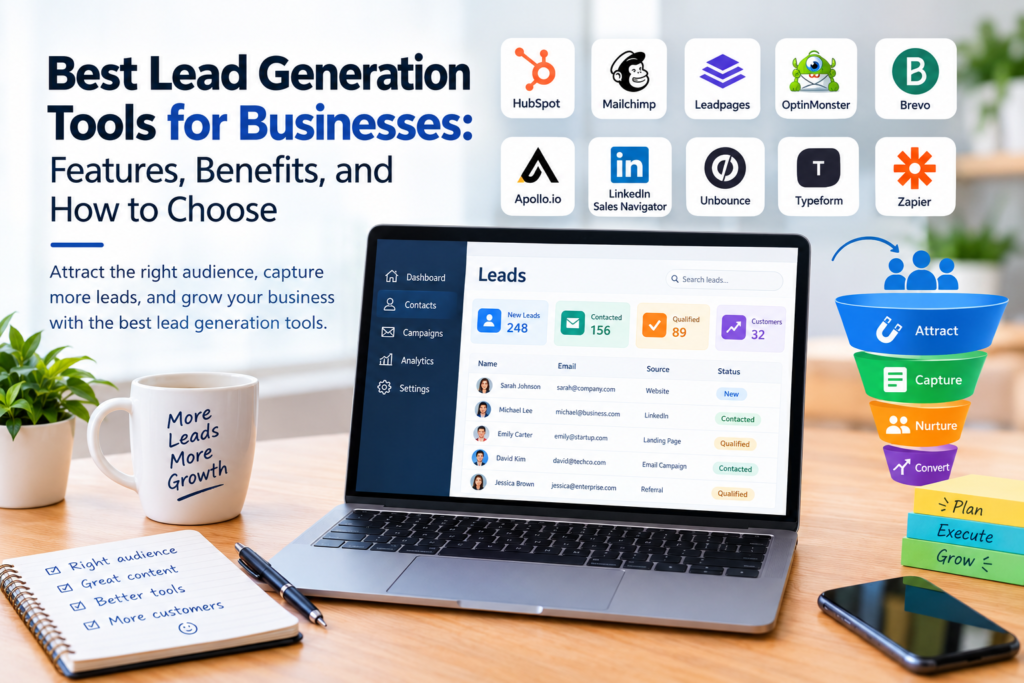
Lead generation tools support different stages of the process:
- Attracting prospects: Landing pages, content marketing, and website optimization tools help people discover a business.
- Capturing leads: Forms, registration pages, and chat tools collect inquiries and contact details.
- Organizing contacts: CRM systems store customer information and track interactions.
- Nurturing relationships: Email marketing and automation platforms help businesses communicate with interested prospects.
- Measuring performance: Analytics and reporting tools help marketers understand which channels generate relevant inquiries.
Not every business needs a separate application for each stage. Many platforms combine several functions, making it possible to start with a small set of tools and expand as requirements change.
Best Lead Generation Tools for Businesses
The following platforms are examples of established tools serving different lead generation needs. They are not a universal ranking; the most suitable choice depends on your audience, workflow, budget, and technical requirements.
1. HubSpot: CRM and Lead Management
HubSpot offers CRM software alongside marketing, sales, customer service, and automation products. Businesses can use its CRM capabilities to organize contacts, track interactions, and manage prospects through a sales process.
Best for: Businesses that want to connect contact management with marketing and sales activities.
Key features may include:
- Contact and company records.
- Deal and sales pipeline management.
- Website forms and lead capture features.
- Marketing and sales integrations.
- Reporting and workflow automation in eligible plans.
Benefits: A centralized CRM can help teams understand a prospect’s history and coordinate follow-up activities.
Limitations: Advanced marketing automation, reporting, and other capabilities may require paid subscriptions. Businesses should review feature availability and usage limits for their chosen plan.
Official website: https://www.hubspot.com/
2. OptinMonster: Website Lead Capture
OptinMonster provides tools for creating website campaigns intended to encourage actions such as newsletter subscriptions and resource downloads.
Businesses can use these campaigns to present relevant offers to visitors, provided the messages are clear and the collection process respects user preferences.
Best for: Website owners who want to improve lead capture on existing traffic.
Key features may include:
- Campaign templates.
- Website display rules.
- Form and campaign integrations.
- Audience targeting options.
- Performance tracking.
Benefits: Businesses can test different lead magnets and messages without necessarily rebuilding their entire website.
Limitations: The tool does not replace a complete CRM or sales process. Results depend on the quality of the offer, the relevance of the audience, and the website experience. Review current pricing and integration requirements before subscribing.
Official website: https://optinmonster.com/
3. Leadpages: Landing Page Creation
Leadpages helps businesses build landing pages designed around specific actions, such as requesting a consultation, registering for an event, or downloading a guide.
A dedicated landing page can give a marketing campaign a clear destination rather than sending every visitor to a general homepage.
Best for: Small businesses, service providers, and marketers who need campaign-specific landing pages.
Key features may include:
- Landing page templates.
- Lead capture forms.
- Conversion-focused page layouts.
- Integrations with selected marketing services.
- Campaign testing or analytics features, depending on the plan.
Benefits: A focused page makes it easier to explain an offer and guide visitors toward one primary action.
Limitations: Page builders cannot compensate for an unclear offer or irrelevant traffic. Businesses should also check supported integrations, customization options, and subscription costs.
Official website: https://www.leadpages.com/
4. Mailchimp: Email Marketing and Lead Nurturing
Mailchimp is an email marketing platform that supports audience management and marketing campaigns. Businesses can use it to collect newsletter subscribers, send updates, and maintain communication with people who have agreed to receive their messages.
Best for: Small businesses and marketing teams building email-based relationships with prospects.
Key features may include:
- Email campaign creation.
- Audience and contact management.
- Signup forms and landing pages.
- Campaign reporting.
- Marketing automation in eligible plans.
Benefits: Email helps businesses share useful information and maintain contact with interested subscribers over time.
Limitations: Some features depend on the subscription plan. Businesses must manage consent, unsubscribe requests, contact quality, and applicable email marketing regulations. A large mailing list is not necessarily more valuable than a smaller, relevant audience.
Official website: https://mailchimp.com/
5. Brevo: Email and Customer Communication
Brevo offers tools for email marketing, customer communication, and related marketing activities. Depending on the plan, businesses can use it to manage contacts, send campaigns, and automate selected communications.
Best for: Businesses looking to combine email marketing with customer communication features.
Key features may include:
- Email campaign management.
- Contact segmentation.
- Signup forms.
- Marketing automation.
- CRM or messaging features, depending on the offering.
Benefits: Combining communication features in one environment may simplify campaign management.
Limitations: Pricing structures, sending limits, and available features vary. Compare the current plans against your expected contact volume, email frequency, and integration needs.
Official website: https://www.brevo.com/
6. Apollo.io: B2B Prospect Research
Apollo.io provides B2B prospecting and sales engagement capabilities. Businesses can use its tools to research potential business contacts and organize outreach activities.
Best for: B2B sales teams that need prospect research and sales prospecting workflows.
Key features may include:
- Business contact and company research.
- Prospect filtering.
- Contact and sales workflow management.
- Outreach features.
- Integrations with selected CRM systems.
Benefits: Prospecting tools can help teams identify organizations and contacts that fit their target customer profile.
Limitations: Contact information may be incomplete, outdated, or inaccurate. Availability and permitted use of personal or business contact data vary by source and jurisdiction. Verify information, respect opt-out requests, and review the provider’s data practices before using its records.
Official website: https://www.apollo.io/
7. LinkedIn Sales Navigator: Professional Prospecting
LinkedIn Sales Navigator is designed to support B2B prospecting through professional and company research on LinkedIn.
It can help sales professionals identify organizations and people who may fit their target market.
Best for: Businesses selling services or products to other businesses.
Key features may include:
- Advanced lead and company searches.
- Saved prospects and accounts.
- Sales research features.
- Alerts and prospecting workflows.
- Integration options that vary by plan.
Benefits: Professional context can help salespeople understand a prospect’s role, company, and business environment before initiating relevant communication.
Limitations: Access generally requires a paid subscription, and availability of particular features depends on the plan. A suitable prospect list does not guarantee interest or a successful sale. Outreach should be relevant, professional, and compliant with applicable platform rules.
Official website: https://business.linkedin.com/sales-solutions/sales-navigator
8. Unbounce: Campaign Landing Pages and Testing
Unbounce provides landing page tools for marketers who want to create campaign pages and test different approaches to their messaging and design.
Best for: Marketing teams running campaigns that need dedicated landing pages and conversion optimization.
Key features may include:
- Landing page creation.
- Page templates.
- Conversion testing capabilities.
- Form and marketing integrations.
- Campaign performance features, depending on the plan.
Benefits: Testing headlines, calls to action, and page layouts can help businesses make decisions based on observed visitor behavior.
Limitations: Testing requires sufficient, relevant traffic and a carefully designed experiment. Small or inconsistent samples may make it difficult to identify meaningful differences. Review current plan restrictions and integration support.
Official website: https://unbounce.com/
9. Typeform: Interactive Forms and Surveys
Typeform provides tools for creating online forms, surveys, and other interactive information-gathering experiences.
Businesses can use forms to collect consultation requests, qualify inquiries, conduct customer research, or register participants for events.
Best for: Businesses that need structured lead qualification or customer feedback forms.
Key features may include:
- Customizable online forms.
- Conditional question flows.
- Survey and response collection.
- Integrations with supported applications.
- Response reporting, depending on the plan.
Benefits: Asking relevant questions can help a team understand what a prospect needs before arranging a follow-up conversation.
Limitations: Long forms can discourage completion. Ask only for information that serves a clear purpose, and avoid collecting sensitive details unless there is a legitimate need and appropriate protection.
Official website: https://www.typeform.com/
10. Zapier: Lead Generation Workflow Automation
Zapier connects supported applications and automates actions based on defined triggers. For example, a new form submission could create a CRM contact or notify the appropriate salesperson.
Best for: Businesses that want to connect lead capture, contact management, and follow-up applications.
Key features may include:
- Application integrations.
- Trigger-based workflows.
- Automated record creation.
- Notifications and task creation.
- Multi-step workflows in eligible plans.
Benefits: Automation can reduce repetitive data entry and help teams route inquiries to the right place.
Limitations: Incorrect configurations can create duplicate records, incomplete data, or missed notifications. Workflows need testing and monitoring. Check task limits, supported integrations, and costs before building essential business processes around an automation.
Official website: https://zapier.com/
Lead Generation Tools Compared
Use this table to identify a practical starting point based on your main requirement.
| Tool | Primary purpose | Suitable for |
|---|---|---|
| HubSpot | CRM and lead management | Businesses organizing prospects and sales |
| OptinMonster | Website lead capture | Websites seeking newsletter or offer signups |
| Leadpages | Landing pages | Campaigns and service inquiries |
| Mailchimp | Email marketing | Subscriber communication and nurturing |
| Brevo | Email and customer communication | Businesses combining marketing activities |
| Apollo.io | B2B prospect research | Business-to-business sales teams |
| LinkedIn Sales Navigator | Professional prospecting | Teams researching business buyers |
| Unbounce | Landing pages and testing | Conversion-focused marketing campaigns |
| Typeform | Forms and surveys | Lead qualification and customer research |
| Zapier | Workflow automation | Teams connecting multiple applications |
These tools overlap in some areas but are not interchangeable. For example, a landing page builder helps collect inquiries, while a CRM helps manage those inquiries after they arrive.
How to Choose the Best Lead Generation Tools
Selecting software becomes easier when you begin with your business goals rather than a list of popular features.
1. Define Your Target Audience
Identify who you want to reach and what makes a potential customer relevant to your business.
For a B2B company, useful criteria might include industry, company size, job function, or business need. For a local service provider, location and the type of service requested may be more important.
A clear target audience helps you choose tools that support the right acquisition channels.
2. Identify Your Lead Generation Method
Different tools are designed for different approaches.
- Content marketing: Use relevant articles, guides, and downloadable resources to attract interested readers.
- Landing pages: Create dedicated pages for campaigns, consultations, and registrations.
- Email marketing: Invite interested visitors to subscribe to useful updates.
- B2B prospecting: Research relevant businesses and professional contacts.
- Website inquiries: Collect service requests through clear, easy-to-use forms.
- Referral programs: Record and manage inquiries from existing customers or business partners.
Choose a primary method first. You can add other channels when you have the resources to manage them effectively.
3. Check Essential Features
Make a checklist of the capabilities you genuinely need.
For example, a small consulting business might require a contact form, a CRM, appointment scheduling, and basic reporting. A larger sales team may also need lead assignment, pipeline reporting, data enrichment, and integration with existing systems.
Check whether those features are included in the relevant subscription plan rather than assuming they are available in every tier.
4. Compare Costs Carefully
The cost of lead generation software can include more than the subscription itself.
Consider:
- Monthly or annual fees.
- Contact, user, or email sending limits.
- Additional costs for premium integrations.
- Implementation and training.
- Data migration.
- Time needed to manage the platform.
A free plan may work well for a new business with limited needs. A paid tool may be justified when it supports essential workflows or provides capabilities the business genuinely uses.
Review official pricing pages before making a purchasing decision because plan details can change.
5. Evaluate Integration Options
Lead information often moves between multiple systems. A website form may need to send contact details to a CRM, which then assigns a task to a salesperson.
Before choosing a platform, check whether it connects to your existing website, email service, CRM, analytics platform, and scheduling software.
Where direct integration is unavailable, an automation service may provide an alternative. However, additional integrations can introduce costs and maintenance requirements.
6. Review Privacy and Data Security
Lead generation involves collecting and handling information about people and businesses.
Choose tools that allow you to manage access, protect stored data, and honor requests to unsubscribe or delete information where required.
Also consider:
- Clear explanations of why information is collected.
- Appropriate consent and communication preferences.
- Data retention and deletion policies.
- User permissions and account security.
- Applicable privacy and electronic marketing laws.
- The vendor’s data processing terms.
Avoid purchasing or importing contact lists without checking their origin, permitted use, and compliance with applicable rules. Collect only the information you need and use it responsibly.
7. Test Before Committing
If a trial or free plan is available, test the tool using a realistic workflow.
Create a landing page, submit a test inquiry, check how the information is stored, and verify whether the intended follow-up occurs.
Evaluate how easy the system is to maintain and whether the reporting provides useful information. This is more reliable than choosing software based only on promotional descriptions.
How to Build a Simple Lead Generation System
You do not need a complicated marketing stack to get started. A small business can build a basic process using a website, a contact form, a CRM or organized contact database, and an appropriate follow-up method.
Step 1: Create a Useful Offer
Give potential customers a clear reason to contact you.
Examples include a product demonstration, a consultation request, a practical checklist, a relevant guide, or a webinar registration.
The offer should relate directly to the problem your business helps solve.
Step 2: Build a Focused Landing Page
Explain what you offer, who it is for, and what the visitor should do next.
Include a clear headline, concise supporting information, and a visible call to action. If a form is necessary, ask for only the information required to respond appropriately.
Ensure the page works well on mobile devices and clearly explains how submitted information will be used.
Step 3: Capture and Organize Inquiries
Send form submissions to a suitable CRM or contact management system.
Record relevant details such as the inquiry date, requested service, source, and follow-up status. Restrict access to people who need the information for their work.
Use consistent fields and naming conventions so that records remain useful as the business grows.
Step 4: Follow Up Appropriately
Respond to genuine inquiries within a reasonable timeframe and provide information relevant to the person’s request.
If someone subscribes to marketing emails, follow the consent and unsubscribe requirements that apply to your business and audience.
Avoid sending repetitive messages or treating every form submission as permission for unrelated marketing.
Step 5: Measure Relevant Results
Track indicators that help you understand the quality and performance of your process.
Useful measures include:
- Number of valid inquiries received.
- Lead source and campaign.
- Percentage of inquiries that meet your qualification criteria.
- Percentage of qualified leads that become customers.
- Cost per lead, when campaign costs can be measured reliably.
- Time taken to respond to inquiries.
Use consistent definitions when comparing campaigns. A high number of leads does not necessarily indicate success if those leads are irrelevant or unlikely to become customers.
Common Lead Generation Mistakes to Avoid
Focusing on Quantity Instead of Quality
A large contact list may contain people who are not interested in your offer or do not match your target audience.
Define what qualifies a lead for your business and review whether your marketing channels attract the right people.
Using Complicated Forms
Requesting too much information at the first interaction can make a form difficult to complete.
Start with essential fields and ask additional questions later when they are relevant to the next step.
Ignoring Follow-Up
Capturing contact details is only one part of lead generation. If inquiries remain unanswered or follow-up responsibilities are unclear, potential business opportunities may be missed.
Assign ownership of incoming leads and establish a practical process for reviewing them.
Automating an Unclear Process
Automation can repeat an inefficient process just as easily as an efficient one.
Before automating, define what should happen when a lead arrives, who should receive it, what information must be recorded, and how errors will be handled.
Overlooking Data Quality
Duplicate records, incorrect email addresses, and incomplete contact details can reduce the usefulness of a CRM.
Use validation where appropriate, review records periodically, and provide a clear method for correcting or removing inaccurate information.
Frequently Asked Questions
1. What are the best lead generation tools for small businesses?
The right choice depends on the business model. HubSpot may suit businesses that need CRM functionality, Mailchimp can support email marketing, Leadpages can help create landing pages, and Typeform can collect structured inquiries. Start with the tool that addresses your biggest current need.
2. Are there free lead generation tools?
Some platforms offer free plans or limited free functionality. The available features, user limits, contact allowances, and usage restrictions vary by provider. Check current official pricing details and confirm that a free plan supports your intended workflow.
3. What is the difference between lead generation software and CRM software?
Lead generation software helps attract potential customers and collect their information. CRM software organizes contact records, tracks interactions, and supports follow-up and sales management. Some platforms combine both types of functionality.
4. How do lead generation tools help improve marketing?
They can make it easier to capture inquiries, organize contacts, automate selected tasks, and measure campaign performance. Their effectiveness still depends on relevant offers, appropriate targeting, accurate data, and a consistent follow-up process.
5. How many lead generation tools does a business need?
There is no fixed number. A new business may need only a website form, a contact database, and an email service. A larger organization may need additional prospecting, automation, analytics, and sales tools. Choose the smallest combination that meets your requirements reliably.
Conclusion
The best lead generation tools help businesses attract relevant prospects, capture inquiries, organize contact information, and maintain appropriate follow-up. However, no single platform is ideal for every business.
Start by defining your audience and choosing a lead generation method. Then compare tools such as HubSpot, Mailchimp, Leadpages, Apollo.io, and Zapier based on their core features, total cost, integrations, usability, and privacy controls.
Build a simple process, test it with real inquiries, and measure the quality of the leads you receive. With a clear strategy and the right supporting tools, your business can manage its marketing activities more consistently and make better-informed decisions about where to invest its time and resources.