

A payroll quote can look affordable until you ask about year-end forms, an extra run to correct a mistake, or support when a filing is rejected. For your first hires, it helps to compare providers using the same headcount, pay schedule, and work locations. Then ask each provider to explain what happens between approving payroll and employees receiving their pay.
Here’s how to compare small business payroll services for your first hires. You’ll get a copy-ready quote comparison, an example that shows how a lower monthly price can turn into a higher first-year cost, and a checklist for your first payday.
1. Write down what your first payroll needs to handle
Give each provider the same description. Include your planned first payday, the number of employees, where they’ll work, how often they’ll be paid, and whether you’ll have hourly pay, salaries, or both. Add any deductions, benefits, or accounting integrations you know you need.
Pay frequency matters when a provider charges by the run. A twice-monthly schedule has 24 regular pay runs a year. An every-two-weeks schedule typically has 26, with 27 in some payroll calendar years. Use your actual dates. If you expect to hire more people midyear, ask for a quote under both headcount assumptions.
2. Ask who calculates, files, pays, and fixes errors
Labels like “full service” can cover different tasks. Ask for a written list that says who calculates pay, submits filings, sends tax payments, and follows up if a return is rejected. Check coverage for each location where employees will work, including local filing where applicable. Confirm whether employer registration is included or has to be completed before onboarding.
| Task | Question for the provider |
|---|---|
| Gross-to-net pay | Can the service show approved hours, earnings, deductions, and final take-home pay before I approve? |
| Employee payments | What is the approval and funding cutoff for my payday? What happens if I miss it? |
| Tax filings and deposits | Which agencies and filings does this plan cover? Where can I see proof of submission and payment? |
| Corrections and notices | Who responds to a rejected filing or notice? Are corrections or extra pay runs billed separately? |
| Year-end and exit | Which forms and records are included? What can I export if I switch providers? |
Keep an internal owner for approving payroll, checking available funds, and reviewing confirmations. In the U.S., the IRS says employers generally retain responsibility for federal employment tax payments when they outsource payroll, with exceptions for certain arrangements. In the UK, HMRC explains how to set up PAYE and report pay and deductions. Use the relevant authority for the rules where your employees work. IRS guidance on outsourcing payroll · HMRC payroll setup guidance
3. Compare the full first-year cost
List the setup fee, subscription, per-employee charges, extra payroll runs, and year-end charges. Include necessary add-ons such as time tracking or additional jurisdiction coverage if they appear in the quote. Ask how paused employees, departures, and contractors affect billing, and when promotional pricing ends.
First-year provider cost = setup + recurring charges + expected run fees + year-end charges + required add-ons.
Track wages, employer taxes, and benefit costs separately for your cash forecast. The formula compares what you pay the provider. Your payroll account still needs enough money to cover employee pay and amounts due to the relevant authorities.
Worked example with two employees
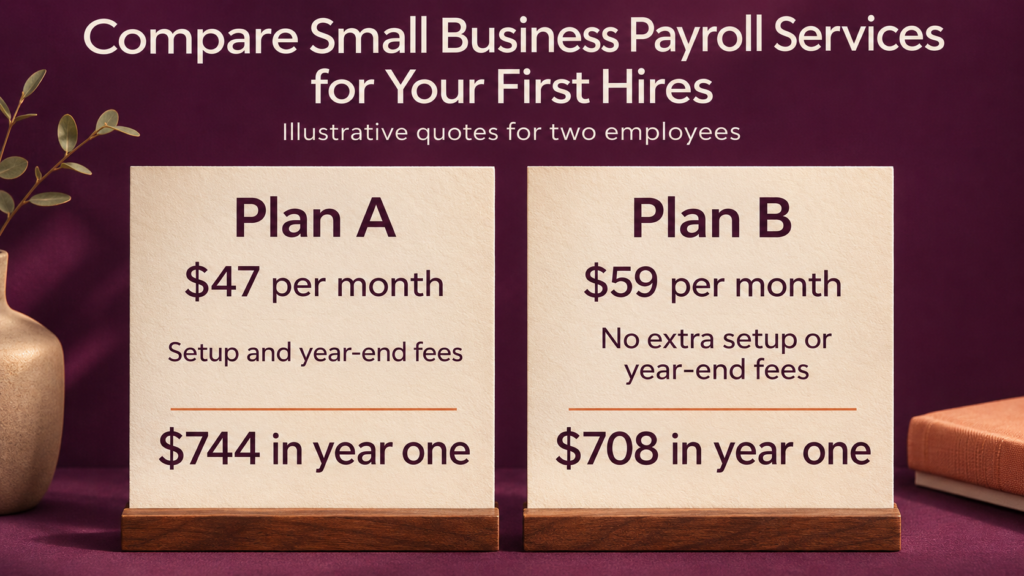
A fictional business compares two offers for two employees who stay on payroll all year. Both quotes are assumed to cover the filings the business needs and include all regular runs. The two quotes use U.S. dollars for illustration and are independent of any current provider prices.
| Cost item | Plan A | Plan B |
|---|---|---|
| Monthly base fee | $35 | $49 |
| Monthly fee per employee | $6 | $5 |
| Monthly cost for two employees | $47 | $59 |
| Setup fee | $100 | $0 |
| Year-end fee | $40 per employee | Included |
| First-year provider cost | $744 | $708 |
Plan A adds up to $564 in recurring charges, $100 for setup, and $80 for year-end forms. Plan B totals $708, or $36 less in the first year under these assumptions. If the only change in year two is that the one-time setup fee drops away, Plan A would cost $644 at the same rates. Check renewal terms and compare service coverage before deciding whether the difference matters.
4. Ask for a demo based on your first payday
Have the provider show you a sample run using fictional employee information. Ask to see where you would add a new starter, enter or import hours, review deductions, preview the bank debit, approve the run, and retrieve filing confirmations. Try a correction too. It’s easier to understand support quality when you can see what a missed approval or an incorrect pay amount would require.
Check support hours against the hours your team works. Find out whether onboarding includes a named contact, and how to get urgent help around payday. Ask who can view employee tax and bank details, whether administrators can use multifactor authentication, and whether the system records who approved changes. Use the provider’s secure process to collect real employee details.
Copy-ready payroll comparison template
| Item | Provider A | Provider B |
|---|---|---|
| Plan name, quote date, and renewal price | [ ] | [ ] |
| Work locations and filing agencies covered | [ ] | [ ] |
| Base fee, headcount charges, and regular run fees | [ ] | [ ] |
| Setup, year-end, and required add-on fees | [ ] | [ ] |
| Cost of an off-cycle run or correction | [ ] | [ ] |
| Total first-year and estimated renewal cost | [ ] | [ ] |
| First-payday approval and funding deadlines | [ ] | [ ] |
| Proof of filings and deposits | [ ] | [ ] |
| Support and escalation contact | [ ] | [ ] |
| Records export and cancellation terms | [ ] | [ ] |
Fill it in from the written quote. Mark unclear items as confirm with provider and ask for a written answer before choosing a plan.
First payday checklist
- Confirm employer registration and any provider authorizations needed for your locations.
- Set the pay calendar and assign who prepares and approves payroll.
- Collect employee details through a secure process and check rates, start dates, and bank details.
- Confirm the funding deadline and make sure enough cash is available.
- Preview pay, deductions, and the amount to be withdrawn before approval.
- After the run, confirm employees were paid and check filing or deposit confirmations when due.
If you’re changing systems midyear, request a separate handover checklist for year-to-date balances and filings. Confirm who will prepare year-end forms and where you can retrieve previous records.
Frequently asked questions
1. Do I need a full-service payroll provider for one employee?
It depends on how much work you want to handle. Compare which calculations, filings, deposits, and corrections are included. A lower-cost tool may fit if your business or accountant has time to manage the remaining tasks.
2. Can my bookkeeper or accountant run payroll instead?
They may offer payroll directly or work with a provider. Ask who handles each task, which fees are included, and whom you contact if a filing or payment goes wrong.
3. How early should I set up payroll?
Work back from your first payday using the provider’s onboarding, approval, and funding deadlines. Allow time for employer registrations or authorizations if required. Ask the provider when it needs the final employee details to meet that payday.
4. Should I include contractors in my quote?
Tell the provider whether you expect to pay contractors and ask whether those payments and any related reporting cost extra. If you’re unsure how a worker should be classified, check the rules that apply where they work before adding them to a payment workflow. IRS guidance on worker classification
5. What happens if I run payroll late or make an error?
Contact the provider promptly and ask what correction or extra run is available. Confirm the payment timing, any fees, and who handles related filings. Check the applicable pay and reporting deadlines with the relevant authority if the delay affects them.
Conclusion
Compare quotes using your actual employees, pay dates, and work locations. Then use a demo to see who files, who approves, how you verify payments, and what happens if a mistake needs correcting. A clear first-payday plan can help you judge what each quote covers and what your team will still need to handle.