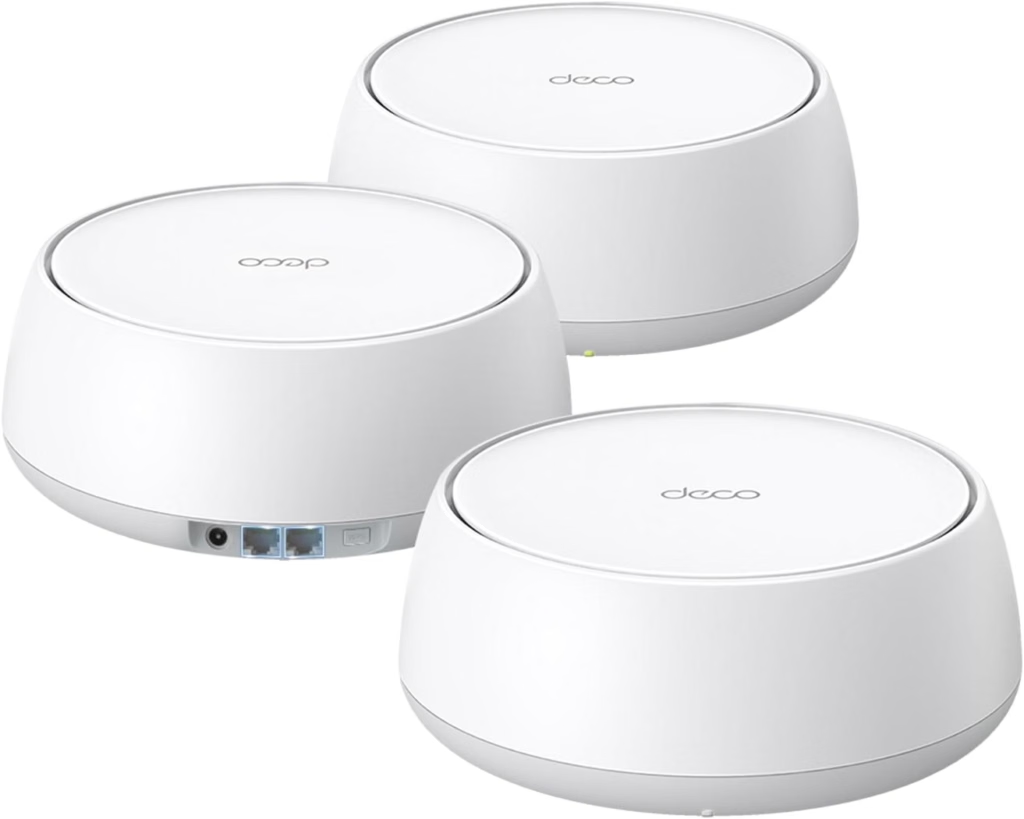

The TP-Link Deco BE25 is a dual-band Wi-Fi 7 mesh system designed to spread connectivity across your home. Its strongest practical feature is the combination of mesh expansion and two 2.5Gbps Ethernet ports per unit.
It is particularly worth considering if you can connect the units with Ethernet. Its biggest compromise is the absence of a 6GHz band, which limits its appeal for buyers expecting the capabilities associated with higher-end Wi-Fi 7 systems. Independent testing confirms both its useful everyday performance and these limitations. RTINGS.com
Our recommendation: Shortlist the BE5000 version for coverage improvements and a wired-backhaul setup. Compare alternatives if you need several wired connections, advanced local management, or maximum wireless performance between rooms.

- 𝐃𝐞𝐜𝐨 𝟕 𝐒𝐮𝐩𝐞𝐫𝐜𝐡𝐚𝐫𝐠𝐞𝐝 𝐰𝐢𝐭𝐡 𝟒-𝐒𝐭𝐫𝐞𝐚𝐦 𝐁𝐄𝟓𝟎𝟎𝟎 𝐃𝐮𝐚𝐥-𝐁𝐚𝐧𝐝 𝐖𝐢𝐅𝐢 𝟕: Delivers up to 4324 Mbps (5 GHz) and 688 Mbps (2.4 GHz) speed…
- 𝐒𝐞𝐚𝐦𝐥𝐞𝐬𝐬 𝐖𝐡𝐨𝐥𝐞-𝐇𝐨𝐦𝐞 𝐂𝐨𝐯𝐞𝐫𝐚𝐠𝐞: Covers up to 4,600 sq. ft. for over 150 devices with the option to expand anytime by addin…
- 𝐒𝐢𝐦𝐮𝐥𝐭𝐚𝐧𝐞𝐨𝐮𝐬 𝐖𝐢𝐫𝐞𝐝 & 𝐖𝐢𝐫𝐞𝐥𝐞𝐬𝐬 𝐁𝐚𝐜𝐤𝐡𝐚𝐮𝐥: Wi-Fi 7 and 2.5G Ethernet work together to balance traffic between Deco units fo…
Introduction: Start with the Wi-Fi problem
A newer router cannot automatically fix every connection problem.
Your difficulty might be weak coverage upstairs, interference near your desk, poor satellite placement, or an internet connection that is slow before Wi-Fi enters the picture.
The Deco BE25 is most relevant when your existing router struggles to provide useful coverage throughout the home. Its mesh design gives you additional connection points, while Ethernet backhaul offers a way to connect those points without relying entirely on wireless links.
The buying decision should therefore begin with your home layout and available cabling—not simply the Wi-Fi generation printed on the box.
Product overview
The Deco BE25 can operate as the main router or as part of a mesh network. TP-Link sells different pack sizes, and its documentation supports both router and access-point operating modes.
The verified US BE5000 specification lists two bands: 2.4GHz and 5GHz. There is no 6GHz radio. Its advertised wireless rates are theoretical link rates, rather than guaranteed download speeds. TP-Link
In a typical installation, one unit connects to your internet equipment. Additional units extend the network into other areas.
Those units still need a good connection to the rest of the system. This connection—called backhaul—is central to understanding whether the BE25 suits your home.
Check the version: BE5000 versus BE3600
This deserves attention before comparing prices.
TP-Link’s current US product page describes the BE25 as BE5000, while a version-specific official page describes a BE3600 model. The listed maximum 5GHz rates differ: 4,324Mbps versus 2,882Mbps. TP-Link
That means “Deco BE25” alone is insufficient to establish the complete specification.
Before ordering, check:
- The advertised speed class.
- The hardware and regional version.
- Whether the listing contains one, two, or three units.
- The seller and applicable warranty.
- Whether the specifications match the product label and regional support page.
Do not assume a cheaper listing is an identical kit.


Key features and their practical value
Two 2.5Gbps ports per unit
The faster Ethernet connections are useful for compatible internet equipment, wired backhaul, or local-network devices.
However, port count matters alongside port speed.
If the main unit uses one connection for the internet and another for a wired satellite, you have no unused Ethernet socket on that unit. A switch may become necessary for a desktop, NAS, television, or console.
This is a practical ownership cost to consider before deciding that the kit provides everything your desk needs.
Ethernet backhaul
TP-Link documents support for wired and wireless backhaul, including combined operation. Its US datasheet also makes clear that actual throughput depends on network equipment and environmental conditions. static.tp-link.com
Our analysis: Ethernet is especially attractive when walls or floors weaken the connection between units. It gives the mesh a connection path that does not depend on the same radio conditions affecting your devices.
A wired satellite upstairs may be more useful than placing another wireless unit in an already weak reception area.
Multi-Link Operation
The BE25 supports Multi-Link Operation, or MLO. TP-Link states that compatible clients are required to use relevant Wi-Fi 7 features. TP-Link
The buyer implication is straightforward: owning a Wi-Fi 7 mesh does not mean every connected phone or laptop receives every Wi-Fi 7 benefit.
Check your client hardware and software. Treat MLO as an available capability, rather than a universal speed multiplier.
App-based setup and management
TP-Link’s setup guide directs users to the Deco app for iOS or Android and includes signing in with a TP-Link ID. static.tp-link.com
This approach suits buyers who prefer guided configuration. It is a less natural fit for someone who specifically wants an account-free setup or extensive management through a traditional browser interface.
HomeShield features
HomeShield includes basic and advanced functions, with advanced features requiring a paid subscription. TP-Link also warns that feature availability can depend on subsequent software updates. TP-Link
Buying the hardware should not be interpreted as buying permanent access to every security or parental-control feature advertised around the platform.
Check the exact feature you need and its current plan requirements.
Verified specifications
| Specification | US Deco BE25 BE5000 |
| Brand | TP-Link |
| Product type | Whole-home mesh Wi-Fi system |
| Wireless standard | Wi-Fi 7 |
| Bands | 2.4GHz and 5GHz |
| Advertised maximum wireless rates | 4,324Mbps on 5GHz; 688Mbps on 2.4GHz |
| Ethernet | Two 2.5Gbps WAN/LAN auto-sensing ports per unit |
| Operating modes | Router and access point |
| Backhaul | Wireless and Ethernet support |
| Antennas | Four internal antennas |
| Dimensions per unit | 150 × 150 × 62mm |
| Management | Deco app |
| Three-pack contents | Three units, three power adapters, one Ethernet cable, installation guide |
| US warranty | Two years for eligible purchases, subject to policy |
Specifications are drawn from TP-Link’s product documentation and US datasheet. Advertised wireless rates are not measured application throughput. TP-Link
TP-Link’s US warranty requires an eligible purchase and proof of purchase; unauthorized resellers and other exclusions can affect coverage. Confirm regional support if importing. Replacement and Warranty
Design, build quality, and ease of use
A compact design with internal antennas
The low-profile enclosure is easier to accommodate on open furniture than a large router with external antennas.
That does not mean it should disappear inside a cabinet. Placement should prioritize a useful signal path and ventilation.
There is no original durability or thermal testing in this review. We cannot establish long-term construction quality from product photographs or dimensions.
Setup requires a network decision
Before configuring the app, decide whether the Deco should replace your router’s routing role or work alongside it.
TP-Link’s guidance recommends considering access-point mode when keeping an existing router in charge. Router mode allows Deco to take over gateway functions. TP-Link
This matters because some features change with operating mode. TP-Link’s comparison shows that gateway functions—including several HomeShield, parental-control, and QoS functions—are unavailable through Deco in access-point mode. Exact availability can vary by model and software. TP-Link
Choose the network arrangement first, then check whether your required features remain available.
Performance and realistic use
Everyday browsing, calls, and streaming
RTINGS found the BE25 capable of good everyday wireless performance, including multiple 4K streams. Its published assessment describes usable wireless speeds around the gigabit level in its testing, rather than establishing multi-gigabit Wi-Fi performance from the port specifications alone. RTINGS.com
Those findings support considering it for ordinary household use. They do not predict the speed in your particular bedroom or office.
Your result will depend on placement, interference, client hardware, and whether the connection passes through a wireless satellite.
Wireless satellites
A satellite can improve the signal available to nearby devices, but it must communicate effectively with the rest of the mesh.
Our analysis: Avoid installing it at the far edge of an existing dead zone simply because that is where you want better service. Start in an intermediate location, then evaluate the connection.
The BE25’s dual-band design also means that buying Wi-Fi 7 does not provide an additional 6GHz path for backhaul.
Gaming and latency-sensitive work
MBReviews’ testing reported useful throughput but identified weaknesses in latency under its FLENT testing, suggesting that some applications would benefit from a cabled connection. MBReviews
For competitive gaming or other latency-sensitive work, evaluate Ethernet before assuming a mesh upgrade alone is the answer.
Neither “gaming” marketing nor a high maximum wireless rate guarantees consistent response times under load.
Multi-gigabit internet and local transfers
The hardware offers faster Ethernet links, but a complete transfer is limited by every relevant part of the path.
For example, upgrading the mesh cannot make a Gigabit-only computer interface operate at 2.5Gbps. Similarly, a fast connection to the main unit does not establish the speed available through a remote wireless satellite.
Buy the BE25 for a network arrangement you can identify, rather than an assumed end-to-end speed.
Pros
- Two 2.5Gbps ports on each unit.
- Ethernet backhaul supports a practical upgrade path.
- Router and access-point modes accommodate different existing networks.
- Guided app setup suits less technical households.
- Expandable mesh design.
- Useful everyday performance documented by independent reviewers.
Cons
- No 6GHz band.
- Two ports can be restrictive once internet and backhaul connections are in use.
- Wireless satellite performance remains dependent on placement.
- Some advanced functions require subscriptions.
- Features differ between router and access-point modes.
- BE5000 and BE3600 documentation makes exact-version checking important.
Value for money
The BE25’s strongest value case is a household that needs several access points and can connect them with Ethernet.
It is less persuasive as an upgrade for someone whose current Wi-Fi 6 system already provides reliable coverage and adequate speeds.
Before paying more, identify what improves:
- Coverage in a poorly served room.
- Available Ethernet speed.
- The connection between mesh units.
- Compatibility with newer clients.
- Management or configuration convenience.
If none of those answers is meaningful, retaining the existing system may be the better decision.
Also include any switches, extra cables, installation work, and optional subscriptions in the comparison.
Current Amazon price
Current Amazon price: Not verified.
Current Amazon customer rating and review count: Not verified.
Check Amazon for the latest price and available offers.
A previously captured price or a different pack’s offer should not be presented as today’s price for your selected listing.
View your supplied Amazon product link
Confirm that it opens the intended BE5000 configuration before purchasing or publishing.
Best alternatives
TP-Link Deco X55: Consider it for an existing Gigabit setup
The Deco X55 is a dual-band Wi-Fi 6 system with three Gigabit Ethernet ports per unit. TP-Link
What it does better: Provides an additional Ethernet socket on each unit.
What it does worse: Its Gigabit connections do not provide the BE25’s 2.5Gbps link capability, and it lacks Wi-Fi 7.
Choose it instead: You need coverage for ordinary devices and find a meaningfully lower like-for-like price.
Stay with BE25: Multi-gigabit Ethernet and newer client support are useful parts of your actual setup.
Check official Deco X55 specifications
TP-Link Deco BE63: Consider it for 6GHz and more Ethernet ports
The Deco BE63 is a tri-band Wi-Fi 7 option with 6GHz support and four 2.5Gbps ports per unit. TP-Link
What it does better: Offers an additional radio band and more wired connections.
What it does worse for a basic buyer: Adds capabilities that may not justify the purchase cost if your clients and usage cannot exploit them. Current comparative prices are not verified here.
Choose it instead: You specifically want 6GHz, more wired connectivity, or a more capable wireless arrangement.
Stay with BE25: You prioritize a simpler dual-band system and can use Ethernet backhaul.
Check official Deco BE63 specifications
Comparison table
| Feature | Deco BE25 BE5000 | Deco X55 | Deco BE63 |
| Generation | Wi-Fi 7 | Wi-Fi 6 | Wi-Fi 7 |
| Radio bands | Dual-band | Dual-band | Tri-band |
| 6GHz | No | No | Yes |
| Ethernet per unit | 2 × 2.5Gbps | 3 × Gigabit | 4 × 2.5Gbps |
| Ethernet backhaul | Supported | Supported | Supported |
| Main attraction | Mesh with multi-gigabit ports | Additional socket; compare purchase cost | 6GHz and expanded wired connectivity |
| Main trade-off | No 6GHz; limited socket count | Gigabit port ceiling | Verify whether added capability warrants cost |
Compare equivalent pack sizes and regional versions.
Who should buy the Deco BE25?
Consider it if:
- Your main problem is coverage across multiple rooms.
- You can install Ethernet backhaul.
- You want guided setup rather than extensive manual configuration.
- You have a practical use for 2.5Gbps connections.
- You understand the limits of a dual-band system.
A particularly sensible candidate is a home-office user with Ethernet available between floors and an unreliable wireless connection at the current workstation.
Who should not buy it?
Look elsewhere if:
- You specifically require 6GHz.
- Your existing network already meets your needs.
- You expect every wireless device to achieve multi-gigabit speeds.
- You need several Ethernet sockets without adding a switch.
- You want advanced controls without checking subscriptions and operating-mode restrictions.
- You expect mesh hardware to resolve an unreliable ISP connection.
Buying considerations
Confirm the exact listing
Match the speed class, pack size, hardware version, seller, and regional warranty. The product name alone does not settle these details.
Check your internet equipment
Determine whether you have a modem, fiber terminal, router, or combined gateway. Confirm which equipment must remain and which device will handle routing.
Plan backhaul and placement
Check where Ethernet is available and where each unit can sit. Do not buy three units automatically when one or two well-positioned access points could meet the need.
Count Ethernet connections
Include the internet connection, satellite links, desktop, NAS, television, and console. Add the cost of a switch if needed.
Check current firmware and features
Consult the support page for the exact regional hardware revision. Do not assume that a feature shown for another Deco model or promised in older coverage is available on your unit.
Evaluate within the return period
Check your actual problem locations during busy household use. Record connection reliability, transfer behavior, and calls—not just a single speed-test result beside the main unit.
Frequently asked questions
1. Is the Deco BE25 really Wi-Fi 7 without 6GHz?
Yes. The verified BE5000 model supports Wi-Fi 7 while operating on 2.4GHz and 5GHz. Wi-Fi generation and the available radio bands are separate specifications. TP-Link
2. What does BE5000 mean?
It describes the product’s combined advertised wireless speed class across its bands. It is not a promise of a 5Gbps internet download to one device.
3. Is Ethernet backhaul required?
No. Wireless backhaul is supported. Ethernet is worth considering when the link between mesh units is weakened by distance, walls, or floors.
4. Can I keep my existing router?
Yes. TP-Link documents using Deco with an existing router, including access-point mode. Check which device will handle routing and which Deco features remain available. TP-Link
5. Does it replace my modem?
Do not assume that it does. TP-Link notes that users may still require ISP-compatible modem equipment. Your provider’s installation requirements determine what stays connected. TP-Link
6. Do I need a HomeShield subscription?
A subscription is not necessary simply to use the mesh network. Advanced HomeShield features can require payment, so check the particular function you want.
7. Is it worth upgrading from Deco X55?
Potentially, if you need 2.5Gbps Ethernet or have a clear reason to use newer wireless features. If the X55 already provides adequate coverage and speed, the upgrade is less compelling.
8. Will a three-pack cover my whole house?
That cannot be guaranteed from the pack size. Building materials, layout, interference, placement, and backhaul quality affect the outcome. Treat coverage figures as manufacturer estimates rather than a promise for your property.
Final verdict
The Deco BE25 BE5000 offers a useful combination of expandable coverage and multi-gigabit Ethernet. Independent findings support its suitability for everyday home networking, while also demonstrating why its specifications should not be translated into guaranteed wireless speeds.
Its limitations deserve equal weight: no 6GHz, only two Ethernet ports per unit, subscription-dependent extras, and version details that buyers must verify.
Choose it when it fits a planned network improvement. Compare the X55 when purchase cost and ordinary Gigabit use dominate; compare the BE63 when 6GHz and additional wired connectivity matter.