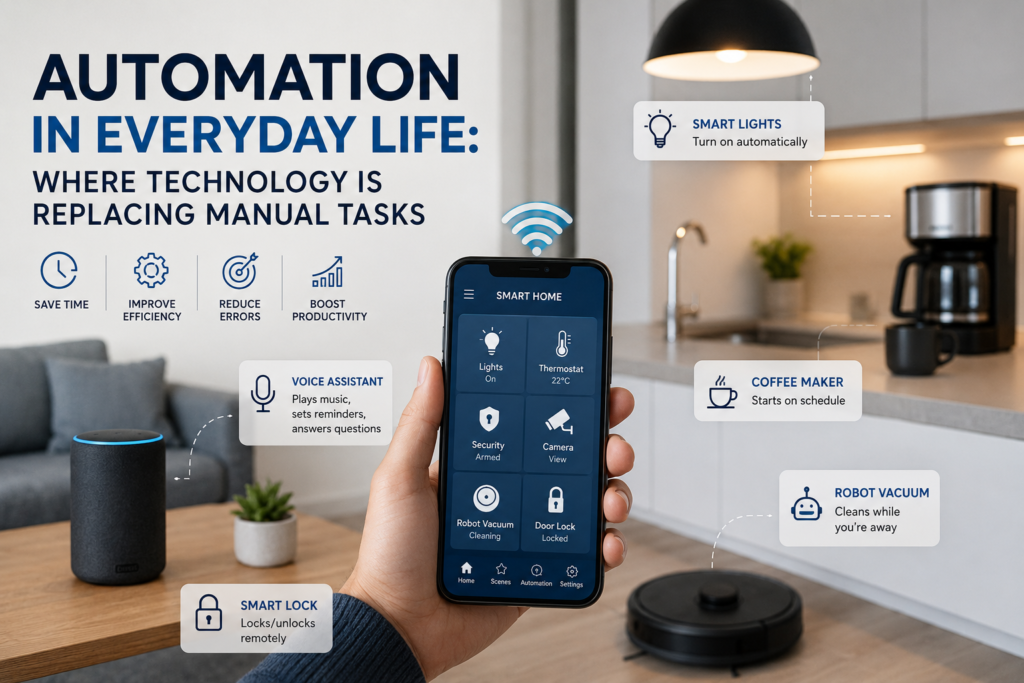

Technology is becoming increasingly integrated into ordinary activities that once required people to perform every step manually. From automatic payments and smart home devices to navigation apps and software that organizes information, automation is quietly changing how people work and live.
Automation in everyday life does not necessarily mean robots replacing humans. In many cases, it means software or connected devices handling repetitive steps while people make decisions, provide instructions, or deal with situations that require judgment.
The result is a shift in how routine work gets done. Tasks that once required repeated attention can increasingly be scheduled, triggered automatically, or completed with minimal human input.
Understanding this change is useful for consumers, employees, students, and businesses because automation can bring convenience and efficiency while also creating new responsibilities around privacy, reliability, cost, and human oversight.
What Is Automation in Everyday Life?
Everyday automation is the use of technology to perform a task or sequence of tasks with limited human intervention.
A simple example is an automatic bill payment. Instead of remembering to make the same payment every month, a person can authorize the service to process it automatically.
Other examples include:
- Email filters sorting incoming messages
- Smartphones automatically backing up photos
- Navigation apps calculating routes
- Washing machines running programmed cycles
- Smart thermostats adjusting temperatures according to settings
- Banking apps categorizing transactions
- Calendar applications sending reminders
- Online stores automatically processing orders
- Software synchronizing files between devices
Some systems are relatively simple, while others combine software, sensors, cloud services, artificial intelligence, and connected devices.
Where Technology Is Replacing Manual Tasks
Automation is most noticeable when a task is repetitive, predictable, and based on clearly defined rules.
Here are some of the most common areas where it is happening.
1. Household Tasks
Modern household appliances can automate several routine activities.
Washing machines can automatically control washing cycles. Robotic vacuum cleaners can navigate rooms and clean floors according to schedules. Dishwashers can run predetermined programs based on selected settings.
Smart home systems can also connect lights, appliances, cameras, and other devices so that certain actions occur automatically.
For example, a homeowner might configure outdoor lights to turn on at a particular time rather than switching them on manually every evening.
The important point is that these systems generally follow instructions established by the user. Automation can reduce repetitive work, but it still depends on correct setup and maintenance.
2. Personal Finance
Financial technology has automated many routine administrative tasks.
People can use digital banking services to schedule recurring payments, receive transaction notifications, transfer money between accounts, and monitor spending.
Businesses similarly use accounting software to automate activities such as invoice generation, payment reminders, expense categorization, and financial record organization.
Automation can make financial administration easier, but it should not remove human oversight. Users still need to review transactions, monitor account activity, and make financial decisions themselves.
3. Communication and Email
Managing digital communication can become difficult when inboxes contain hundreds of messages.
Automation helps organize this information.
Email services can automatically identify spam, categorize messages, apply filters, and send certain messages into specific folders. Users can also create rules for newsletters, notifications, or messages from particular senders.
Businesses use automated communication for tasks such as appointment reminders, order confirmations, and customer notifications.
This allows people to spend less time performing repetitive communication tasks and more time handling messages that require individual attention.
4. Transportation and Navigation
Navigation technology has transformed everyday travel.
Instead of manually studying maps or calculating routes, drivers can enter a destination into a navigation application. The software can determine a route and provide directions while adapting to changing road conditions when supported by available traffic information.
Modern vehicles also include automated features such as parking assistance, adaptive cruise control, and collision-warning systems.
However, these technologies do not eliminate the driver’s responsibility. Automated driving-related features have limitations, and users must understand what a particular system is designed to do before relying on it.
5. Shopping and Online Services
E-commerce platforms automate many steps that previously required direct interaction.
For example, an online purchase can involve automated inventory updates, payment processing, order confirmation, shipping notifications, and delivery tracking.
Subscription services can also automatically renew according to their terms.
This convenience means consumers should pay attention to subscription settings, renewal dates, prices, and cancellation policies rather than assuming every recurring transaction requires manual approval.
6. Work and Office Administration
Automation is particularly useful for repetitive administrative work.
Office software can automate tasks such as:
- Scheduling meetings
- Creating recurring reports
- Sorting documents
- Sending reminders
- Moving information between systems
- Processing standardized forms
- Generating routine notifications
- Organizing digital files
For example, a company might use an automated workflow so that when an employee submits a form, the relevant manager automatically receives a notification.
The employee still completes the important information, but the software handles the administrative steps that follow.
How AI Is Expanding Everyday Automation
Artificial intelligence is adding another layer to automation.
Traditional automation usually follows predefined rules. For example:
If X happens → perform Y.
AI-based systems can sometimes analyze language, images, patterns, or other information and use that analysis to determine an appropriate response.
This makes automation useful for a wider range of tasks.
Examples include:
- Summarizing documents
- Classifying customer inquiries
- Transcribing speech
- Organizing information
- Generating draft content
- Identifying objects in images
- Providing software assistance
- Extracting information from documents
However, AI-powered automation is not automatically accurate. The quality of its output can depend on the data, instructions, system design, and context.
For important decisions, human review remains valuable.
Automation vs. Manual Tasks
The difference between manual work and automation can be understood through a simple comparison.
| Manual Process | Automated Process |
|---|---|
| Person performs each step | Software or device performs predefined steps |
| Requires repeated attention | Can operate according to rules or schedules |
| Easier to adapt immediately | May require configuration for unusual situations |
| Human controls every action | Some actions happen automatically |
| Often predictable but time-consuming | Can reduce repetitive effort |
| Mistakes may result from fatigue or oversight | Errors can result from incorrect rules or system failures |
Automation is therefore not automatically better in every situation.
For repetitive processes, it can be highly useful. For complex situations requiring empathy, judgment, creativity, or physical flexibility, human involvement can remain essential.
Benefits of Automation in Everyday Life
Saves Time
One of the clearest benefits is reducing the amount of time spent repeating the same actions.
A scheduled payment, automatic backup, or recurring reminder can handle a routine task without requiring the user to initiate it every time.
Reduces Repetitive Work
People often spend time on small administrative tasks that provide little value individually but consume significant attention when repeated.
Automation can take over some of these activities.
Improves Consistency
A properly configured automated process can perform the same sequence repeatedly without becoming tired or distracted.
This can be useful for routine administrative processes where consistency matters.
Makes Technology More Convenient
Automation can make digital services easier to use.
Instead of repeatedly entering the same information or manually checking for updates, users can configure systems to perform certain actions automatically.
Helps Businesses Scale Routine Operations
Businesses can use automation to manage repetitive processes as their operations grow.
For example, automated notifications can help a company communicate with customers without requiring employees to manually send every routine message.
The Limitations and Risks of Automation
Automation also has disadvantages that should not be ignored.
Errors Can Be Repeated
An automated system can perform a wrong instruction repeatedly.
If a rule is configured incorrectly, automation may make the mistake more efficiently rather than preventing it.
Systems Can Fail
Internet connections, software, hardware, batteries, servers, or integrations can experience problems.
A process that depends completely on automation can become inconvenient when the underlying technology stops working.
Privacy Matters
Connected devices and digital services may collect information about users and their activities.
Before enabling an automated service, users should understand what information is collected, why it is collected, and what privacy controls are available.
Initial Setup May Take Time
Automation is not always immediately convenient.
Creating rules, configuring devices, connecting services, and learning how a system works can require time and technical knowledge.
Human Oversight Is Still Important
Automation should not become an excuse to stop checking important processes.
Financial transactions, important communications, business records, and other consequential activities may still require human review.
How to Use Automation Wisely
Automation works best when it is introduced deliberately rather than simply because a feature exists.
1. Identify Repetitive Tasks
Start by looking for activities you perform repeatedly.
Ask:
- Do I do this task every day or week?
- Does it follow predictable steps?
- Does it require little judgment?
- Would automation save meaningful time?
If the answer is yes, the task may be a good candidate.
2. Start With Low-Risk Activities
Try automation with simple tasks first.
Examples include organizing emails, creating calendar reminders, backing up files, or controlling smart lighting.
This gives you an opportunity to understand how the system behaves before using automation for more important processes.
3. Understand the Settings
Before activating an automated service, review its settings.
Pay attention to:
- What triggers the automation
- What action it performs
- How often it runs
- What information it can access
- How to disable it
- What happens if something goes wrong
4. Keep Important Human Checks
For tasks involving money, sensitive information, legal obligations, or important business decisions, maintain an appropriate level of human review.
Automation should support decision-making rather than blindly replace it.
5. Review Your Automations Periodically
Technology and personal circumstances change.
A payment schedule, software integration, smart-home rule, or automated workflow that was useful six months ago may no longer be necessary.
Regular reviews help prevent outdated rules from continuing unnoticed.
What Tasks Should Not Be Fully Automated?
Not every task is suitable for complete automation.
Activities involving complex judgment, emotional understanding, accountability, or unusual circumstances often benefit from human involvement.
For example, a customer service system may automatically categorize a routine request, while a complicated complaint may need to be handled by a person.
Similarly, software can help organize information for a business decision, but the final decision may require knowledge of context that an automated system does not possess.
The goal should therefore be appropriate automation, not automation at any cost.
The Future of Automation in Daily Life
Automation is likely to become increasingly integrated into ordinary digital services.
The important change may not always be visible as a physical robot or dramatic new device. Instead, automation can appear as background functionality inside applications, websites, appliances, vehicles, and business systems.
Artificial intelligence may also allow automated systems to handle more varied types of information than traditional rule-based software.
At the same time, the growing use of automation makes digital literacy more important. People will need to understand what their devices and software are doing, what information they are using, and when human intervention is necessary.
The future of automation is therefore not simply about machines doing more work. It is also about people deciding which work should be automated, which should remain human, and how the two can work together effectively.
Frequently Asked Questions
1. What is automation in everyday life?
Automation in everyday life refers to technology performing routine tasks with limited human intervention. Examples include automatic payments, email filtering, scheduled reminders, smart appliances, and automated backups.
2. What everyday tasks can be automated?
Many repetitive and predictable tasks can be automated, including scheduling, notifications, email organization, file backups, household appliance programs, routine business workflows, and some financial administration.
3. Does automation completely replace humans?
No. Automation can replace certain repetitive tasks, but many activities still require human judgment, creativity, communication, responsibility, and decision-making.
4. Is everyday automation safe?
Automation can be useful when properly configured, but it is not risk-free. Users should consider privacy, security, system failures, incorrect settings, and the consequences of automated decisions.
5. How can I start using automation?
Begin with a simple, low-risk repetitive task. Identify the task, choose a suitable feature or service, configure its rules, test it, and periodically review whether it continues to work as intended.
Conclusion
Automation in everyday life is changing how people handle routine activities at home, at work, while traveling, and when using digital services. Many technologies now perform repetitive actions that once required people to complete every step manually.
The biggest advantage is not simply that technology can do more. It is that people can spend less attention on predictable tasks and more on activities that require judgment, creativity, communication, and problem-solving.
However, automation also requires responsibility. Incorrect settings, technical failures, privacy concerns, and excessive reliance on automated systems can create problems.
The most practical approach is to automate tasks that are repetitive and predictable while keeping meaningful human oversight where judgment and accountability matter. Used thoughtfully, automation can become a useful tool for making everyday technology more convenient without removing the human role entirely.