
Marketing automation can help businesses reduce repetitive marketing work, organize customer journeys, and communicate with audiences at appropriate stages of the buying process. Instead of manually sending every follow-up email or checking every customer action, businesses can use automated workflows triggered by events such as a signup, website interaction, purchase, or change in customer status.
However, choosing the right platform is not simply about finding the tool with the longest feature list. A small business may need straightforward email automation, while an established company may require advanced segmentation, CRM integration, lead management, analytics, and multi-channel campaigns.
This guide explores some of the best marketing automation tools available today, what they are designed to do, their potential limitations, and how to choose one based on your actual marketing requirements.
What Is Marketing Automation?
Marketing automation is the use of software to automate recurring marketing activities and customer communication.
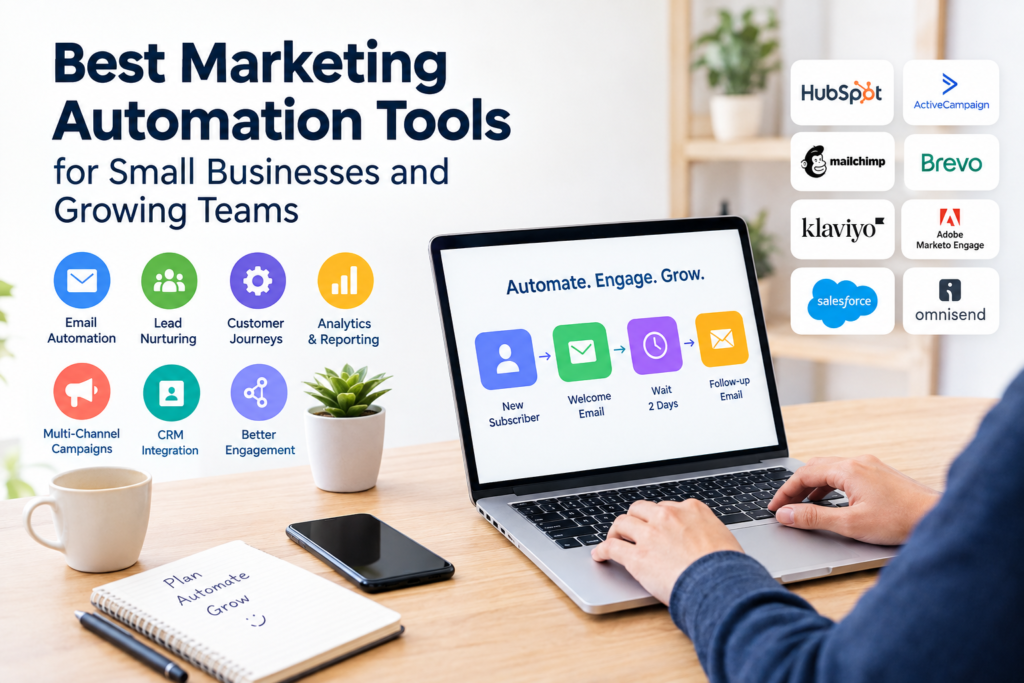
A basic workflow might look like this:
New subscriber → Welcome email → Wait several days → Educational email → Check engagement → Send relevant follow-up
More advanced workflows can use customer attributes, website activity, purchases, lead scores, or other events to determine what happens next.
Marketing automation can be used for:
- Email campaigns
- Lead nurturing
- Customer onboarding
- Audience segmentation
- Follow-up messages
- Website behavior tracking
- Abandoned-cart campaigns
- Customer re-engagement
- Lead scoring
- Sales and marketing coordination
- Reporting and campaign management
The objective is not to automate every interaction. Good automation should make communication more timely and relevant while leaving room for human interaction when it is more appropriate.
Best Marketing Automation Tools to Consider
There is no single platform that is ideal for every business. The following tools serve different use cases and business needs.
1. HubSpot Marketing Hub
HubSpot is a widely used platform that combines marketing automation with CRM capabilities.
Its marketing automation features include workflows, forms, email automation, lead scoring, customer journey orchestration, and other CRM-connected marketing functions. HubSpot states that its automation tools can use CRM data to automate marketing activities.
Best suited for
- Businesses wanting marketing and CRM capabilities together
- Lead-generation teams
- Companies managing longer customer journeys
- Teams that want centralized customer information
Potential limitation
The platform can become more complex as a business adopts more advanced features. Businesses should also review the current plans, feature availability, contact limits, and other costs before selecting a subscription.
2. ActiveCampaign
ActiveCampaign focuses heavily on marketing and sales automation.
Its automation builder supports conditional and branching workflows, behavioral triggers, segmentation, website and event tracking, and cross-channel communication. ActiveCampaign also currently promotes automation across channels such as email, SMS, WhatsApp, social, and web.
Best suited for
- Businesses requiring detailed automated customer journeys
- Email and lead-nurturing campaigns
- Behavioral segmentation
- Marketing and sales automation
Potential limitation
Advanced automation can require more planning and configuration. A business with only basic email requirements may not need the full complexity of a sophisticated automation platform.
3. Mailchimp
Mailchimp is well known for email marketing and also provides marketing automation and customer journey functionality.
Mailchimp’s current marketing resources cover email automations, CRM-related automation, transactional email, and customer journey planning.
Best suited for
- Small businesses starting with email automation
- Newsletter-focused marketing
- Welcome campaigns
- Basic customer journeys
- Businesses already familiar with Mailchimp’s ecosystem
Potential limitation
Businesses with highly sophisticated CRM, attribution, or multi-stage automation requirements should carefully compare Mailchimp’s current capabilities with more specialized platforms.
4. Brevo
Brevo provides automation features for marketing, sales, and contact management.
Its current automation documentation describes workflows based on triggers, rules, and actions. Examples include welcome messages, website-related follow-ups, contact management, and lead scoring.
Best suited for
- Small and growing businesses
- Email and SMS marketing
- Automated welcome sequences
- Contact management
- Businesses looking for multiple communication channels
Potential limitation
Before choosing a plan, review current sending limits, contact requirements, available automation features, and channel-specific pricing.
5. Klaviyo
Klaviyo is particularly relevant to businesses that need behavior-based customer communication, especially ecommerce companies.
Klaviyo’s Flows functionality can respond to customer behavior and events. Its documentation describes automated sequences for use cases such as welcoming subscribers, abandoned-cart communication, post-purchase follow-ups, and re-engagement.
Best suited for
- Ecommerce businesses
- Customer lifecycle marketing
- Personalized email and SMS communication
- Behavior-based campaigns
- Abandoned-cart and post-purchase workflows
Potential limitation
The platform may be more than a small organization needs if its marketing requirements are limited to occasional newsletters and simple autoresponders.
6. Adobe Marketo Engage
Adobe Marketo Engage is designed for more sophisticated marketing operations and enterprise environments.
Adobe describes Marketo Engage as a marketing automation platform supporting activities such as forms, landing pages, smart campaigns, segmentation, lead scoring, website integration, CRM synchronization, and marketing analytics.
Best suited for
- Larger marketing teams
- B2B organizations
- Complex lead-nurturing programs
- Organizations with advanced campaign requirements
- Businesses that need extensive marketing operations
Potential limitation
Its broader capabilities can introduce additional implementation, administration, and training requirements. It may not be practical for a small business looking for only basic email automation.
7. Salesforce Marketing Cloud
Salesforce offers several marketing products, including Marketing Cloud Next and Marketing Cloud Account Engagement.
Salesforce’s current documentation distinguishes the products and their automation capabilities. For example, Marketing Cloud Next uses Flow Builder, while Account Engagement uses Engagement Studio and other automation features.
Best suited for
- Organizations already using Salesforce
- Businesses with complex customer data
- Larger sales and marketing teams
- Companies requiring CRM-connected marketing processes
Potential limitation
Salesforce’s marketing ecosystem can be complex. Businesses should evaluate the specific Marketing Cloud product they need rather than assuming all Salesforce marketing features are included in one package.
8. Omnisend
Omnisend focuses strongly on ecommerce marketing automation.
Its automation tools support triggers, filters, paths, conditions, delays, and channel settings. Omnisend also provides pre-built workflows for activities such as welcome campaigns, abandoned-cart communication, and post-purchase messages.
Best suited for
- Ecommerce stores
- Welcome sequences
- Abandoned-cart campaigns
- Post-purchase communication
- Automated customer messaging
Potential limitation
Businesses that do not sell products online may find that an ecommerce-oriented platform offers features they do not need.
Marketing Automation Tools Compared
| Tool | Particularly useful for | Automation focus | Consider carefully |
|---|---|---|---|
| HubSpot | CRM-connected marketing | Workflows, lead nurturing, customer journeys | Plan complexity and current pricing |
| ActiveCampaign | Advanced customer journeys | Behavioral and conditional automation | Learning curve for complex workflows |
| Mailchimp | Email marketing | Email and customer journeys | Advanced requirements and plan limits |
| Brevo | Small and growing businesses | Email, SMS, and contact automation | Current limits and channel costs |
| Klaviyo | Ecommerce | Behavior-based customer flows | Pricing and platform complexity |
| Adobe Marketo Engage | Enterprise/B2B | Advanced campaign automation | Implementation and administration |
| Salesforce Marketing Cloud | Salesforce-centered organizations | CRM-connected automation | Product complexity and configuration |
| Omnisend | Ecommerce | Pre-built and behavior-triggered workflows | Ecommerce orientation |
Important: Features, plan structures, usage limits, integrations, and prices can change. Check the vendor’s current documentation before purchasing.
Key Features to Look for in Marketing Automation Software
Choosing between automation platforms becomes easier when you identify the features your business actually needs.
Workflow Builder
A visual workflow builder makes it possible to create sequences using triggers, conditions, delays, and actions.
For example:
Form submission → Add contact to segment → Wait 2 days → Send email → Check engagement → Continue with appropriate follow-up
Look for a builder that matches the complexity of your campaigns.
Audience Segmentation
Segmentation allows marketers to divide contacts according to useful characteristics or behaviors.
Examples include:
- New subscribers
- Existing customers
- Website visitors
- Previous purchasers
- Highly engaged contacts
- Inactive subscribers
- Leads at different stages
Good segmentation can help businesses avoid sending identical messages to every contact.
Email Automation
Email remains one of the most common applications of marketing automation.
Useful automated campaigns include:
- Welcome sequences
- Educational series
- Product follow-ups
- Event reminders
- Customer onboarding
- Re-engagement campaigns
- Post-purchase communication
CRM Integration
CRM integration becomes increasingly important when marketing and sales teams work together.
A connected system can help teams understand where contacts are in the customer lifecycle and coordinate marketing activities with sales processes.
Analytics and Reporting
Automation without measurement can create activity without useful insight.
Look for reporting that helps you understand:
- Email engagement
- Workflow performance
- Conversion events
- Audience behavior
- Campaign performance
- Unsubscribes
- Revenue attribution, where appropriate
The exact metrics available vary considerably between platforms.
Integrations
Your automation software should work with the systems you already use.
Depending on your business, this might include:
- Ecommerce platforms
- CRM software
- Website forms
- Analytics platforms
- Customer support tools
- Payment systems
- Webinar platforms
- Advertising platforms
An impressive automation platform can still be a poor fit if it cannot exchange the data your business needs.
How to Choose the Right Marketing Automation Tool
Instead of selecting a platform solely because it appears on a list of popular tools, follow a structured process.
1. Define Your Main Objective
Start with the problem you want to solve.
For example:
“We want to automatically follow up with new leads.”
This is more useful than saying:
“We need the most powerful automation software.”
Your objective should determine the features you evaluate.
2. Identify Your Audience
Consider the size and type of audience you manage.
Ask:
- How many contacts do we have?
- How quickly is the database growing?
- Do we need multiple audience segments?
- Do customers have different journeys?
- Do we sell to consumers or businesses?
These answers can significantly affect the right platform.
3. Map Your Customer Journey
Write down what normally happens from the first interaction to conversion and beyond.
For example:
Visitor → Subscriber → Lead → Qualified lead → Customer → Repeat customer
Then identify where automation could genuinely save time or improve communication.
4. Compare Pricing Carefully
Do not compare only the advertised starting price.
Check:
- Contact limits
- Email or message limits
- Number of users
- Automation availability
- Required add-ons
- SMS costs
- CRM features
- Advanced reporting
- Integration availability
A platform that appears inexpensive at a small scale may have different costs as your database grows.
5. Test Before Committing
If a trial or demonstration is available, use it to build a real workflow.
For example, try creating:
Signup form → Welcome email → Delay → Second email → Engagement condition → Follow-up
This gives you a much better understanding of the platform than simply watching promotional demonstrations.
Common Marketing Automation Mistakes
Automation can save time, but poorly designed workflows can create unnecessary problems.
Automating Too Much
Not every customer interaction should be automated.
Some situations require personal communication, particularly when customers have complex questions or specific needs.
Creating Complicated Workflows
A workflow with dozens of conditions can become difficult to maintain.
Start with simple automation and add complexity only when there is a clear reason.
Sending Too Many Messages
Automation makes it easy to send messages frequently. That does not mean you should.
Review your overall communication frequency so customers do not receive overlapping campaigns from different workflows.
Ignoring Data Quality
Automation depends on the information entering the system.
Incorrect customer data, duplicate contacts, outdated segments, or poorly configured triggers can cause the wrong communication to be sent.
Failing to Test Workflows
Before activating an important workflow, test different scenarios.
Check:
- What starts the workflow?
- What happens after each step?
- Are delays correct?
- What happens if someone purchases?
- Can contacts exit the workflow?
- Are links working?
- Are personalization fields populated correctly?
Testing can prevent avoidable errors.
A Simple Marketing Automation Workflow for Beginners
If you are new to automation, start with one practical workflow.
Step 1: Create a signup opportunity
Add a form to your website or another legitimate customer-contact point.
Step 2: Send a welcome message
Introduce your business and explain what the subscriber can expect.
Step 3: Provide useful content
After an appropriate delay, send educational or relevant information.
Step 4: Segment based on engagement
Where your platform supports it, use engagement or customer information to determine appropriate next steps.
Step 5: Review the results
Look at meaningful performance indicators and identify where the workflow can be improved.
Step 6: Expand gradually
Once the first workflow works reliably, consider additional campaigns such as onboarding, re-engagement, or post-purchase communication.
Are Marketing Automation Tools Worth It?
Marketing automation can be valuable when a business repeatedly performs the same marketing tasks or manages customer journeys that require timely follow-up.
However, software alone does not create an effective marketing strategy.
A business still needs:
- Useful content
- A clear audience
- Accurate customer data
- Appropriate messaging
- Well-designed campaigns
- Regular performance reviews
- Responsible handling of customer information
Automation is best viewed as infrastructure that helps execute a marketing strategy rather than a replacement for strategy itself.
Frequently Asked Questions
1. What are marketing automation tools?
Marketing automation tools are software platforms that automate recurring marketing activities. Depending on the platform, they can automate email campaigns, customer journeys, segmentation, lead nurturing, website-based triggers, reporting, and other marketing processes.
2. What is the best marketing automation tool for a small business?
There is no universal best option. A small business should compare tools based on its specific needs, including email requirements, CRM integration, audience size, automation complexity, available budget, and ease of use.
For simple email campaigns, a relatively straightforward platform may be sufficient. Businesses with complex customer journeys may need more advanced automation.
3. Can marketing automation replace a marketing team?
No. Automation can handle repetitive processes, but people are still needed for strategy, creative development, campaign planning, customer understanding, analysis, and decisions about messaging.
4. Is marketing automation only useful for email?
No. Although email is one of the most common applications, modern platforms can support multiple channels and processes. Depending on the product, automation can involve SMS, website activity, CRM data, customer journeys, ecommerce events, and other channels.
5. How much does marketing automation software cost?
Pricing varies significantly between providers and depends on factors such as contacts, features, message volume, users, channels, and required add-ons. Because pricing and product plans can change, review the provider’s current pricing page before making a purchase decision.
Conclusion
The best marketing automation tools are not necessarily the platforms with the largest number of features. The right choice depends on what your business needs to automate, how complicated your customer journeys are, which systems you already use, and how much time your team can dedicate to managing the platform.
HubSpot can be useful for businesses looking for CRM-connected marketing automation, while ActiveCampaign focuses heavily on detailed customer journeys. Mailchimp and Brevo can suit businesses with email and broader communication needs, while Klaviyo and Omnisend are particularly relevant to ecommerce. Larger organizations may consider platforms such as Adobe Marketo Engage or Salesforce Marketing Cloud when their marketing operations require greater complexity.
Before choosing a platform, define your goals, map your customer journey, compare current plans and limits, test important workflows, and consider the total cost of running the system.
The most effective automation is usually the automation that solves a specific business problem clearly, reliably, and without making the customer experience unnecessarily complicated.