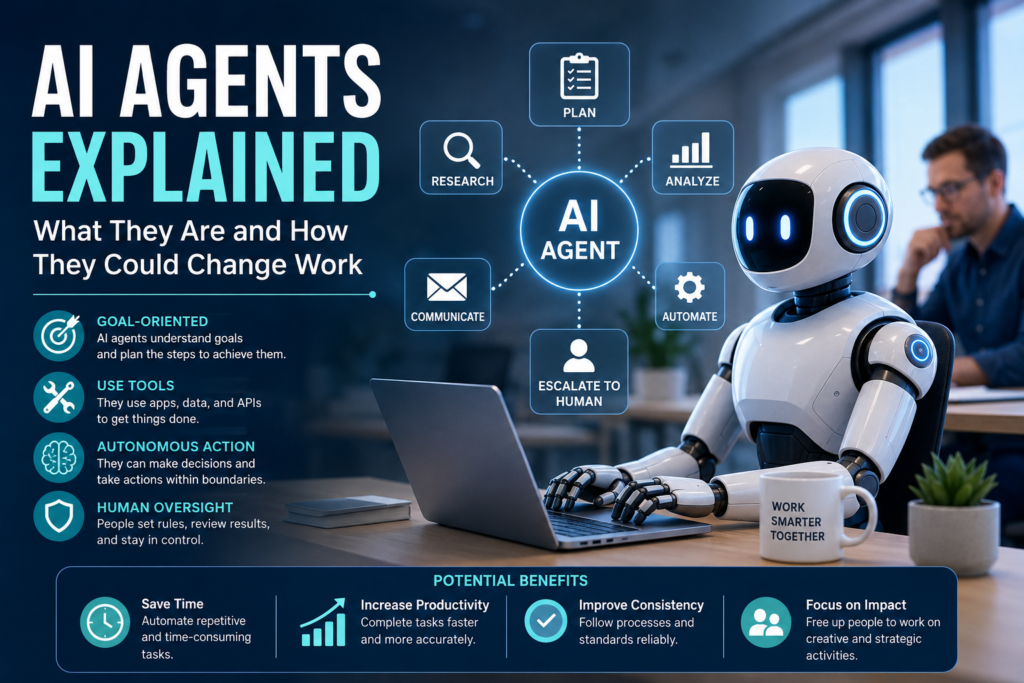

Artificial intelligence has moved beyond simply answering questions or generating text. A newer generation of AI systems can interpret a goal, plan multiple steps, use digital tools, and take actions with less direct human involvement. These systems are commonly called AI agents.
AI agents are becoming an important technology topic for businesses, developers, and employees because they can connect AI models with real-world workflows. Instead of asking an AI system to complete one isolated task, a user may give an agent a broader objective and allow it to work through several steps.
But AI agents are not magic digital employees, and they are not suitable for every task. They can make mistakes, misunderstand instructions, require access to sensitive information, and create new security and oversight challenges.
This guide explains AI agents, how they work, how they differ from traditional chatbots and automation, where businesses can use them, and what their growth could mean for the future of work.
What Are AI Agents?
An AI agent is a software system that uses an AI model to pursue a goal by interpreting information, deciding what steps to take, using available tools, and taking actions within defined boundaries.
A traditional chatbot might answer:
“What are the latest sales figures?”
An AI agent could potentially go further. If it has authorized access to a company’s systems, it might retrieve sales information, analyze the data, identify important changes, prepare a summary, and send the report to an approved recipient.
The important difference is action and multi-step decision-making.
OpenAI describes agents as systems that independently accomplish tasks on behalf of users, while Google Cloud describes them as applications that process inputs, reason with available tools, and take actions based on their decisions.
Because the term “AI agent” is used differently across the technology industry, there is no single architecture that defines every agent. However, autonomy, tool use, goal-oriented behavior, and multi-step task execution are common characteristics.
How Do AI Agents Work?
Although implementations vary, many AI agents contain several important components.
1. An AI Model
The AI model provides the reasoning and language capabilities used by the agent.
It can interpret instructions, understand context, evaluate information, and determine what action may be appropriate.
Large language models are commonly used as the central reasoning component of modern agents, although the exact technology can vary.
2. Instructions and Goals
An agent needs to know what it is supposed to accomplish.
For example:
- Review incoming customer support requests.
- Identify requests that require human attention.
- Gather relevant account information.
- Draft an appropriate response.
- Escalate sensitive cases to a human employee.
Clear instructions help define what the agent should and should not do.
3. Tools
Tools allow an agent to interact with systems outside the AI model.
Depending on its permissions, an agent might have access to:
- Databases
- Search systems
- Company documents
- Customer relationship management software
- Calendars
- Business applications
- APIs
- Computer interfaces
- Code execution environments
Tool access is one of the features that makes agents different from systems that only generate responses.
4. Memory and Context
Agents may need information from previous steps to complete a task.
For example, an agent researching a business issue might need to remember what documents it already reviewed and what information it still needs.
Modern agent architectures can use different forms of memory or state to maintain context throughout a workflow.
5. Orchestration
Orchestration controls how the different components work together.
An agent may follow a cycle such as:
Goal → Plan → Use a tool → Review the result → Adjust → Take the next action
This process can continue through several steps until the task is completed, stopped, or handed to a person.
Anthropic describes this as a self-directed loop in which an agent can plan, act, observe results, adjust its approach, and repeat when appropriate.
6. Guardrails and Human Oversight
Responsible agents need boundaries.
For example, an organization might allow an agent to draft an email but require human approval before sending it. Another agent might be allowed to read a database but not modify records.
Permissions, approval processes, monitoring, testing, and security controls can reduce the risks associated with autonomous actions.
AI Agents vs Chatbots vs Traditional Automation
These technologies are related, but they are not the same.
| Technology | Typical behavior | Level of autonomy |
|---|---|---|
| Traditional chatbot | Responds to predefined interactions or questions | Low |
| AI assistant | Helps users complete tasks through interaction | Moderate |
| Traditional automation | Follows predefined rules and workflows | Usually predictable |
| AI agent | Can reason through a goal, select tools, and take multiple actions | Higher |
The boundaries can overlap. Some modern assistants include agent-like capabilities, while some automated workflows incorporate AI models.
The most useful distinction is not the label but how much decision-making and action the system performs independently.
Google Cloud similarly distinguishes agents from assistants and bots based on autonomy, complexity, and interaction style.
What Can AI Agents Be Used For?
AI agents can potentially support many types of digital work.
Customer Service
An agent could help classify incoming requests, retrieve relevant account information, suggest responses, and route complex cases to human representatives.
Human review can remain important for sensitive or unusual cases.
Marketing
Marketing teams could use agents to support repetitive activities such as:
- Researching topics
- Organizing campaign information
- Drafting content
- Summarizing customer feedback
- Preparing campaign reports
- Monitoring predefined data sources
The final content and important business decisions should still be reviewed according to the organization’s requirements.
Software Development
Coding agents can assist with tasks such as understanding a codebase, writing code, reviewing changes, and helping investigate software problems.
However, generated code still needs appropriate testing, security review, and human oversight, particularly when changes affect production systems.
Data and Reporting
An agent could collect information from approved sources, organize it, identify patterns, and prepare a draft report.
For organizations working with important operational or financial data, verification remains essential because an AI system can misinterpret information or produce an incorrect conclusion.
Administrative Work
Agents may also help with repetitive digital processes such as:
- Organizing documents
- Preparing meeting summaries
- Drafting routine communications
- Updating approved records
- Coordinating information between applications
- Creating recurring reports
The strongest opportunities are often tasks that are repetitive, structured, tool-based, and easy to evaluate. OpenAI’s guidance on workspace agents highlights these characteristics as useful indicators for agent-based workflows.
A Practical Example of an AI Agent at Work
Imagine a company receives dozens of customer inquiries every day.
A traditional process might require an employee to:
- Read each message.
- Identify the customer’s issue.
- Search the customer record.
- Find relevant company information.
- Draft a response.
- Update the support system.
- Escalate complicated cases.
An AI agent could potentially perform several of these steps using authorized tools.
For example:
Customer message → Understand request → Retrieve account information → Search approved knowledge base → Draft response → Update ticket → Request human approval
The agent is not simply writing text. It is coordinating multiple actions toward a defined objective.
That is the central idea behind agentic AI.
How AI Agents Could Change Work
The biggest impact of AI agents may not come from replacing individual tasks with AI. Instead, it could come from changing how workflows are organized.
From Individual Tasks to End-to-End Workflows
Traditional AI tools often help with one step.
For example:
Human writes prompt → AI generates summary → Human continues working
An agent-oriented workflow could look more like:
Goal → AI gathers information → AI processes information → AI prepares output → Human reviews important decisions
This could reduce the amount of manual coordination required for certain digital processes.
Employees May Spend More Time on Judgment
If repetitive information-processing work becomes increasingly automated, employees may spend more time on activities that require:
- Judgment
- Communication
- Creativity
- Relationship building
- Strategic thinking
- Problem-solving
- Accountability
This does not mean every job will change in the same way. The impact will depend heavily on the industry, role, organization, technology, and level of human oversight.
Managers May Need to Manage AI Workflows
The workplace may increasingly involve people supervising both human colleagues and AI-enabled processes.
That could create new responsibilities such as:
- Defining what an agent is allowed to do
- Reviewing agent performance
- Checking outputs
- Managing permissions
- Monitoring errors
- Improving workflows
- Establishing escalation procedures
In this environment, understanding AI may become useful even for employees who do not build AI systems themselves.
Benefits of AI Agents
When appropriately designed and supervised, AI agents can offer several potential benefits.
Reduced Repetitive Work
Agents can handle certain recurring digital tasks, allowing employees to concentrate on higher-value activities.
Faster Workflow Execution
An agent can potentially move information between systems and complete multiple steps without requiring a person to manually coordinate every stage.
Better Integration Between Tools
Instead of using separate applications independently, an agent can potentially connect approved tools as part of a single workflow.
More Consistent Processes
When an agent operates according to clear instructions and rules, it can help standardize repetitive processes.
However, consistency does not automatically mean correctness. An agent can consistently make the same mistake if its instructions, data, or workflow are flawed.
Limitations and Risks of AI Agents
The growing capabilities of agents also create important challenges.
AI Can Make Mistakes
An agent may misunderstand a request, use incorrect information, select an inappropriate tool, or reach an incorrect conclusion.
Human review remains especially important for high-impact decisions.
Greater Autonomy Creates Greater Risk
A chatbot that produces an incorrect answer is one problem.
An agent that produces an incorrect answer and then takes an action based on it can create a larger problem.
This is why permissions and approval mechanisms matter.
Security Risks
Agents may interact with company systems, documents, and external tools. That creates additional security considerations.
One example is prompt injection, where malicious or misleading instructions are designed to influence an AI system into taking unintended actions.
Anthropic has highlighted prompt injection and unintended actions as important risks associated with increasingly autonomous agents.
Privacy and Data Protection
Organizations must consider what information an agent can access and whether that access is necessary.
Sensitive information should be protected through appropriate access controls, security practices, and organizational policies.
Cost and Complexity
Building and maintaining reliable agents can require more than simply connecting an AI model to an application.
Organizations may need:
- Software development
- Testing
- Monitoring
- Security controls
- Data integration
- Access management
- Evaluation systems
- Ongoing maintenance
Agentic systems can also introduce additional model usage and infrastructure costs.
Anthropic notes that agentic systems can involve trade-offs involving complexity, latency, and cost, and recommends using the simplest approach that adequately solves the problem.
Should Every Business Use AI Agents?
No.
An AI agent is not automatically the best solution just because it is newer or more capable.
A simple automated workflow may be better when the process is predictable and the rules are clear.
For example, if a company simply needs to move a file from one folder to another every evening, conventional automation may be more reliable than introducing an AI agent.
An agent becomes more attractive when a process involves ambiguity, changing information, multiple tools, or decisions that are difficult to describe entirely through fixed rules.
The goal should be to solve the business problem—not to use AI simply because AI is available.
How Businesses Can Start With AI Agents
Organizations interested in agentic AI can take a cautious, practical approach.
Step 1: Identify a Repetitive Workflow
Start with a process that occurs frequently and consumes meaningful staff time.
Step 2: Define the Desired Outcome
Describe what successful completion looks like.
A vague goal such as “make customer service better” is difficult to evaluate.
A clearer goal might be:
“Classify incoming support requests, retrieve relevant information, and prepare a response for human approval.”
Step 3: Identify the Required Tools
Determine which systems the agent would need to access.
Only provide the permissions necessary for the task.
Step 4: Set Human Approval Points
Decide which actions an agent can perform automatically and which require human authorization.
Step 5: Test Before Deployment
Use representative examples to evaluate:
- Accuracy
- Reliability
- Security
- Response time
- Failure handling
- Escalation behavior
Step 6: Monitor Performance
Deployment should not be the end of the process.
Organizations should monitor results and update instructions, tools, permissions, and workflows when problems are identified.
What Skills Will Matter in an AI-Agent Workplace?
The rise of AI agents does not make human skills irrelevant.
Instead, it may increase the importance of skills that complement AI.
AI Literacy
Employees should understand what AI systems can and cannot reliably do.
Critical Thinking
People need to evaluate AI-generated information instead of automatically accepting it.
Communication
Clear instructions and effective communication become increasingly important when people collaborate with AI systems.
Data Skills
Understanding data quality, privacy, analysis, and interpretation can help employees work more effectively with AI-powered systems.
Domain Expertise
AI agents still need people who understand the business context.
A knowledgeable employee can often identify errors or inappropriate decisions that a general-purpose AI system may miss.
The Future of AI Agents
AI agents are likely to continue evolving as models, tools, security systems, and business integrations improve.
The direction of development is moving from AI that primarily responds toward AI that can increasingly plan and act within defined environments.
However, the future will not necessarily be about giving AI unlimited independence.
Reliable systems are more likely to combine AI capabilities with:
- Clear goals
- Limited permissions
- Human oversight
- Monitoring
- Testing
- Security controls
- Reliable data
- Defined accountability
In other words, the most useful AI agent may not be the one that does everything independently. It may be the one that knows what it is allowed to do, performs its assigned work reliably, and knows when a human should take over.
Frequently Asked Questions About AI Agents
1. What is an AI agent in simple terms?
An AI agent is a software system that can work toward a goal by understanding information, deciding what steps to take, using available tools, and performing actions with a certain level of autonomy.
2. Are AI agents the same as chatbots?
No. A chatbot generally focuses on conversations and responses, while an AI agent can potentially plan and perform multiple actions using connected tools. However, modern chatbots and assistants can include agent-like capabilities, so the boundary is not always absolute.
3. Can AI agents replace human workers?
AI agents can automate or assist with some tasks, but they do not eliminate the need for human judgment in every situation. Their impact will vary by job, industry, workflow, and how organizations implement the technology.
4. Are AI agents safe?
AI agents can be useful, but they are not risk-free. Incorrect decisions, unauthorized actions, privacy problems, security threats, and prompt injection are among the issues organizations need to consider. Proper permissions, testing, monitoring, and human oversight are important.
5. How can a small business use an AI agent?
A small business could start with a clearly defined, low-risk workflow such as organizing customer inquiries, preparing routine reports, summarizing approved business information, or assisting with internal administrative processes. It is generally better to begin with a narrow use case that can be measured and reviewed.
Conclusion
AI agents represent an important shift in the way artificial intelligence can be used at work. Rather than simply generating an answer, an agent can potentially interpret a goal, plan a sequence of actions, use connected tools, and carry out parts of a workflow.
That could change how businesses approach customer service, marketing, software development, reporting, administration, and other digital processes.
At the same time, AI agents should not be treated as flawless digital employees. Their autonomy creates additional requirements for security, privacy, testing, permissions, monitoring, and human oversight.
For businesses and professionals, the most practical approach is to understand the technology, identify appropriate use cases, start small, measure results, and keep people responsible for important decisions.
The future of work with AI agents is therefore unlikely to be simply about humans versus AI. A more realistic direction is humans working with increasingly capable AI systems, with technology handling appropriate tasks while people provide judgment, accountability, creativity, and oversight.