
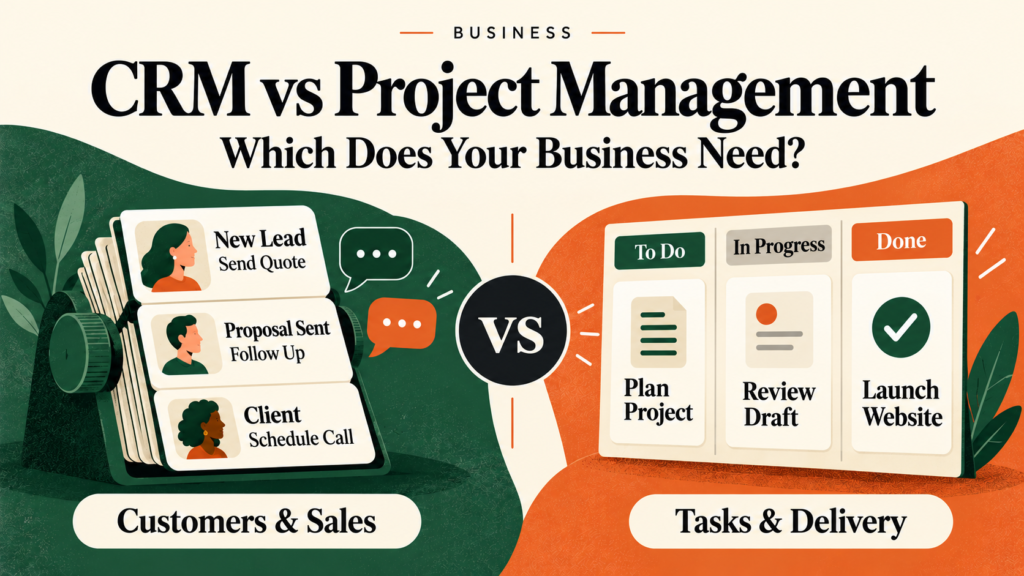

A potential customer requests a quote. You send a proposal, answer questions, and agree on the work. Now someone must schedule tasks, collect files, manage approvals, and meet the deadline.
These activities belong to the same customer journey, but they require different kinds of organization.
That is the central question behind CRM vs project management software: which does your business need? A CRM helps organize customer relationships and sales opportunities. Project management software helps organize the work your team must complete.
Some businesses need one. Others benefit from both. The right starting point depends on where information gets lost, which responsibilities are unclear, and what your existing tools already handle.
What Does CRM Software Do?
CRM stands for customer relationship management. CRM software brings information about customers and prospects into a shared system so your team can track relationships and interactions across sales, marketing, and service. Microsoft Dynamics 365
Depending on the product and subscription, useful capabilities may include:
- Contact and company records.
- Lead and sales opportunity tracking.
- Communication history.
- Follow-up reminders.
- Proposal and deal stages.
- Sales reporting.
- Customer service or marketing features.
For a small business, the immediate value may be simple: knowing who needs a response and what was discussed last time.
Example: Following Up on a Quote
Consider a hypothetical cleaning company receiving inquiries through its website, phone, and referrals.
A CRM could help the owner record each prospect, the requested service, the quote amount, and the next follow-up date. Instead of searching several inboxes, the owner can review outstanding opportunities in one place.
However, a sales record does not automatically provide everything needed to schedule cleaners, allocate equipment, or manage recurring visits. Those requirements need separate evaluation.
What Does Project Management Software Do?
Project management software helps teams plan, assign, and track work. For example, Asana’s documentation describes organizing projects with tasks, milestones, and views such as lists, boards, calendars, and timelines. Help Center
Depending on the tool and plan, features may include:
- Tasks, owners, and deadlines.
- Project templates.
- Task dependencies.
- Milestones and progress tracking.
- File sharing and comments.
- Approval workflows.
- Workload planning.
- Time tracking or budget monitoring.
These tools help answer questions such as: What happens next? Who is responsible? What is blocking completion?
Example: Delivering a Website Project
A hypothetical design agency has already agreed to build a customer’s website.
Its project management system could track content collection, design approval, development, testing, and launch. Each activity has an owner and a due date.
The system may organize delivery effectively while providing limited support for tracking prospects, recording sales conversations, or forecasting future deals.
CRM vs Project Management Software: Key Differences
The following table describes typical strengths. Individual products overlap, so verify the capabilities of the specific plan you are considering.
| Area | CRM software | Project management software |
|---|---|---|
| Main focus | Customer relationships and opportunities | Work planning and delivery |
| Common records | Contacts, companies, leads, deals | Projects, tasks, milestones |
| Typical question | Who needs a follow-up? | What needs to be completed? |
| Common workflow | Inquiry → qualification → proposal → decision | Planning → assignment → execution → completion |
| Useful reports | Pipeline value, sales activity, conversion rates | Overdue work, project progress, workload |
| Frequent users | Owners, sales, account management, service teams | Delivery teams, operations, project managers |
| Common limitation | Detailed delivery planning may be limited | Detailed relationship tracking may require customization |
A CRM is not limited to acquiring customers: it can support ongoing relationships after a sale. Project management software can also organize internal initiatives that have no direct customer connection.
When Your Business Should Start With a CRM
A CRM is a sensible first priority when the main problem involves managing inquiries, conversations, or customer relationships.
Look for these signs:
- Prospects wait too long for a response.
- Quotes disappear into inboxes without follow-up.
- Different employees maintain separate customer lists.
- Nobody can reliably identify the next action for an opportunity.
- Important customer history depends on one person’s memory.
- You cannot easily see which deals are still active.
Practical recommendation: Start with a basic process: contact record, opportunity stage, responsible person, and next action. Add more fields only when they support a real decision.
A complicated CRM that nobody updates will provide unreliable information.
When Your Business Should Start With Project Management Software
Project management software is a stronger first priority when you have enough customer information but struggle to deliver work consistently.
Warning signs include:
- Deadlines are missed because responsibilities are unclear.
- Requests and approvals are scattered across messages.
- Team members cannot see what is ready to start.
- Several projects compete for the same people.
- Repeatable work is rebuilt from scratch every time.
- Customers repeatedly ask for updates your team cannot quickly provide.
Practical recommendation: Begin with one repeatable project template. Include the essential tasks, owners, deadlines, and approval points.
Avoid creating elaborate dashboards before the team has a reliable habit of updating the underlying work.
When Using Both Makes Sense
Using both can help when selling and delivery are substantial activities with different information needs.
Consider a hypothetical consultancy:
- A CRM records the prospect’s requirements and proposal.
- The customer accepts the agreed scope.
- A project is created with tasks, responsibilities, and milestones.
- Delivery progress is made visible to the account owner.
- The CRM retains the relationship history for future conversations.
The handoff needs more than a customer name. It should include the agreed deliverables, relevant contacts, deadlines, exclusions, and supporting documents.
Decide Where Each Type of Information Belongs
If both systems are used, designate the authoritative location for important information.
For example:
- CRM: customer contact details, sales conversations, opportunity stage.
- Project management tool: delivery tasks, approvals, milestones.
- Accounting system: invoices, payments, and financial records.
You can link records or share selected information between systems. Avoid making employees maintain the same information manually in several places.
Check Integration Details Before Buying
An advertised integration may support only a narrow workflow. Ask:
- Which records and fields move between the systems?
- Is information transferred one way or both ways?
- What triggers an update?
- How are duplicates handled?
- What happens when a transfer fails?
- Does the connection require another paid subscription?
- Can sensitive information be excluded?
Begin with one useful connection, such as creating a project after a deal reaches an approved stage. Test it with sample records before relying on it for customer work.
Can One Tool Handle Both?
Sometimes one platform is sufficient.
A CRM with suitable project features may cover straightforward delivery. A flexible project management platform may support basic contact and opportunity tracking. Asana, for example, documents ways to configure its platform for lightweight customer relationship management. Asana
However, customization has a maintenance cost.
A task board labeled “Sales Pipeline” may work well for a simple process, but you should still test how it handles multiple contacts at one company, communication history, duplicate records, permissions, and reporting.
Likewise, a CRM task list may be adequate for basic follow-ups while falling short when work depends on approvals, shared resources, or linked deadlines.
Choose one platform when it supports your essential workflows clearly and reliably. Reconsider when workarounds become difficult to maintain.
Compare the Full Cost of Each Option
The advertised subscription is only part of the cost.
Check the exact plan for:
| Cost area | What to verify |
|---|---|
| Paid users | Who needs a paid seat, including administrators? |
| External access | Can customers or contractors participate, and at what cost? |
| Required features | Are permissions, reporting, or automation restricted to higher plans? |
| Usage limits | Are there limits on contacts, storage, actions, or projects? |
| Connections | Will integration software or technical help cost extra? |
| Setup | Who will import records and configure workflows? |
| Maintenance | Who will manage access, templates, duplicates, and errors? |
| Leaving the service | Can you export usable records and attachments? |
Prices, packaging, and limits can change. Check official pricing pages and documentation before committing.
A Hypothetical Cost Comparison
Suppose Option A costs $90 per month for your team but requires four hours of monthly manual administration. Option B costs $150 and requires one hour.
Using an assumed staff-time value of $25 per hour:
- Option A: $90 + $100 in staff time = $190 per month.
- Option B: $150 + $25 in staff time = $175 per month.
These are illustrative figures, not product prices or promised savings. Staff time saved also does not automatically reduce payroll spending, but it can free capacity for other work.
A Practical Checklist for Choosing Your Software
1. Identify Your Most Expensive Recurring Problem
Choose a specific issue: missed follow-ups, delayed approvals, unclear ownership, or duplicate data entry.
“Get more organized” is too broad to guide a purchase.
2. Map One Customer Journey
Write down how an inquiry becomes paid work and how that work gets completed.
Mark where information changes hands. This reveals whether your biggest gap concerns relationships, delivery, or both.
3. Separate Essential Features From Extras
Keep the essential list short enough to test.
For example, your CRM may need reliable reminders and shared contact history. Your project tool may need task dependencies and customer approvals.
4. Run a Small Pilot
Use sample or appropriately protected records to test a complete workflow. Involve the people who will use the software daily.
Check whether they can find information, update progress, and identify the next action without constant assistance.
5. Test Access and Export
Confirm that users can access only the information they need. Try an export and inspect what it includes, especially attachments, comments, and relationships between records.
6. Assign an Owner
Someone must maintain the process, resolve issues, and decide when changes are needed. Software ownership should be an explicit responsibility.
Frequently Asked Questions
1. What is the main difference between CRM and project management software?
CRM software primarily organizes customer relationships and sales opportunities. Project management software primarily organizes tasks, responsibilities, and delivery. Features can overlap, so compare actual workflows rather than product labels alone.
2. Can project management software replace a CRM?
It can support a simple customer-tracking process if its records, permissions, and reporting meet your needs. A dedicated CRM may become more useful when communication history, multiple customer contacts, or a more complex sales pipeline become difficult to manage.
3. Can a CRM manage projects?
Some CRMs include project features or offer connected project applications. Check whether they support your required dependencies, approvals, templates, workload planning, and reporting. Basic task tracking may be enough for straightforward work.
4. Does a freelancer need both tools?
Not necessarily. A freelancer with a few active clients may manage with one suitable system. Separate tools become more useful when managing prospects and delivering work both require substantial organization.
5. Which should a small business buy first?
Start with the tool that addresses the clearest recurring problem. Missed inquiries and follow-ups suggest a CRM. Missed deadlines and unclear task ownership suggest project management software. If neither is a persistent problem, improve the existing process before adding subscriptions.
Conclusion
Choose a CRM when customer information and follow-ups need better control. Choose project management software when planning and completing work is the bigger challenge. Use both when each solves a distinct, recurring problem and the handoff between them is clear.
Before paying, test one complete workflow with the people who will use it. The most useful choice is a system your team can maintain and trust.