
An online store can look simple to a customer while relying on several systems behind the scenes. Product information, inventory, payments, customer accounts, and the storefront all need to work together.
How those parts connect affects the cost of building the store, how easily employees can update it, and who is responsible when something breaks.
That is the practical issue behind headless commerce vs traditional e-commerce.
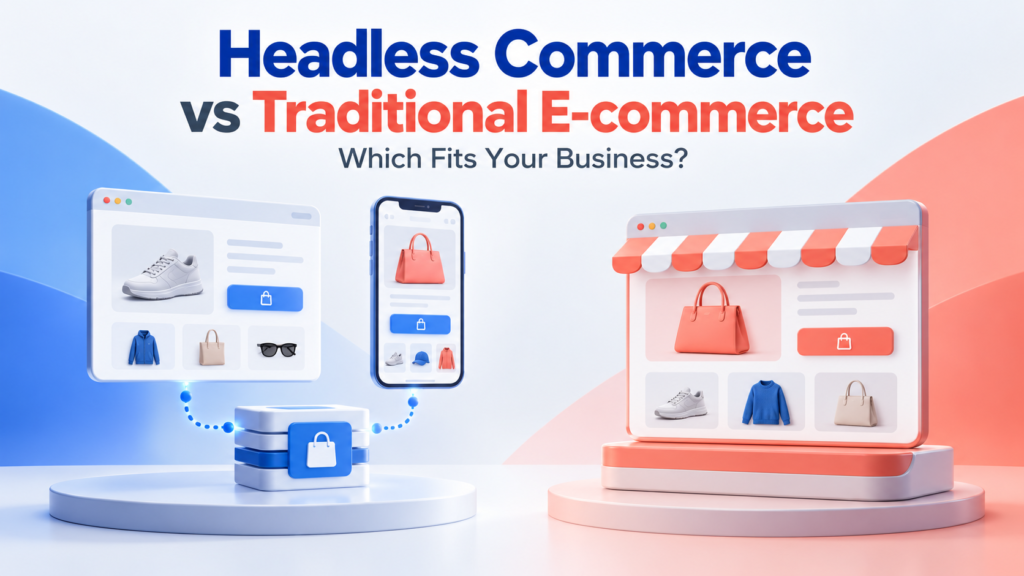
A traditional setup generally provides a more integrated storefront and commerce system. A headless setup separates the customer-facing experience from the commerce backend, connecting them through APIs.
For a business with standard selling requirements and limited development resources, an integrated storefront is usually the sensible starting point. Headless becomes worth evaluating when specific experience or integration requirements justify its additional responsibilities.
This guide explains the differences, costs, limitations, and questions to ask before choosing.
What Is Traditional E-commerce?
Traditional e-commerce uses a storefront that is closely integrated with the commerce platform.
The platform’s themes, templates, or page-building tools control much of what customers see. Its backend manages activities such as products, orders, and inventory.
In this article, “traditional” describes that integrated storefront model. It does not mean outdated software or selling through a physical shop.
A typical business might:
- Select a storefront theme.
- Add products and images.
- Configure shipping and payment options.
- Install compatible extensions.
- Launch and maintain the store.
The amount of technical work varies. A hosted service and a heavily customized self-hosted store can both use integrated storefronts while requiring very different maintenance arrangements.
BigCommerce, for example, documents Stencil as its traditional storefront option alongside headless alternatives.
What Is Headless Commerce?
Headless commerce separates the presentation layer—the website or application customers use—from the commerce backend.
The two communicate through APIs, which provide defined ways for software systems to exchange information and request actions.
For example, a custom storefront might request product information, add an item to a cart, and direct the customer to the platform’s checkout.
The commerce backend still exists. Headless does not mean removing order management or building every commerce function yourself.
Official BigCommerce documentation describes headless storefronts that can include websites, mobile applications, kiosks, and other interfaces. Shopify also documents APIs and tooling for building custom storefronts.
A Platform Can Support Both Approaches
The decision is not always between two different vendors.
A platform may offer an integrated theme-based storefront and APIs for a separate frontend. You may therefore change the presentation layer while retaining parts of the existing commerce system.
Whether that is practical depends on the platform, extensions, data, and checkout requirements.
Headless Commerce vs Traditional E-commerce: Key Differences
| Consideration | Traditional integrated storefront | Headless storefront |
|---|---|---|
| Frontend | Built around the platform’s storefront system | Developed separately and connected through APIs |
| Initial setup | Often simpler for standard requirements | Usually requires more integration and development |
| Design control | Shaped by theme and platform capabilities | Greater control over the custom frontend |
| Content editing | Commonly uses built-in editing tools | Depends on the CMS and editing workflow implemented |
| Extensions | Compatible apps may provide ready-made storefront components | Frontend components may need separate implementation |
| Maintenance | Depends on hosting and customization | Includes the custom frontend and its integrations |
| Performance | Depends on implementation | Also depends on implementation |
| Team requirements | Often manageable with less development support | Usually needs dependable technical ownership |
| Likely fit | Standard retail workflows and constrained teams | Specific custom experiences or complex requirements |
These are typical trade-offs, not guarantees about every platform or project.
1. Setup and Ongoing Costs
Traditional E-commerce Costs
An integrated storefront can reduce initial work because common shopping functions already have a supported presentation.
Costs may include:
- Platform subscriptions or hosting.
- Themes and customization.
- Apps and extensions.
- Payment processing.
- Maintenance and support.
- Content preparation and migration.
However, a traditional store can still become expensive when it relies on extensive custom code or many interacting plugins.
Headless Commerce Costs
A headless project may add:
- Frontend design and development.
- Separate deployment and monitoring.
- CMS configuration.
- API integration.
- Search and filtering implementation.
- Custom app interfaces.
- Testing across connected systems.
- Ongoing developer support.
Some platforms bundle parts of this infrastructure. Check what is included rather than assuming every component requires a separate subscription.
Compare Equivalent Requirements
Request estimates against the same scope.
Both proposals should cover the same product types, markets, payment methods, search behavior, analytics, and support expectations.
A basic integrated store and a highly customized headless experience are not equivalent projects.
2. Design Flexibility
Headless gives developers more freedom to build the customer-facing experience independently of the platform’s theme system.
That can help with requirements such as:
- Interactive product configuration.
- Unusual navigation or product discovery.
- Content-rich shopping experiences.
- Multiple branded storefronts.
- Connections to an established application.
Shopify’s documentation, for example, supports bringing a custom technology stack to its headless APIs.
However, greater design freedom creates more design and testing responsibilities.
Before choosing headless, ask whether a suitable theme, extension, or smaller custom feature can meet the need. A distinctive visual style alone does not establish a business case for a separate frontend.
3. Website Speed and Reliability
Headless architecture creates opportunities to control rendering, caching, and frontend delivery.
It does not automatically create a faster store.
A poorly implemented headless site can be slow because of excessive scripts, oversized images, inefficient API requests, or weak caching. An integrated storefront can also perform well when carefully configured.
Evaluate realistic customer journeys:
- Browsing a category.
- Searching and filtering.
- Selecting a product variant.
- Adding an item to the cart.
- Beginning checkout.
- Signing into an account.
Test on mobile devices and slower connections.
Reliability also depends on connected services. Decide what customers see if product search, a CMS, or an API becomes unavailable.
4. SEO Responsibilities
Neither architecture guarantees better search rankings.
Both need crawlable pages, useful content, clear navigation, and technically sound implementation.
For a headless build, explicitly assign responsibility for:
- Product and category URLs.
- Titles and meta descriptions.
- Canonical tags.
- Redirects.
- Structured data.
- XML sitemaps.
- Pagination and filtered navigation.
- Correct status codes.
- Rendering important page content.
Do not assume that an existing SEO plugin will control a separately built frontend.
A redesign or migration also needs a URL mapping and validation plan. Changing the storefront without preserving important search behavior can introduce avoidable problems.
5. Apps, Integrations, and Checkout
An extension that works with an integrated storefront may rely on that platform’s theme system.
Its backend functionality might remain available in a headless setup while its visible components require rebuilding.
Check essential features individually:
- Reviews.
- Subscriptions.
- Loyalty rewards.
- Product options.
- Discounts.
- Customer accounts.
- Search.
- Localized content.
- Analytics and consent controls.
For example, WooCommerce documents APIs for customer-facing shopping functions and separate APIs for other integrations. The existence of an API does not establish that every installed extension works with a custom storefront.
Headless Does Not Necessarily Mean Custom Checkout
A custom storefront can hand customers to a platform-managed checkout.
Confirm the permitted checkout flow, customization limits, customer account behavior, and tracking requirements with the provider.
Do not assume that separating the frontend gives unrestricted control over payments or checkout.
6. Content Management and Marketing Work
Store employees need to update pages after launch.
Integrated storefronts commonly provide established theme editing workflows. A headless project can provide a strong editing experience too, but it must be designed and configured.
Ask the implementation team to demonstrate how a nontechnical employee will:
- Create a promotional page.
- Preview unpublished changes.
- Schedule a campaign.
- Change images and copy.
- Add a reusable page section.
- Restore an earlier version.
If routine marketing changes require developer assistance, include that dependency in the operating budget.
A headless CMS is optional. Some implementations use platform content features, while others add a separate content system.
7. Maintenance and Technical Ownership
Headless separates development responsibilities; it does not eliminate them.
Someone needs to maintain the frontend, dependencies, integrations, deployment process, and monitoring.
Define:
- Who responds to storefront failures.
- Who handles API changes.
- Who updates dependencies.
- Who tests new releases.
- Who owns the code and accounts.
- How another developer can take over.
An integrated store also needs clear ownership, particularly when self-hosted or heavily customized.
The important question is whether your team can sustain the chosen setup.
When Traditional E-commerce Is the Better Starting Point
An integrated storefront is usually worth prioritizing when:
- Standard product pages and checkout meet your needs.
- The launch budget is limited.
- Employees need straightforward editing tools.
- You lack ongoing development support.
- Compatible extensions cover essential functions.
- There is no demonstrated limitation requiring separation.
A business can grow substantially without changing to headless. Revenue or catalog size alone does not determine the architecture.
When Headless Commerce Is Worth Evaluating
Consider a headless project when:
- A valuable customer experience is difficult to deliver in the existing storefront.
- You need a custom frontend connected to an established commerce backend.
- Several interfaces require a deliberately coordinated architecture.
- Existing platform restrictions cause measurable operational problems.
- You have reliable development resources.
- Expected benefits justify the full operating cost.
Support the decision with specific requirements.
“We need a product configuration journey the current system cannot reasonably support” is more useful than “we want modern technology.”
Two Illustrative Scenarios
A Small Accessories Store
A retailer sells a straightforward catalog and needs product filtering, payment processing, shipping, and occasional campaign pages.
An integrated storefront is likely the more practical first option. The team can focus on product information, fulfillment, and customer service.
A Specialist Equipment Business
A business needs a guided configuration process connected to external product rules and an existing customer portal.
Headless may be worth evaluating, provided the team confirms API coverage and budgets for maintenance.
These scenarios illustrate a decision process. They are not claims about actual businesses or guaranteed outcomes.
A Checklist Before Moving to Headless
- ☐ We have documented the current limitation.
- ☐ We evaluated simpler changes first.
- ☐ Required APIs support our workflows.
- ☐ Essential apps and checkout behavior have been tested.
- ☐ Marketing staff can edit and preview content.
- ☐ SEO and analytics responsibilities are assigned.
- ☐ We have a realistic launch and maintenance budget.
- ☐ Support ownership and escalation routes are clear.
- ☐ We have a migration, validation, and rollback plan.
- ☐ We know how success will be measured.
Where feasible, test a limited experience before committing to a full migration.
Frequently Asked Questions
1. Is headless commerce better than traditional e-commerce?
It offers more control over a separate frontend, but also creates additional responsibilities. The better choice depends on the required experience, budget, integrations, and technical resources.
2. Is headless commerce suitable for small businesses?
Sometimes. A small business with a specific custom requirement and dependable technical support may benefit. For standard selling needs, an integrated storefront is usually easier to justify.
3. Does headless commerce improve SEO?
Not automatically. It can support strong technical implementation, but SEO depends on how the storefront is built, maintained, and populated with useful content.
4. Can an existing store become headless?
Potentially, if the commerce platform provides suitable APIs. Confirm support for products, carts, accounts, checkout, and essential extensions before planning the migration.
5. Is headless commerce the same as composable commerce?
No. Headless describes separating the presentation layer from commerce functionality. Composable commerce describes assembling a solution from selected components. A headless storefront can still use one main commerce backend.
Conclusion
Choose an architecture your business can operate confidently.
For standard requirements, an integrated storefront often provides the clearest route to launch and maintenance. Headless deserves consideration when a defined customer or operational need requires greater frontend control.
Start with that requirement, compare equivalent proposals, and test the difficult parts before committing.