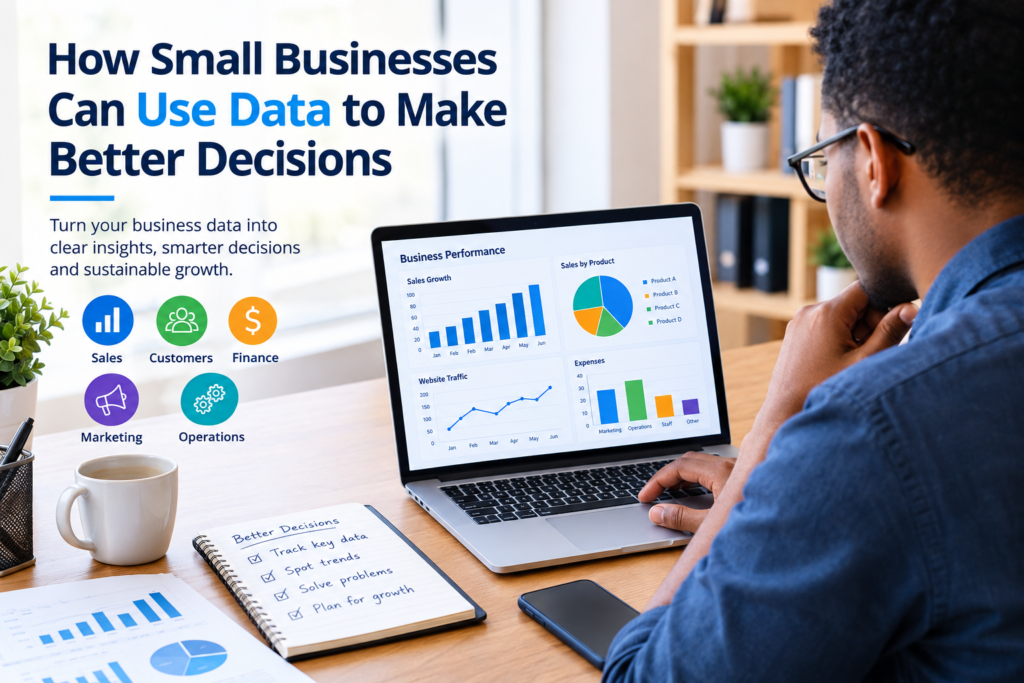

Running a small business often means making important decisions with limited time, money, and resources. Owners may need to decide which products to stock, which marketing channels to prioritize, when to hire, how to control expenses, or what customers actually want.
Experience and intuition can be valuable, but data can help small businesses make better decisions by providing evidence about what is happening in the business.
Business data does not have to mean complicated analytics or expensive software. Even basic information such as sales records, customer feedback, website traffic, expenses, and inventory levels can reveal useful patterns.
The key is knowing what information to collect, how to interpret it, and how to use it responsibly.
What Is Data-Driven Decision-Making?
Data-driven decision-making is the process of using relevant information and evidence to support business decisions rather than relying entirely on assumptions or intuition.
For a small business, this could be as simple as reviewing monthly sales before deciding which products to promote.
For example, suppose a business sells ten different products. Instead of promoting all ten equally, the owner could review sales records to identify:
- Products with consistently strong sales
- Products with declining demand
- Products generating the highest revenue
- Products that have high costs relative to their sales
- Seasonal changes in customer demand
The data does not automatically tell the owner what to do. Instead, it provides useful evidence that can be considered alongside experience, customer needs, market conditions, and business goals.
Why Data Matters for Small Businesses
Large companies often have dedicated analysts and sophisticated reporting systems, but smaller businesses can also benefit from using basic business data.
1. It Can Reduce Guesswork
Business decisions sometimes involve uncertainty. Looking at relevant information can help an owner understand what has happened before making a decision.
For example, if a business is considering increasing its advertising budget, it can first review previous campaigns to understand which channels generated meaningful customer activity.
2. It Helps Identify Customer Trends
Customer behavior can change over time.
Businesses can examine purchasing patterns, feedback, repeat purchases, inquiries, and other available information to better understand what customers value.
This can help businesses adjust their products, services, pricing, communication, or customer experience.
3. It Can Improve Financial Planning
Tracking revenue and expenses gives business owners a clearer picture of financial performance.
Instead of simply asking whether sales are increasing, a business can examine several measures together, such as:
- Revenue
- Operating expenses
- Gross profit
- Cash flow
- Outstanding payments
- Average transaction value
Looking at these measures together can provide a more useful picture than focusing on sales alone.
4. It Can Improve Marketing Decisions
Marketing data can help businesses understand which activities are producing useful results.
For example, a company might compare website visits, inquiries, leads, or sales associated with different marketing channels.
This can help the business decide where to focus future effort while recognizing that different channels may serve different purposes.
5. It Can Help Improve Operations
Operational data can highlight inefficiencies.
A retailer might track inventory levels and stock movement. A service business might monitor appointment volume, completion times, or customer requests.
These observations can help identify areas where processes may need improvement.
What Types of Data Should Small Businesses Track?
The right data depends on the type of business and its goals. Collecting everything is usually unnecessary.
Instead, start with information that can help answer important business questions.
Sales Data
Sales data can include:
- Total sales
- Sales by product or service
- Number of transactions
- Average order value
- Sales by month
- Sales by customer segment, where appropriate
This information can help identify products and periods that perform differently.
Customer Data
Depending on the business and applicable privacy requirements, useful customer information may include:
- Customer feedback
- Purchase history
- Customer inquiries
- Repeat purchases
- Service preferences
- Customer satisfaction feedback
Businesses should collect only information they genuinely need and handle customer information responsibly.
Marketing Data
Marketing data may include:
- Website traffic
- Search traffic
- Email engagement
- Social media engagement
- Leads or inquiries
- Conversions
- Campaign costs
The most useful metric depends on the marketing objective. High website traffic, for example, does not necessarily mean a campaign is generating customers.
Financial Data
Financial information can include:
- Revenue
- Expenses
- Profit
- Cash flow
- Accounts receivable
- Accounts payable
- Cost per product or service
Accurate financial records are particularly important when making decisions about spending and growth.
Operational Data
Operational information can include:
- Inventory levels
- Order processing time
- Delivery performance
- Production volume
- Customer service requests
- Employee workload
The objective is to identify information that helps answer practical operational questions.
How Small Businesses Can Start Using Data
A business does not need a complicated analytics department to begin.
Step 1: Define the Business Question
Start with a specific question.
Instead of asking, “How is my business doing?”, ask:
- Which products generate the most sales?
- Which marketing channel produces the most qualified leads?
- Why are expenses increasing?
- Which months have the highest demand?
- Which products remain in inventory the longest?
- Are customers returning after their first purchase?
A specific question makes it easier to identify the information that matters.
Step 2: Choose Relevant Data
Once the question is clear, determine what information can help answer it.
For example, if the question is about product performance, sales records and product costs may be more useful than social media engagement.
Avoid collecting data simply because it is available.
Step 3: Keep Records Consistent
Data becomes more useful when it is recorded consistently.
For example, if monthly sales are recorded differently each month, comparisons can become difficult.
A simple spreadsheet can be enough for a small operation. Larger businesses may eventually need accounting software, customer relationship management systems, inventory platforms, or analytics tools.
Step 4: Look for Patterns
Review the information regularly rather than looking at it only when a problem occurs.
Look for patterns such as:
- Increasing or decreasing sales
- Recurring customer complaints
- Seasonal demand
- Rising expenses
- Changes in product performance
- Differences between marketing channels
A single unusual result may not represent a long-term trend, so context matters.
Step 5: Turn Findings Into Actions
Data is useful when it contributes to a decision.
Suppose a business discovers that one service receives many inquiries but relatively few purchases. The owner could investigate pricing, customer expectations, communication, or the sales process before deciding what to change.
The data identifies an issue; further investigation helps determine the appropriate response.
Step 6: Measure the Result
After making a change, continue tracking relevant information.
This creates a simple cycle:
Question → Data → Analysis → Decision → Action → Review
Over time, this process can help a business learn which decisions and strategies are working and which need adjustment.
Simple Example of Data-Driven Decision-Making
Imagine a small online store selling office accessories.
The owner notices that overall website traffic is increasing, but sales are not growing at the same pace.
Instead of immediately spending more money on advertising, the owner reviews available data and finds:
- Several products receive substantial page visits.
- Some popular products have low stock.
- Customers frequently leave after viewing shipping information.
- A smaller group of products generates most purchases.
The owner could then investigate inventory availability and the purchasing process before increasing advertising spending.
This example illustrates an important principle: more data does not necessarily mean better decisions. Relevant data and thoughtful interpretation are what matter.
Useful Tools for Small Business Data
Small businesses can begin with tools they already have.
Spreadsheets
Spreadsheet applications can be useful for tracking:
- Sales
- Expenses
- Inventory
- Customers
- Marketing activities
- Monthly performance
They are particularly suitable for businesses with relatively manageable amounts of data.
Accounting Software
Accounting platforms can help organize financial records and produce reports that support budgeting and financial decisions.
Businesses should choose software based on their size, accounting requirements, budget, and local compliance needs.
Customer Relationship Management Tools
CRM systems can help businesses organize customer interactions, leads, sales activities, and follow-ups.
They can be especially useful when customer information becomes too difficult to manage manually.
Website Analytics
Website analytics can provide information about how visitors interact with a website.
Businesses can use this information to understand traffic sources, popular pages, and customer journeys, while following applicable privacy and data-protection requirements.
Business Dashboards
A dashboard can bring important measurements together in one place.
A small business dashboard might contain:
| Area | Example Metric |
|---|---|
| Sales | Monthly revenue |
| Customers | Repeat purchase rate |
| Marketing | Qualified inquiries |
| Finance | Monthly expenses |
| Inventory | Stock levels |
| Website | Relevant traffic or conversions |
The exact metrics should reflect the business’s objectives.
Common Mistakes When Using Business Data
Data can support better decisions, but it can also be misunderstood.
Focusing on Too Many Metrics
Tracking dozens of numbers can make decision-making more complicated.
Choose a small set of measurements that directly relate to current business goals.
Confusing Correlation With Cause
Two things can change at the same time without one necessarily causing the other.
For example, sales might increase during the same period that a company launches a social media campaign. Other factors, such as seasonality, pricing, or increased demand, could also have contributed.
Data should therefore be investigated rather than interpreted too quickly.
Using Poor-Quality Data
Incorrect, outdated, duplicated, or incomplete information can lead to poor conclusions.
Businesses should periodically review their records for obvious errors and inconsistencies.
Ignoring Context
A number rarely tells the entire story.
A decline in monthly sales could have many explanations, including seasonality, stock shortages, pricing changes, changes in customer demand, or external market conditions.
Collecting Unnecessary Personal Information
Businesses should avoid collecting personal information without a legitimate business purpose.
Customer data should be handled securely and in accordance with applicable privacy and data-protection requirements.
How to Make Data Part of Your Business Routine
Using data does not have to become a complicated daily task.
A simple routine might include:
Weekly:
Review important operational and sales indicators.
Monthly:
Compare performance with previous periods and investigate meaningful changes.
Quarterly:
Review larger business goals, marketing performance, expenses, customer trends, and operational efficiency.
The frequency can be adjusted depending on the business. A rapidly changing online business may need more frequent monitoring than a business with relatively stable demand.
When Should a Small Business Invest in More Advanced Analytics?
Basic spreadsheets may be sufficient when the business has relatively small amounts of information and simple reporting needs.
More advanced tools may become useful when:
- Data comes from many different systems.
- Manual reporting takes too much time.
- The business needs detailed customer analysis.
- Inventory or transactions have become difficult to manage.
- Multiple employees need access to consistent reports.
- Management needs more frequent or automated dashboards.
The goal should not be to buy the most advanced tool available. The goal is to use an appropriate solution that solves a real business problem.
Frequently Asked Questions
1. How can a small business use data to make better decisions?
A small business can collect relevant information about sales, customers, finances, marketing, and operations, analyze meaningful patterns, and use those findings alongside business experience to make informed decisions.
2. What is the most important data for a small business?
There is no single type of data that is most important for every business. Sales, expenses, cash flow, customer behavior, marketing performance, and operational information can all be useful depending on the company’s goals.
3. Does a small business need expensive analytics software?
Not necessarily. A spreadsheet can be enough for basic tracking and analysis. Businesses can adopt more advanced software when their data volume, reporting needs, or operational complexity justifies it.
4. How often should a small business review its data?
It depends on the type of business and the information being monitored. Important operational information may be reviewed weekly, while broader financial and strategic performance can be reviewed monthly or quarterly.
5. Can data replace business experience?
No. Data is a decision-support tool, not a complete replacement for experience and judgment. Good decisions often combine reliable information with knowledge of customers, market conditions, business goals, and practical circumstances.
Conclusion
How small businesses can use data to make better decisions does not have to involve complicated technology or advanced analytics. The process can begin with simple, reliable records and a clear understanding of the questions the business needs to answer.
By tracking relevant sales, customer, financial, marketing, and operational information, small businesses can identify patterns, investigate problems, evaluate opportunities, and make decisions based on evidence rather than assumptions alone.
The most effective approach is to start small: define a question, collect useful data, examine the evidence, take a measured action, and review the result. Over time, this simple process can become a practical part of everyday business management.